

For most advertisers, Google Ads native call tracking is the right starting point. It’s free, ties directly to your campaigns, and feeds call conversions into automated bidding without any third-party setup. When you need CRM sync, AI-scored lead quality, or attribution across channels beyond Google, add a third-party dynamic number insertion (DNI) platform on top. Your immediate next step: create a call conversion action in Google Ads, or brief your agency to implement DNI and a CRM import schedule.
One thing to sort out before you flip any switch: U.S. call recording laws vary by state. Federal TCPA rules and two-party consent states like California require you to disclose recording at the start of a call. Get that right before you enable recording in Google Ads or any third-party tool.
Table of Contents
- Why call tracking for ads changes how you allocate budget
- How phone call tracking actually works
- What you need in place before you turn tracking on
- How to set up Google Ads call conversions step by step
- Google Ads native tracking versus third-party call-tracking platforms
- Which metrics actually tell you if your calls are converting
- Common setup problems and how to fix them fast
- What call tracking typically costs and when to upgrade
- Envision Marketing Agency’s implementation checklist and when to bring in an agency
- Key Takeaways
- The metric that actually changes budget decisions
- Envisionmarketingagency’s call-tracking audit and Google Ads setup
- Useful sources and official documentation
Why call tracking for ads changes how you allocate budget
Most businesses running paid ads already know their click-through rate and cost-per-click. However, they often lack clarity on which campaigns generate phone calls that turn into customers. That blind spot leads to real money going to the wrong places.
Call tracking for ads closes that gap by connecting a phone lead back to the exact campaign, ad group, keyword, or even the specific ad that drove it. The practical benefits stack up fast:
- Lead quality signals: Conversation intelligence platforms use AI transcription and intent scoring to tell you whether a call was a qualified lead or a wrong number, moving your team beyond raw call counts.
Google’s call conversion measurement uses duration thresholds and, where recording is enabled, AI analysis to filter out low-value calls before they inflate your conversion numbers. That filtering matters because a 45-second call from someone who dialed the wrong number should not count the same as a 6-minute call from a buyer ready to close.
How phone call tracking actually works
There are three distinct flows for tracking calls from ads, and choosing the wrong one for your situation is one of the most common setup mistakes.
Calls from ads (click-to-call and call-only ads)
When someone taps your phone number directly from a Google search ad on mobile, Google attributes that call using a Google forwarding number assigned to your ad. The call event fires when the call connects, and Google records duration, time, and the ad interaction that triggered it. No website visit required, no tag needed on your site. This is the simplest flow and works well for mobile-first campaigns.
Calls from website (DNI)
This flow covers the scenario where someone clicks your ad, lands on your website, and then calls the number they see on the page. The global site tag and phone snippet work together here: the global site tag captures the Google Click ID (GCLID) from the ad click and stores it in a cookie, and the phone snippet dynamically replaces your displayed phone number with a Google forwarding number for that session. When the visitor calls, Google matches the forwarding number back to the GCLID and attributes the call to the correct campaign and keyword.
Calls via uploads (CRM import)
This is the closed-loop option. Your CRM captures the caller’s phone number and the time of the call. You upload that data to Google Ads using the import template or API, and Google matches the caller number back to a GCLID from a prior ad click. This flow lets you import only the calls that actually converted to sales, which is far more accurate for bidding than counting every call that lasted more than 60 seconds. Scheduled imports via Google Sheets, HTTPS-hosted files, or SFTP keep the data flowing automatically.
When recordings aren’t available or a call falls below the minimum duration, Google uses fallback measurement rules based on ad interaction data to estimate call value. It’s a reasonable safety net, but it’s not a substitute for proper CRM import when you have the data.
What you need in place before you turn tracking on
Getting the technical prerequisites right saves hours of debugging later. Here’s what needs to be in order:
- Google Ads account with call assets or call-only ads: — Call reporting must be enabled at the account level before any call data flows through.
- GCLID auto-tagging enabled: — Check under Account Settings in Google Ads. Without auto-tagging, the GCLID never appends to your URLs and the website call flow breaks entirely.
Eligibility and coverage: Google forwarding numbers for call tracking are available in the United States, and Google Ads call reporting works well for domestic campaigns. One important caveat: Google owns the forwarding numbers it assigns to your account. If you ever switch platforms or pause your account, those numbers go away. For businesses that print numbers on materials or build brand recognition around a specific number, that’s a real operational risk.
Privacy and legal requirements in the U.S.: The Telephone Consumer Protection Act (TCPA) governs marketing calls and texts. For call recording specifically, federal law requires one-party consent, but 11 states, including California, Florida, and Illinois, require all-party consent. The safest practice is to play a disclosure message at the start of every recorded call regardless of where your callers are located. Store recordings securely, limit access, and set a retention policy before you enable recording in any platform.
Pro Tip: Before testing, open your site in an incognito window, click a live ad (not just visit the URL directly), and check whether the phone number on the page has changed to a forwarding number. If it hasn’t swapped, your tag firing order or GCLID capture is broken.
How to set up Google Ads call conversions step by step
This is the workflow that maps to Google’s official setup, structured so you can follow it yourself or hand it to a developer.
-
Create the conversion action in Google Ads. Go to Tools & Settings > Conversions > New Conversion Action. Choose “Phone calls” and then select the type: Calls from ads (for click-to-call), Calls to a number on your website (for DNI), or Calls from website that use a phone number (for imports). Set your minimum call duration threshold, typically 60–90 seconds for a meaningful interaction. Decide whether to include this action in your “Conversions” column or track it as an “All conversions” signal only.
-
Install the global site tag. Google provides the tag code in the conversion setup flow. Paste it into the
<head>of every page on your site, or deploy it via Google Tag Manager. Confirm it fires on page load using Google Tag Assistant or the Tag Assistant Chrome extension. -
Add the phone snippet. Copy the phone snippet code from the same conversion setup screen and place it immediately after the global site tag. The snippet contains your actual phone number and the conversion label. If your site has multiple phone numbers, you need a separate snippet for each one. Test by clicking a live ad and checking whether the number swaps.
-
Add call assets to your campaigns and enable call reporting. In Google Ads, add a call asset at the campaign or ad group level with your business phone number. Enable call reporting in the asset settings. If you want to use Google’s AI analysis on recordings, enable call recording in the same settings, and confirm your disclosure message plays at the start of each call.
-
For CRM imports, prepare your data and schedule uploads. Your CRM export needs two fields at minimum: the caller’s phone number and the call start time (in the advertiser’s time zone). Use Google’s import template to format the file. Set up a scheduled import via Google Sheets or SFTP so new conversions upload automatically, typically daily. The import workflow documentation covers the exact column headers and time zone formatting requirements.
-
Test and verify. Click a live ad from a mobile device, call the forwarding number, and wait for the call to exceed your minimum duration. Allow 24–48 hours for the conversion to appear in Google Ads. Check the Conversions column in your campaign view. If nothing appears, verify GCLID capture in your URL parameters, confirm the phone snippet is swapping the number, and check that the conversion action is set to “Include in Conversions.”
Google Ads native tracking versus third-party call-tracking platforms
The honest answer is that Google’s native tools handle the majority of use cases well, and they’re free. The question is what you give up.
| Feature | Google Ads native | Third-party platforms |
|---|---|---|
| Cost | Free (included with Google Ads) | Subscription + per-number/per-minute fees |
| Number ownership | Google owns forwarding numbers | You own the numbers |
| Multi-channel attribution | Google Ads only | Paid search, organic, social, direct, offline |
| AI conversation intelligence | Basic duration + recording analysis | Full transcription, intent scoring, sentiment analysis |
| CRM integration | Manual or scheduled import | Real-time API sync to Salesforce, HubSpot, etc. |
| Call recording | Available where eligible | Available across most markets |
| International coverage | Limited to supported countries | Broader global coverage via providers like Callr |
| Setup complexity | Low | Medium to high |
Native tracking is the right call (no pun intended) for businesses running Google Ads only, with moderate call volume, and no need for real-time CRM signals. A local service business receiving a moderate number of calls from Google Ads may not need a costly third-party platform.
The calculus shifts when you’re running ads across Google, Meta, and programmatic channels and need to know which channel drove which call. It also shifts when your sales team needs to see call quality scores in Salesforce before a rep follows up, or when you want automated bidding to react to whether a call resulted in a booked appointment, not just whether it lasted 90 seconds. Platforms like CTM and others reviewed in independent vendor comparisons add conversation intelligence layers that Google’s native tools don’t match.
One operational point worth flagging: because Google owns the forwarding numbers it assigns, switching away from Google Ads native tracking means those numbers stop working. If you’ve been running the same forwarding number in ads for two years, you can’t port it. Third-party platforms let you own your tracking numbers, which matters for businesses that want continuity across campaigns and vendors.
Pro Tip: If you’re considering AI-driven lead scoring to qualify calls before they reach your sales team, third-party conversation intelligence platforms are significantly ahead of Google’s native recording analysis for that specific use case.
Which metrics actually tell you if your calls are converting
Tracking calls is only useful if you’re measuring the right things and acting on them.
- Answered call rate: — If 30% of your calls go unanswered, that’s a staffing or hours-of-operation problem, not a campaign problem. Fixing it can double your effective conversion rate without touching a single ad.
Once you have qualified call conversions flowing into Google Ads, set your campaign bidding to Target CPA or Target ROAS using that conversion action. The algorithm will shift spend toward the keywords and times of day that generate calls that close, not just calls that connect. Pair this with schedule bid modifiers based on when your highest-quality calls come in, and location bid modifiers if certain zip codes convert at higher rates.
For ad copy optimization, use call transcript themes to identify the questions callers ask most often. If 40% of callers ask about pricing in the first 30 seconds, test an ad that leads with a price anchor or a “free estimate” offer. That’s the kind of insight that comes from call analytics for advertising, not from click data alone.
Avoid double-counting: if you have both a “Calls from ads” conversion action and a “Calls from website” action, and a user clicks an ad and then calls from your site, both can fire. Choose one as your primary conversion action for the “Conversions” column and move the other to “All conversions” only.
Common setup problems and how to fix them fast
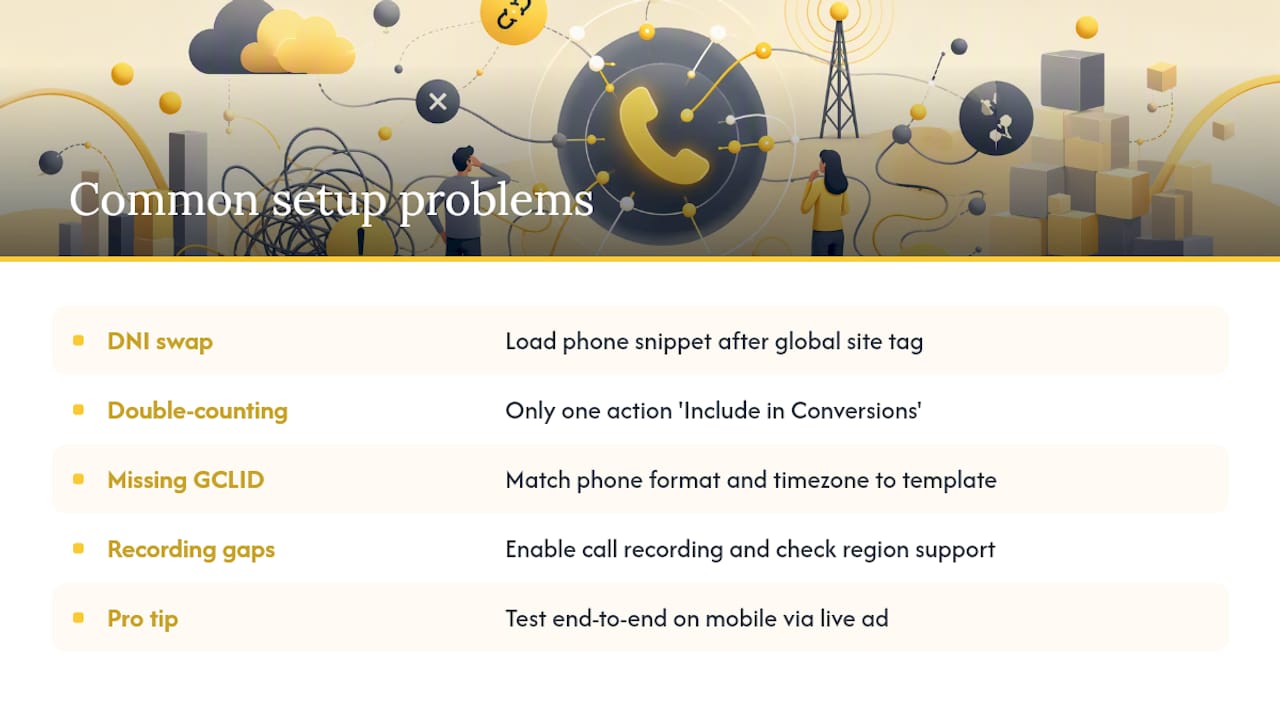
DNI not swapping the number on your site. The most common cause is script load order. The phone snippet must load after the global site tag. If you’re using a tag manager, check the trigger sequence. Then test by clicking a live ad (not typing the URL directly), clearing cookies between tests, and checking whether the number on the page has changed. If it hasn’t, the GCLID isn’t being captured, or the snippet isn’t firing.
Double-counting conversions. If your Conversions column looks inflated, check whether multiple conversion actions are counting the same call. Go to your conversion action settings and confirm only one action per call type is set to “Include in Conversions.” The others should be “All conversions” only.
Missing GCLID in CRM imports. When you upload call conversions and Google can’t match them, the most common culprits are phone number format mismatches (your CRM stores numbers as “6025550100” but Google expects “+16025550100” or vice versa) and time zone errors in the call start time field. Google’s import template specifies the exact format. Match it exactly.
Call recording gaps. If recordings aren’t appearing for calls that should qualify, confirm that call recording is enabled in your call asset settings and that your account is in a supported region. Where recordings aren’t available, Google falls back to duration-based measurement, which is less precise but still functional.
Pro Tip: Always run your end-to-end test from a real mobile device using a live ad click, not from a desktop browser visiting your URL directly. The forwarding number swap only triggers when a valid GCLID is present from an actual ad click.
What call tracking typically costs and when to upgrade
Google Ads native call tracking costs nothing beyond your ad spend. The forwarding numbers, call reporting, and basic AI analysis are included.
Third-party platforms generally charge a monthly subscription plus usage fees. Based on current vendor comparisons, entry-level plans typically start in the range of $30–$100 per month and include a small number of tracking numbers and a set of minutes. Usage fees for additional numbers and minutes add up quickly at scale.
| Tier | Typical monthly base | What’s usually included |
|---|---|---|
| Entry-level | $30–$100 | 3–10 tracking numbers, basic reporting |
| Mid-market | $100–$400 | 10+ numbers, CRM integrations, basic AI scoring |
| Enterprise / API-first | $400+ | Unlimited or high-volume numbers, full transcription, real-time CRM sync, custom integrations |
Upgrading from free native tracking to a paid platform is typically justified when your call volume is high and detailed conversion data is required to optimize bidding. If you’re managing multiple clients or multiple brands, agency-tier platforms with multi-account management become necessary. And if your sales team needs real-time call quality signals in their CRM to prioritize follow-up, the latency of a daily scheduled import won’t cut it.
Budget for the full stack when forecasting: tracking numbers, minutes, transcription, AI scoring, and any CRM integration fees. A platform that looks like $150/month can reach $400/month once you add the integrations and volume you actually need.
Envision Marketing Agency’s implementation checklist and when to bring in an agency
Whether you’re setting this up yourself or briefing an external team, the same checklist applies. Skipping steps here is what causes the “our call tracking isn’t working” conversation three months later.
- Discovery: — Audit existing tags, confirm auto-tagging is enabled, and document all phone numbers on the site and in ads.
When does it make sense to bring in Envisionmarketingagency rather than handle this internally? Three situations stand out. First, when your development team doesn’t have bandwidth to implement and test tags correctly, and a broken DNI setup is costing you attribution data every day it’s wrong. Second, when you need cross-channel attribution and CRM integration that requires API work beyond a standard Google Ads setup. Third, when your campaigns need to react to call-quality signals in real time, which requires a tighter integration between your call platform, CRM, and bidding strategy than most in-house teams have time to build and maintain.
Key Takeaways
Google Ads native call tracking is the right foundation for most advertisers, with third-party DNI and conversation intelligence added when CRM sync, AI scoring, or multi-channel attribution are required.
| Point | Details |
|---|---|
| Start with native Google Ads | Create a call conversion action and enable call reporting before considering any paid platform. |
| Script order determines DNI success | The phone snippet must load after the global site tag, or number swapping fails silently. |
| CRM imports beat duration thresholds | Importing only calls that converted to sales gives bidding algorithms a far more accurate signal. |
| U.S. recording consent is non-negotiable | Play a disclosure message on every recorded call; 11 states require all-party consent. |
| Envisionmarketingagency handles the full stack | From tag audits and DNI setup to CRM mapping and bidding configuration, the agency covers end-to-end implementation. |
The metric that actually changes budget decisions
Most advertisers treat call tracking as a reporting feature. The ones who get the most out of it treat it as a bidding input.
Here’s what that distinction looks like in practice. A campaign running on click-based conversions will optimize toward the keywords that generate the most clicks that lead to form fills. Add call conversions, and suddenly you discover that three keywords you’d been underbidding on generate 60% of your phone leads, and those phone leads close at twice the rate of form fills. The budget shift that follows isn’t a small tweak. It’s often a complete reallocation.
The harder part isn’t the technical setup. It’s getting sales and marketing to agree on what a “qualified call” means before you start importing conversions. If marketing defines a qualified call as anything over 90 seconds and sales defines it as a call that resulted in a quote, you’ll be optimizing toward different goals. That misalignment is where most call-tracking implementations quietly fail, not in the tag configuration.
Envisionmarketingagency’s call-tracking audit and Google Ads setup
If your Google Ads campaigns are generating phone calls you can’t fully attribute, or if your call data isn’t feeding your bidding strategy, Envisionmarketingagency’s PPC and analytics team can close that gap fast. The agency’s full-service digital marketing approach covers the complete call-tracking stack: tag audits, DNI implementation, CRM field mapping, import testing, and reporting configuration, so your campaigns are optimizing on real revenue signals, not just call counts.
Envisionmarketingagency has worked with over 550 clients since 2020, and the PPC team brings the same data-first approach to call attribution that drives results across SEO and paid channels. If you’re weighing whether to stay with Google’s native tools or move to a third-party platform, the audit deliverable includes a clear recommendation based on your actual call volume, CRM setup, and campaign goals. No guesswork, no generic advice.
Request a call-tracking audit or Google Ads conversion setup consultation at Envisionmarketingagency and get a clear picture of what your phone leads are actually worth.
Useful sources and official documentation
The resources below cover the official Google Ads setup steps and selected vendor documentation for readers implementing or troubleshooting call tracking.
- Measure calls from ads – Google Ads Help
- Set up Tracking calls to a phone number on a website – Google Ads Help
- Import phone call conversions – Google Ads Help
- About phone call conversion tracking – Google Ads Help
- Conversation Analytics Software for Sales & Marketing | CTM
- 10 Best Call Tracking Software Compared (2026 Review)
- Call tracking · Callr