

A review generation strategy is a repeatable, ethical system that converts satisfied customers into public reviews while routing unhappy customers into private recovery before they post publicly. Get that system right, and you get a consistent stream of authentic feedback that lifts local search visibility, conversion rates, and customer trust simultaneously.
Here are three things you can do in the next 24–72 hours to get started:
- Identify one post-service trigger (job complete, invoice sent, delivery confirmed) and write a single review request template for it.
- Create a direct Google Business Profile review link and drop it into that template.
- Set a rule: if a customer already left a review, stop all follow-up sequences immediately.
Most businesses that run a clean, single-request campaign see their first new reviews quickly. Response rates vary based on industry, timing, and channel, but a well-timed, personalized email or SMS request typically outperforms a generic blast by a wide margin.
Key Takeaways
A review generation strategy works when it combines ethical solicitation, duplicate detection, a single follow-up, and consistent response to every review across your priority platforms.
| Point | Details |
|---|---|
| Ask everyone, not just happy customers | Selective asking (review gating) violates Google’s guidelines and FTC guidance. |
| One reminder maximum | A single 5–7 day follow-up preserves goodwill; more than one increases opt-outs and risks negative reviews. |
| Duplicate detection first | Build stop-on-review and duplicate checks before any template goes live to prevent annoying repeat asks. |
| Match platform to customer path | Send Google links to local searchers, TripAdvisor to travelers, and G2 to B2B buyers for maximum impact. |
| Respond within 12–72 hours | Negative reviews need a reply within 12–48 hours; positive reviews within 24–72 hours. |
| Envisionmarketingagency builds the system | The agency sets up CRM-connected, compliant review automation with measurable KPIs for local and national clients. |
Table of Contents
- What does a review generation strategy actually include?
- Why reviews drive real business outcomes
- How to build a step-by-step review campaign blueprint
- Which platforms should you prioritize?
- What timing and templates actually work
- What are the ethical rules and legal limits for asking for reviews?
- What should you look for in review generation tools?
- How to monitor reviews and respond without letting anything slip
- How do you measure the ROI of a review generation campaign?
- How do you scale a review program across locations and teams?
- Envision Marketing Agency’s 30/60/90 rollout for a single-location client
- Why ethical review generation is the only kind worth building
- Envisionmarketingagency can build and run your review campaign
- Sources
What does a review generation strategy actually include?
Review generation, sometimes called review solicitation, is the practice of systematically asking customers for feedback at the right moment, through the right channel, with a clear path to posting publicly. It is not a one-off email blast. A real campaign has seven repeatable components working together:
- Trigger: The event that starts the request sequence (service completion, purchase, milestone reached).
- Audience segmentation: Filtering who gets asked, how often, and through which channel based on customer type, purchase history, or satisfaction signal.
- Request channel: Email, SMS, in-app prompt, or QR code, chosen based on where the customer is most likely to respond.
- Timing and cadence: The delay between the trigger and the first request, plus rules for a single follow-up reminder.
- Follow-up rules: One reminder maximum, with stop-on-review logic that halts the sequence the moment a review is detected.
- Response workflow: Who replies to incoming reviews, within what timeframe, and how negative reviews get escalated.
- Measurement: Tracking new reviews per period, average rating, platform share, and downstream conversion impact.
A simple flow looks like this: service is marked complete in your CRM, an eligibility check confirms the customer has not been asked recently and has not already left a review, the request goes out via email or SMS, a single reminder fires if no review appears after a set number of days, the outcome is logged back to the customer record, and any negative signal routes to a private recovery form rather than a public review prompt.
Why reviews drive real business outcomes
Reviews are not just social proof. They are a direct input into local search ranking, paid ad performance, and conversion rates across every stage of the funnel.
Google’s Business Profile guidance states that responding to reviews, both positive and negative, helps build trust and improves visibility in Search and Maps. That means review activity is a ranking signal, not just a credibility badge.
The business case breaks down across four areas:
- Local search visibility: Businesses with more recent, high-quality reviews appear more prominently in Google Maps and the local pack. Review velocity (how frequently new reviews arrive) matters as much as total volume.
- Conversion lift: Shoppers and service buyers read reviews before contacting a business. G2’s research on consumer reviews shows that review recency and volume directly influence buyer trust, with recent reviews carrying more weight than older ones regardless of rating.
- Paid ad performance: Review ratings appear in Google Ads seller ratings extensions, which can lift click-through rates without increasing ad spend.
- Referral and retention fuel: A customer who writes a positive review has articulated their own satisfaction, which reinforces their loyalty and makes them more likely to refer others.
In the funnel, review generation sits at the post-purchase stage but feeds the top of the funnel. Every new review is a piece of content that works for you in search results, on your Google Business Profile, and on third-party platforms, indefinitely.
How to build a step-by-step review campaign blueprint
A campaign that runs reliably needs to be built in a specific order. Skipping the planning steps and jumping straight to templates is the most common reason campaigns produce inconsistent results.
- Set your goals. Define what success looks like: a target number of new reviews per month, a minimum average rating, or a specific platform you want to build up first.
- Choose your platforms. Prioritize based on your business type (more on this in the next section). Start with one or two platforms, not five.
- Map your triggers. List every post-service or post-purchase event in your CRM or POS system that could fire a review request. Choose the one or two with the highest satisfaction correlation.
- Create your templates. Write a short email, a short SMS, and a fallback in-app or QR prompt. Keep each under 100 words.
- Build your automation. Connect your trigger to your messaging platform. Add duplicate detection (has this customer been asked in the last 90 days?), stop-on-review logic, and a single reminder delay of 5–7 days.
- Pilot with a small segment. Run the campaign for 30 days with a subset of customers before scaling. Watch for opt-outs, complaints, and review quality.
- Iterate on timing and copy. Adjust the delay, subject line, or CTA based on open rates and review conversion.
- Scale and document. Once the pilot works, document the workflow, assign ownership, and expand to additional locations or segments.
Cadence and routing rules:
The initial request should go out 3–14 days after service completion, depending on your industry. A plumber can ask within 3 days. A software vendor should wait until the customer has used the product enough to have an opinion, which Gartner recommends timing around meaningful product milestones rather than purely on days elapsed.
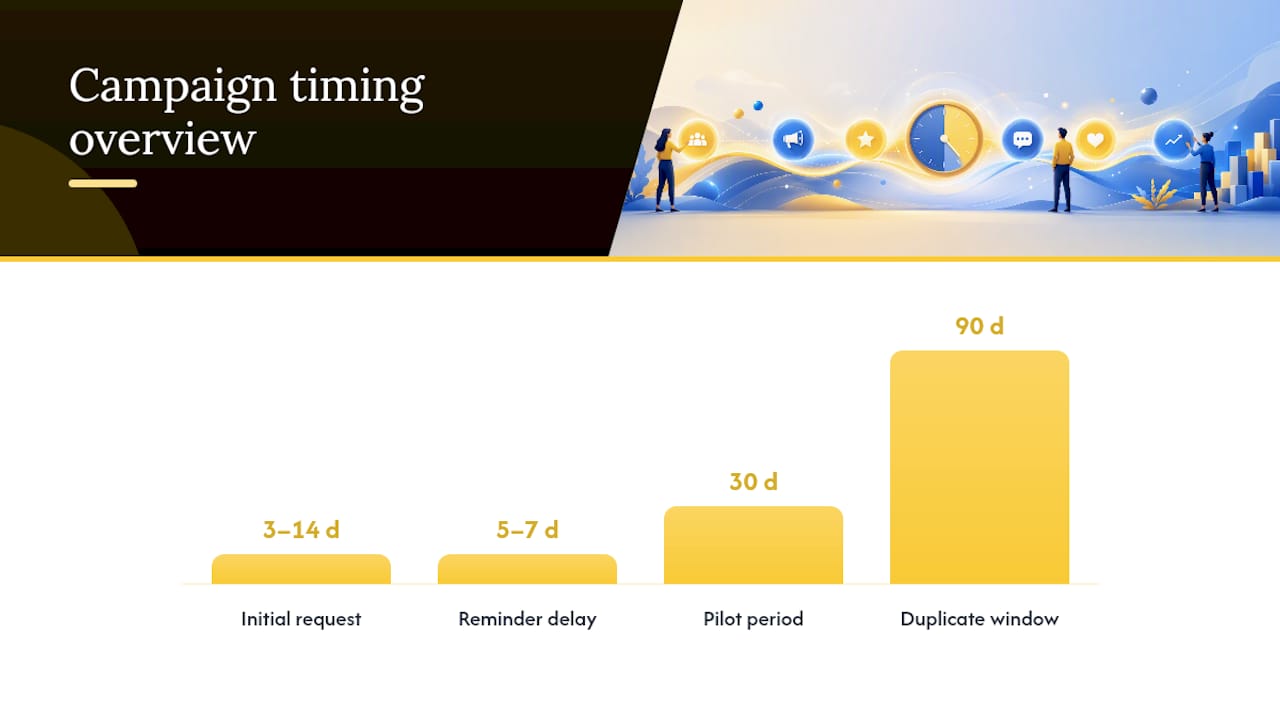
Send one reminder if no review appears after 5–7 days. Then stop. Customers who did not respond to two asks will not respond to a third, and pushing them risks a frustrated reply.
For routing: customers who signal high satisfaction (a positive survey score, a repeat purchase, or a direct compliment) go straight to the public review flow. Customers who signal dissatisfaction route to a private feedback form first, giving you a chance to resolve the issue before it becomes a one-star post.
Pro Tip: Build your duplicate detection and stop-on-review logic before you write a single template. These two checks prevent the most common campaign failure: asking the same customer twice and triggering an annoyed, negative review.
Which platforms should you prioritize?
Platform choice depends on your business model, your customers’ habits, and where discovery actually happens for your category.
- Google Business Profile: The default starting point for almost every local business. Reviews here appear directly in Google Search and Maps, making them the highest-discovery platform for local service businesses, healthcare practices, legal firms, and retail. Create a direct review link from your Google Business Profile dashboard and use it in every request.
- Yelp: High-value for restaurants, home services, salons, and local retail. Yelp’s algorithm is sensitive to review patterns it considers suspicious, so never import or incentivize reviews here. Ask verbally or via a “Find us on Yelp” prompt rather than a direct link, per Yelp’s guidelines.
- Facebook Reviews: Useful for businesses with an active Facebook presence and a community-oriented audience. Facebook reviews appear on your business page and can be shared, making them good for social proof in paid ad campaigns. They carry less local SEO weight than Google but more social reach.
- TripAdvisor: Non-negotiable for hospitality, travel, tourism, and restaurants with a visitor audience. TripAdvisor ranking is heavily influenced by review recency and volume, so a consistent cadence matters more than a one-time push.
- Industry-specific sites: B2B software companies should prioritize G2 and similar platforms where review quality, recency, and volume influence purchasing decisions. Healthcare businesses should consider Healthgrades. Legal firms should look at Avvo and Martindale.
How to decide where to send each customer:
Match the platform to the customer’s likely discovery path. A local homeowner who found you via Google Maps should be sent to Google. A traveler who booked through a travel aggregator should be sent to TripAdvisor. A B2B buyer evaluating software should be sent to G2 or a relevant industry platform.
Never ask customers to post on a platform they do not use. A forced review on an unfamiliar platform produces low-quality content and frustrates the customer.
What timing and templates actually work
Timing is the variable most businesses get wrong. Asking too soon (before the customer has experienced the full value of your service) produces thin reviews. Asking too late (weeks after the experience fades) produces low response rates.
Timing guidance by service type:
- Home services, restaurants, retail: 1–3 days after completion or visit.
- Professional services (legal, accounting, consulting): 7–14 days after project delivery or milestone.
- B2B software: After a meaningful product milestone, not just after purchase.
- Healthcare: Check state regulations and platform policies before automating; some platforms restrict solicitation.
Template 1: Short email request
Use this for: professional services, home services, B2B.
Subject: Quick favor — how did we do?
Hi [First Name],
Thanks for working with us on [project/service]. If you have 60 seconds, we’d love to hear what you thought. Your feedback helps other [customers/businesses] find us and helps us keep improving.
[Leave a review → direct link]
Thanks,
[Your Name]
Template 2: Short SMS request
Use this for: home services, restaurants, retail, any mobile-first audience.
Hi [First Name], thanks for choosing [Business Name]! If you’re happy with [service], a quick Google review would mean a lot: [short link]. Reply STOP to opt out.
Template 3: In-app or QR prompt
Use this for: point-of-sale, checkout screens, printed receipts, table cards.
Enjoyed your experience? Scan to leave us a quick review on Google. [QR code]
Single follow-up reminder (email):
Subject: Did you get a chance to share your thoughts?
Hi [First Name],
Just a gentle follow-up in case my last note got buried. If you have a moment, [leave a review here → link]. No pressure at all — and if there’s anything we could have done better, just reply to this email.
Thanks,
[Your Name]
Keep every link mobile-first. A review link that opens the Google Maps app on mobile tends to convert better than one that opens a desktop browser tab.
What are the ethical rules and legal limits for asking for reviews?
The ethical and legal baseline for review solicitation in the U.S. comes from two sources: platform policies and FTC guidance. Both are non-negotiable.
What the FTC says: Paying for reviews without clear disclosure is deceptive advertising under U.S. law. This applies to cash payments, gift cards, discounts, free products, and any other benefit given in exchange for a review, even if you do not specify that the review must be positive. If you offer an incentive, you must disclose it clearly and conspicuously in the review itself.
What platform policies prohibit:
- Fake or purchased reviews (all major platforms).
- Review gating: selectively asking only happy customers to post publicly while routing unhappy customers away from public platforms entirely. Google’s guidelines prohibit this practice.
- Incentivized reviews without disclosure (Google, Yelp, TripAdvisor).
- Bulk review imports or review swaps.
Do/don’t list:
- Do: Ask all customers, not just the ones you think are happy.
- Do: Make it easy with a direct link or QR code.
- Do: Reply to every review, positive or negative.
- Don’t: Offer a discount, gift card, or any reward in exchange for a review.
- Don’t: Filter who gets asked based on a pre-survey score (that is review gating).
- Don’t: Ask employees or friends to post fake reviews.
Data privacy and SMS compliance: Under the Telephone Consumer Protection Act (TCPA), you need prior express written consent before sending marketing or solicitation SMS messages. Under the California Consumer Privacy Act (CCPA), customers have the right to opt out of having their personal data used for solicitation. Build opt-out language into every SMS template (“Reply STOP to opt out”) and honor opt-outs immediately.
Compliance checkpoints to add to your launch checklist:
- Confirm SMS opt-in consent is documented for every number in your list.
- Confirm your routing logic does not gate reviews based on satisfaction score.
- Confirm no incentive is attached to the review request.
- Confirm opt-out handling is automated and logged.
What should you look for in review generation tools?
The right tool depends on your volume. Under 50 review requests per month, you can run the campaign manually with a spreadsheet and your email platform. Above that, automation pays for itself quickly.
Feature checklist for any tool you evaluate:
- Direct review link generation for Google, Yelp, Facebook, and TripAdvisor.
- CRM or POS integration to fire triggers automatically.
- Duplicate detection to prevent asking the same customer twice.
- Stop-on-review logic that halts follow-up sequences when a review is detected.
- One-reminder maximum with configurable delay.
- Unified monitoring dashboard for all platforms.
- Auto-reply drafts with human override before sending.
- Audit log of all sends, opt-outs, and outcomes.
Integration checklist:
- CRM (Salesforce, HubSpot, Zoho, or your platform of choice) to receive trigger events.
- POS or scheduling software (Square, Mindbody, Jobber) to fire post-service triggers.
- Email and SMS providers (Mailchimp, Klaviyo, Twilio) for delivery.
- Outcome logging back to the customer record so your team knows who reviewed and when.
Vendor evaluation rubric: Look for SOC 2 compliance or equivalent security certification, coverage of all platforms you use, data portability (you own your data if you leave), and API access for custom integrations. A tool that locks your review history behind a proprietary format is a liability.
For multi-location businesses, prioritize tools with location-level reporting and template management so each location can have localized copy without breaking the master compliance rules. Evaluating your landing page and web infrastructure before you build review flows into it is also worth doing, since broken links in review request emails are a silent conversion killer.
How to monitor reviews and respond without letting anything slip
Monitoring without a system means reviews pile up unanswered, which signals to both customers and Google that nobody is paying attention. A response workflow turns monitoring into a customer-care process.
Monitoring essentials:
- Set up a unified dashboard that aggregates reviews from Google, Yelp, Facebook, and TripAdvisor into one view.
- Configure email or Slack alerts for new reviews, especially anything below four stars.
- Assign a daily check routine (5 minutes, same time each day) to a specific team member.
Response templates:
Positive review response:
Thank you so much, [First Name]! We’re glad [specific service/product] hit the mark. We look forward to working with you again.
Neutral or clarifying response:
Thanks for taking the time to share this, [First Name]. We’d love to learn more about your experience so we can do better. Please reach out to us at [email/phone] and we’ll make it right.
Negative review, public response before moving to private:
[First Name], thank you for the honest feedback. We’re sorry your experience didn’t meet expectations. Please contact us at [email/phone] so we can address this directly. We take every concern seriously.
Response time targets:
- Positive reviews: respond within 24–72 hours.
- Negative reviews: respond within 12–48 hours. Speed on negative reviews signals that you are paying attention and that you care, which matters to prospective customers reading the exchange as much as it matters to the reviewer.
Escalation path: Any review mentioning a safety issue, a legal claim, or a named employee complaint goes to leadership within 4 hours. Assign a clear owner in your CRM, whether that is customer success, operations, or the business owner, and document the escalation in the customer record.
Pro Tip: Build a risk-routing queue for your review responses: flag anything below three stars or containing specific keywords (refund, lawsuit, unsafe) for human review before any auto-reply goes out. Auto-replies on sensitive reviews create more problems than they solve.

How do you measure the ROI of a review generation campaign?
Measurement is what separates a campaign from a one-time effort. Without KPIs, you cannot justify the budget, improve the program, or report impact to stakeholders.
Core KPIs to track:
- New reviews per period (weekly, monthly).
- Average rating per platform.
- Review velocity: how many reviews arrive per week compared to the prior period.
- Platform share: what percentage of your reviews are on your highest-priority platform.
- Review-driven sessions: traffic from Google Maps or review platform referrals in Google Analytics.
- Conversion lift: compare conversion rates on pages where reviews are displayed versus those where they are not.
- Sentiment trends: track the ratio of positive to neutral to negative reviews over time.
Reporting cadence:
- Weekly: alert on new reviews and any below four stars.
- Monthly: scorecard showing new review volume, average rating, platform share, and response rate.
- Quarterly: strategy review using quarterly planning frameworks to assess whether the campaign is hitting goals and where to iterate.
Simple ROI formula:
Estimate the revenue value of one new customer. Multiply by the number of new customers you can attribute to improved review visibility (tracked via Google Business Profile Insights, UTM parameters on review links, or direct attribution in your CRM). Subtract the cost of running the campaign (tool cost, staff time). That is your review generation ROI for the period.
If the campaign cost $200 to run that month, the return is $1,400 on $200 invested.
Attribution note: Tag review request emails and SMS messages with UTM parameters so you can track clicks through to your website. Create a dedicated landing page for review-driven traffic if you want cleaner attribution data.
How do you scale a review program across locations and teams?
Scaling without governance produces inconsistent customer experiences and compliance gaps. The answer is a documented system with clear ownership before you add locations or team members.
Governance checklist:
- Assign one owner for template approval (usually marketing or the agency partner).
- Require a privacy review before any new customer segment is added to the campaign.
- Maintain an audit log of all template changes, opt-outs, and campaign pauses.
- Schedule a quarterly compliance review to check for platform policy updates.
Segmentation examples that improve response rates:
- High-value customers (top 20% by revenue): personalize the request with a specific reference to their project or purchase.
- Recent buyers (within 7 days): use SMS for speed; they are still in the experience.
- Repeat buyers: acknowledge the relationship (“You’ve been with us for two years…”).
- One-time buyers: keep the request short and low-pressure.
- Industry-specific segments: B2B customers respond better to email with a clear business rationale; consumer segments respond better to SMS with a one-tap link.
Integration patterns for scaling:
- Push trigger events from your CRM via webhook to your messaging platform.
- Map review outcomes back to the customer record so sales and support teams know who reviewed and what they said.
- Use location-level tags in your CRM to route requests to the correct platform link for each location.
TCPA and data retention reminders: Document SMS opt-in consent at the point of collection, not retroactively. Set a data retention policy for review request logs (most businesses use 24 months). Delete or anonymize records beyond that window to stay aligned with CCPA data minimization principles.
Envision Marketing Agency’s 30/60/90 rollout for a single-location client
Here is how Envisionmarketingagency operationalizes the blueprint above for a single-location client, from discovery to a running campaign in 90 days.
8-step agency pilot checklist:
- Discovery: Audit the client’s existing review presence, identify gaps by platform, and confirm which CRM or POS fires post-service events.
- Segmentation: Define the eligible customer list (exclude recent opt-outs, recent reviewers, and customers with open complaints).
- Template creation: Write email and SMS templates, get client approval, and confirm compliance (no incentives, opt-out language in SMS).
- Automation build: Connect the CRM trigger to the messaging platform, add duplicate detection, stop-on-review logic, and a single 7-day reminder.
- Pilot launch: Run with a subset of 50–100 customers for 30 days. Monitor opt-outs, response rates, and review quality.
- Measure: Pull the 30-day scorecard: new reviews, average rating change, opt-out rate, and any complaints.
- Iterate: Adjust timing, subject lines, or CTA based on pilot data. Fix any compliance gaps.
- Scale: Expand to the full customer list, add additional platforms if warranted, and hand off the monitoring workflow to the client or retain it as an ongoing service.
30/60/90 milestones:
- Day 30: Pilot complete. At least one platform has new reviews. Opt-out rate is below 2%. No compliance issues flagged.
- Day 60: Full campaign running. Review velocity is measurably higher than the pre-campaign baseline. Response workflow is documented and assigned.
- Day 90: First quarterly scorecard complete. ROI estimate prepared for stakeholder review. Decision gate: expand platforms, add locations, or adjust cadence.
Privacy and compliance checklist used by Envisionmarketingagency:
- SMS opt-in consent documented for every number.
- Opt-out handling automated and tested.
- No satisfaction pre-screen used to gate who gets asked.
- No incentive attached to any request.
- Audit log active and accessible.
- Platform-specific prohibited behaviors reviewed and excluded from templates.
For a single-location home services business, the metrics to watch in the first 90 days are new Google reviews per month, average star rating, and the number of review-driven calls or form submissions tracked via Google Business Profile Insights. These three numbers tell you whether the campaign is working before you invest in expanding it.
Why ethical review generation is the only kind worth building
The temptation to shortcut review generation is real. Buying reviews is faster. Gating out unhappy customers feels safer. Sending five follow-up emails feels more aggressive and therefore more effective.
None of those shortcuts hold up. Purchased reviews get filtered or removed by platform algorithms, and the FTC has increased enforcement on undisclosed paid endorsements. Review gating, even when it feels like smart routing, violates Google’s guidelines and creates a false public picture that eventually catches up with you when the unhappy customers find another channel. And aggressive drip sequences do not produce more reviews. They produce more opt-outs and, occasionally, a frustrated one-star post from someone who just wanted you to stop emailing them.
What actually works is simpler: ask everyone, ask once (with one polite reminder), make it easy, and respond to everything. The businesses that build review programs on that foundation end up with review profiles that are more credible, more durable, and more useful for SEO than anything a shortcut produces.
Envisionmarketingagency prioritizes compliance not because it is the cautious choice, but because it is the only choice that compounds over time. A review profile built on authentic feedback from real customers keeps growing. One built on shortcuts resets to zero the moment the platform catches up.
Envisionmarketingagency can build and run your review campaign
Running a compliant, automated review campaign requires the right triggers, the right templates, and the right integrations, all connected and monitored. Most business owners have the intent but not the infrastructure.
Envisionmarketingagency builds end-to-end review automation and client feedback systems for local and national businesses, including CRM integration, duplicate detection, platform-specific templates, and response workflow setup. The agency has served over 550 clients since 2020, with a data-driven approach that ties every campaign decision to measurable outcomes, not vanity metrics. Whether you need a 30-day pilot for a single location or a scaled program across multiple markets, the team builds it to your compliance requirements and hands you a running system with clear KPIs. To get started, contact Envisionmarketingagency for a free audit of your current review presence and a clear plan for what to build next.
Sources
The following official resources are the primary references for platform policy and legal compliance. Check them directly before launching any campaign, since platform-specific wording for review links and policy exceptions changes periodically.
- Get reviews – Google Business Profile Help
- Soliciting and paying for online reviews – FTC
- I Automated the Awkward Part of Asking for Google Reviews (n8n, 14 nodes, no code) – DEV Community
- 14 surprisingly easy ways to collect B2B software reviews – Gartner
- Consumer reviews – G2 Learn
Recommended
- The Complete Guide to Building AI Systems That Run Your Business | Envision Marketing Agency
- How to Use AI to Create Business Systems | Envision Marketing Agency
- How to Use AI to Evaluate Side Hustle Ideas | Envision Marketing Agency
- How AI Helps Reduce Burnout in Entrepreneurs | Envision Marketing Agency