

An effective ecommerce SEO strategy centers on five prioritized pillars: keyword strategy, site architecture, product and category page optimization, technical SEO, and product data and feeds. Get these right in sequence and you have a program that compounds over time, lowering your customer acquisition cost while paid channels stay flat or climb.
Why these five first? Because they address the root causes of poor organic performance, not the symptoms. Keyword strategy tells you which pages to build. Architecture tells search engines how to crawl and index them. On-page optimization makes those pages competitive. Technical SEO removes the friction that buries even well-optimized pages. Feeds and structured data unlock shopping surfaces and, increasingly, AI-driven discovery.
Quick-start checklist (one action per pillar):
- Keyword strategy: Pull your top 20 non-brand queries from Google Search Console and map each to a specific category or product page.
- Site architecture: Audit your URL structure for duplicate parameters and confirm canonical tags are set on all paginated and filtered URLs.
- Product and category optimization: Add unique, spec-rich descriptions to your five highest-traffic category pages this week.
- Technical SEO: Run a Core Web Vitals report in Google Search Console and flag any pages scoring “Poor” on Largest Contentful Paint.
- Feeds and structured data: Verify your Google Merchant Center feed has no price or availability mismatches using the Diagnostics tab.
What to expect near-term:
- Weeks 1–4: Crawl errors drop, index coverage improves, and feed rejections clear.
- Months 2–3: Non-brand impressions climb as newly optimized category pages gain traction.
- Months 4–6: Organic revenue from category and product pages begins to measurably increase.
- Measure first: non-brand impressions and clicks suggested by analytics data, then organic conversion rate by landing page type in GA4.
Pro Tip: Don’t try to fix everything at once. The teams that see the fastest results pick one pillar per sprint and ship complete fixes rather than partial improvements across all five.
Key Takeaways
A winning ecommerce SEO strategy requires five pillars executed in sequence: keyword mapping, clean architecture, optimized pages, technical hygiene, and accurate product feeds.
| Point | Details |
|---|---|
| Start with keyword mapping | Assign each query cluster to the correct page type before optimizing anything. |
| Architecture prevents index bloat | Canonical tags and selective filter indexing protect crawl budget and ranking clarity. |
| Schema must match visible content | Mismatched price or availability in structured data triggers GSC errors and suppresses rich results. |
| Feed health is non-negotiable | Monitor Google Merchant Center weekly; a degraded feed silently suppresses shopping visibility. |
| Envisionmarketingagency delivers the full program | From GMC setup to content strategy, Envisionmarketingagency ties every tactic to organic revenue outcomes. |
Table of Contents
- Why does ecommerce SEO matter for your bottom line?
- How do you build an ecommerce SEO strategy with keyword research?
- How should you structure your site for maximum crawlability and SEO?
- What makes a product page or category page rank and convert?
- What technical SEO issues hurt ecommerce sites most?
- How do Google Merchant Center and product feeds affect your SEO?
- What supporting content should you create to build topical authority?
- How can internal search and reviews improve your SEO?
- What advanced ecommerce SEO plays deliver the highest ROI?
- What does a 90-day ecommerce SEO roadmap look like?
- Should you run ecommerce SEO in-house or hire an agency?
- An implementer’s perspective on what actually moves the needle
- Envisionmarketingagency accelerates your ecommerce SEO results
- Sources
Why does ecommerce SEO matter for your bottom line?
Organic search is one of the few acquisition channels where the cost per visit decreases as your program matures. Paid search costs rise with competition; organic traffic compounds. That asymmetry is the core business case for investing in SEO for ecommerce.
The commercial outcomes are concrete. A well-executed program typically produces higher organic revenue, improved conversion rates on landing pages built around buyer intent, and lower blended customer acquisition cost over time. The Semrush ecommerce SEO guide frames the core activities as keyword research, site architecture, on-page optimization, technical fixes, content marketing, and link building, and that framing holds because each layer feeds the next.
Timeline reality check:
- Months 1–3: Technical fixes and feed corrections take effect. Crawl coverage improves. Expect modest impression gains, not revenue spikes.
- Months 3–6: Category pages optimized in month one begin ranking for mid-funnel commercial queries. Non-brand clicks start climbing.
- Months 6–12: Revenue attribution to organic becomes visible in GA4. Category pages often outperform product pages at this stage because they aggregate relevance across many products.
When SEO outperforms paid channels:
- Your products have stable, recurring demand with consistent search volume.
- You sell in a category where shoppers research before buying (electronics, furniture, supplements, apparel).
- Your average order value is high enough that a single organic conversion justifies weeks of optimization work.
- You are building a brand and need owned traffic that does not disappear when ad budgets are cut.
When paid remains necessary:
- You are launching a new product with no organic history and need immediate visibility.
- Your category has seasonal spikes that require rapid traffic scaling.
- You are testing price points or messaging and need controlled traffic fast.
The tradeoffs between SEO and paid channels are worth mapping against your specific revenue model before you commit budget. Most mature ecommerce programs run both, with SEO carrying the base load and paid filling gaps.
How do you build an ecommerce SEO strategy with keyword research?
The highest-leverage keyword work is mapping keyword clusters to the correct page type. Sending a broad commercial query to a product detail page, or a product-specific query to a category page, wastes ranking potential on both ends.
Step-by-step keyword research workflow
Step 1: Pull data from multiple sources. Google Search Console shows you what you already rank for and where you are losing clicks. Semrush and Ahrefs reveal competitor gaps and volume estimates. Your own site search logs surface what shoppers type when they cannot find something. Amazon and marketplace search suggest-completions expose product-attribute language your category pages may be missing entirely.
Step 2: Label intent. Every query falls into one of three buckets: broad commercial (someone browsing a category), specific commercial (someone narrowing to a subcategory or attribute), or pre-purchase informational (someone comparing options or researching before buying). Label each cluster before assigning it to a page.
Step 3: Prioritize by revenue opportunity. Volume alone is a poor proxy. A 200-search-per-month query on a $400 product with a 3% conversion rate beats a 2,000-search query on a $15 product with the same conversion rate. Score clusters by estimated revenue, not just traffic.
Keyword-to-page mapping:
| Query type | Example | Target page type |
|---|---|---|
| Broad commercial | “running shoes for women” | Category page |
| Attribute-specific commercial | “women’s trail running shoes wide width” | Subcategory or filtered landing page |
| Product-specific | “Brooks Ghost 16 women’s size 8” | Product detail page (PDP) |
| Pre-purchase informational | “how to choose trail running shoes” | Buying guide or support content |
Tools and how to combine them:
- Google Search Console: Start here. It shows real impressions and clicks for pages you already own.
- Semrush or Ahrefs: Use for gap analysis, competitor keyword sets, and volume estimates. Pick one; you do not need both.
- Google Keyword Planner: Useful for volume ranges and seasonal trends, especially for new categories with no GSC history.
- Site search logs: Often the most underused source. Queries with zero results or high exit rates point directly to content and product gaps.
The practical ecommerce SEO framework from Inspace makes the case that category pages carry the largest SEO opportunity, which is why broad commercial queries belong there, not on PDPs.
Tactical tip for long-tail capture: Mine product reviews and Q&A sections for attribute language. Shoppers describe products in ways your internal team never would (“runs narrow,” “good for wide feet,” “fits true to size for petite women”). Those phrases belong in your category copy, filter labels, and PDP descriptions, and they often match long-tail queries exactly.
How should you structure your site for maximum crawlability and SEO?
Design your architecture so every high-value commercial query maps to a single canonical URL or an intentionally indexed landing page. Anything less creates index bloat, splits link equity, and confuses search engines about which page to rank.
URL design and canonicalization rules
Do:
- Keep URLs short, descriptive, and keyword-relevant:
/womens-trail-running-shoes/not/category?id=4872&sort=new. - Use hyphens to separate words, never underscores.
- Set canonical tags on all paginated URLs pointing to the root category page (or use
rel="next"/rel="prev"for paginated series if your platform supports it). - Submit a clean XML sitemap to Google Search Console that includes only indexable, canonical URLs.
- Use HTTPS sitewide. Site structure, hosting, and SSL materially affect ecommerce SEO performance, and a mixed-content warning on a product page will suppress rankings.
Don’t:
- Let session IDs, tracking parameters, or sort parameters generate unique URLs without canonical tags.
- Index thin filtered pages that combine attributes with no measurable search demand.
- Create multiple URL paths to the same product (e.g., via breadcrumb variations or legacy redirects that resolve to different canonical URLs).
Filter indexing: a decision tree
Faceted navigation is where most ecommerce sites bleed crawl budget and create duplicate content. The rule is simple: index a filtered combination only when all three conditions are true.
- The filtered combination has measurable search demand (check Semrush or Ahrefs for the specific phrase).
- The category has enough products to make the filtered page substantively different from the parent.
- The combination has clear conversion intent (a shopper who lands there is likely to buy, not just browse).
If any condition fails, use noindex or block the parameter in robots.txt. For Shopify stores, this often means disabling indexation of collection filter URLs by default and selectively enabling only the combinations that pass all three tests.
Pagination and infinite scroll
Paginated category pages should use numbered pagination with canonical tags on page 2+ pointing to page 1, or use a “load more” pattern that keeps the root URL canonical. Infinite scroll without proper pagination markup is a crawlability problem: Googlebot often cannot trigger JavaScript-driven content loads, so products below the fold may never be indexed. If your platform uses infinite scroll, implement a fallback paginated URL structure that Googlebot can follow.
Problematic URL patterns and fixes:
/shoes?color=red&size=8&sort=price_ascwith no canonical → addcanonicalpointing to/shoes/red/if that filtered page is intentionally indexed, or addnoindexif it is not./products/brooks-ghost-16and/collections/running/products/brooks-ghost-16both resolving as indexable → pick one canonical path and 301-redirect the other./page/2with no relationship to the root category → addrel="prev"/rel="next"or set canonical to the root.
What makes a product page or category page rank and convert?
The highest-impact elements on a product detail page and category page are the title tag, H1, unique descriptive copy, structured data, and reviews. Get those five right and you have covered most of the ranking signal gap between you and competitors.
Category page checklist
- Title tag:
[Category Name] | [Brand]— keep it under 60 characters and lead with the keyword. - H1: Match the title tag keyword but write it for the reader, not the algorithm.
- Introductory copy: 100–200 words above the product grid that describes the category, includes the primary keyword naturally, and answers the most common pre-purchase question.
- Internal links: Link to subcategories and relevant buying guides from the category description.
- Schema: Implement
ItemListschema for category pages listing products.
Product detail page checklist
- Title tag template:
[Product Name] | [Key Attribute] | [Brand]— e.g., “Brooks Ghost 16 Women’s Running Shoe | Neutral Cushion | Brooks.” - H1: Match the product name and primary attribute.
- Description: Write unique copy for every product. Manufacturer descriptions are duplicated across hundreds of sites. Even 150 words of original, spec-rich copy differentiates your page.
- Specs table: Structured spec data (weight, dimensions, materials, compatibility) feeds both shoppers and search engines.
- Images: Descriptive file names (
brooks-ghost-16-womens-blue-size-8.jpg), alt text that describes the image accurately, responsive sizing, and lazy-loading for images below the fold. - Reviews: Display aggregate ratings visibly. They feed
aggregateRatingschema and improve click-through rates in search results. - Schema: Implement
Product,Offer,aggregateRating, andReviewschema. Keep every schema field consistent with visible page content — a price in schema that does not match the displayed price triggers a Google Search Console structured data error.
Schema.org fields to prioritize:
| Schema field | Why it matters |
|---|---|
Product > name | Feeds product name in rich results and shopping surfaces |
Offer > price | Required for price display in Google Shopping |
Offer > availability | Suppresses out-of-stock products from shopping ads automatically |
aggregateRating | Enables star ratings in organic search results |
Review | Supports individual review display and LLM-driven product summaries |
Pro Tip: Use the Schema.org validator to check your structured data before deploying. A single malformed field can suppress rich results across your entire product catalog.
For related-product links on PDPs, surface “frequently bought together” and “customers also viewed” sets. These reduce returns by helping shoppers confirm compatibility before purchase and increase average order value. They also distribute internal link equity across your catalog, which matters for newly added products with no external links.
The Digital Marketing Institute’s ecommerce SEO tips reinforce that product page optimization and long-tail keyword targeting are among the highest-return activities for stores at any scale.
What technical SEO issues hurt ecommerce sites most?
Fixing crawlability and page experience unlocks the rest of your SEO work. A beautifully optimized category page that Googlebot cannot reliably crawl, or that loads in 6 seconds on mobile, will not rank regardless of how good the copy is.
Prioritized technical audit checklist
- Google Search Console coverage report: Check for “Excluded” URLs. Pages marked “Crawled — currently not indexed” or “Discovered — currently not indexed” in high volume signal crawl budget problems or thin content issues.
- Core Web Vitals: Run the CWV report in GSC. Prioritize pages scoring “Poor” on Largest Contentful Paint (LCP) and Cumulative Layout Shift (CLS). LCP above 4 seconds on mobile is considered a ranking signal problem, not just a UX problem.
- Mobile UX: Use Google’s Mobile-Friendly Test for representative category and product pages. Tap targets, font sizes, and horizontal scroll are the most common failures on ecommerce sites.
- JavaScript rendering: If your store uses a JavaScript-heavy framework (React, Vue, Next.js), verify that Googlebot renders product content correctly using the URL Inspection tool in GSC. Client-side rendered content that Googlebot cannot see is effectively invisible.
- Sitemaps: Confirm your XML sitemap is submitted, contains only canonical, indexable URLs, and is updated automatically when products are added or removed.
- Robots.txt: Block cart, checkout, account, and search result pages. Do not accidentally block CSS or JavaScript files that Googlebot needs to render your pages.
- Status code hygiene: Crawl your site monthly with Screaming Frog or a similar tool. Fix 4xx errors on linked pages immediately; they bleed link equity.
Handling out-of-stock and discontinued products
Out-of-stock products are a constant challenge for ecommerce technical SEO. The wrong handling destroys link equity; the right handling preserves it.
- Temporarily out of stock: Keep the page live with a 200 status. Update the
Offer > availabilityschema toOutOfStock. Add a restock notification form. Do not 404 or noindex the page. - Permanently discontinued: If the product has a natural successor, 301-redirect to it. If not, redirect to the parent category. Never let a high-authority product page return a 404 without a redirect.
- Seasonal products: Keep the URL live year-round with updated availability schema. Seasonal pages that disappear and reappear lose their accumulated ranking signals each cycle.
Pro Tip: Server-side rendering (SSR) is almost always the right choice for ecommerce platforms where SEO matters. Client-side rendering (CSR) saves initial server load but creates a dependency on Googlebot’s JavaScript rendering queue, which can delay indexation by days or weeks. If you are building or rebuilding on a scalable, SEO-friendly platform, SSR or static site generation (SSG) for category and product pages is the safer default.
After every major release, run a quick regression check: pull the coverage report from your search console tools, check core web vitals for your top 20 pages, and spot-check five PDPs with URL inspection tools. Catching a broken canonical or a missing sitemap entry the day after a deploy costs minutes; catching it six weeks later costs rankings.
How do Google Merchant Center and product feeds affect your SEO?
Feeds and product schema are required for reliable visibility on shopping surfaces, and they are increasingly important for AI-driven product discovery. Google’s own guidance is direct: sharing product data and structured data helps Google find, parse, and present your ecommerce content across Search and other surfaces.
Google Merchant Center setup checklist
- Create and verify your GMC account. Verify your domain and confirm your business information matches your website exactly.
- Set required feed attributes. Every product needs:
id,title,description,link,image_link,price,availability,condition, andbrand. Missing any of these triggers feed disapprovals. - Match feed data to page data. The most common feed error is a price or availability mismatch between the feed and the live product page. GMC checks your pages against your feed; discrepancies suppress the product from shopping results.
- Schedule automated feed refreshes. For stores with frequent price changes or inventory fluctuations, set feed refresh to daily or use the Content API for real-time updates.
- Monitor the Diagnostics tab weekly. GMC surfaces feed errors, policy violations, and item disapprovals. Unresolved disapprovals reduce your shopping visibility incrementally.
- Enable free listings. Beyond paid Shopping ads, GMC’s free product listings appear in the Shopping tab and increasingly in AI-powered search features. There is no reason not to enable them.
How product schema complements your feed
Your GMC feed and your on-page Product schema serve overlapping but distinct purposes. The feed drives Shopping ads and free listings. On-page schema drives rich results in organic search (price, availability, star ratings in the SERP) and feeds LLM-driven product summaries in AI search features. Both need to be accurate and consistent with each other and with your visible page content.
Pro Tip: Set up automated alerts in GMC for feed errors above a threshold (e.g., more than 5% of items disapproved). A feed that silently degrades over a weekend after a price update can suppress hundreds of products before anyone notices Monday morning.
What supporting content should you create to build topical authority?
Supporting content should be selective and designed to route authority to revenue-driving pages. A buying guide that does not link to your category pages is a dead end. Every piece of supporting content should have a clear internal linking purpose.
Hub-and-spoke internal linking
The hub is your category page. The spokes are supporting pages that address pre-purchase questions, comparisons, and use-case scenarios. Each spoke links back to the hub and to relevant PDPs. This structure concentrates topical authority on the category page, which is where you want ranking power for broad commercial queries.
Example for a running shoe store:
- Hub:
/womens-trail-running-shoes/ - Spokes: “How to choose trail running shoes,” “Trail vs road running shoes: what’s the difference,” “Best trail running shoes for wide feet,” “How to break in new trail running shoes”
Each spoke targets a pre-purchase informational query, answers it thoroughly, and links back to the category hub and two or three specific PDPs.
High-value supporting page types:
- Buying guides: Target “best for [use case]” queries. These rank well and convert shoppers who are close to a purchase decision.
- Comparison pages: “[Product A] vs [Product B]” pages capture high-intent queries from shoppers who have already narrowed their options.
- Compatibility pages: “Does [Product X] work with [Device Y]?” These are high-conversion pages that reduce returns and support calls.
- FAQs: Answer the questions your support team hears most. These pages capture voice search and featured snippet opportunities.
- Post-purchase support content: Care guides, setup instructions, and troubleshooting pages build brand trust and reduce returns.

For content marketing that actually drives growth, the key is connecting every piece back to a commercial page rather than publishing informational content in isolation.
Pro Tip: Use your internal site search logs and customer reviews to seed content topics. The exact phrases shoppers use in reviews (“great for narrow feet,” “runs hot in summer”) are the same phrases they type into Google. Build content around that language and you capture long-tail queries your competitors are not targeting.
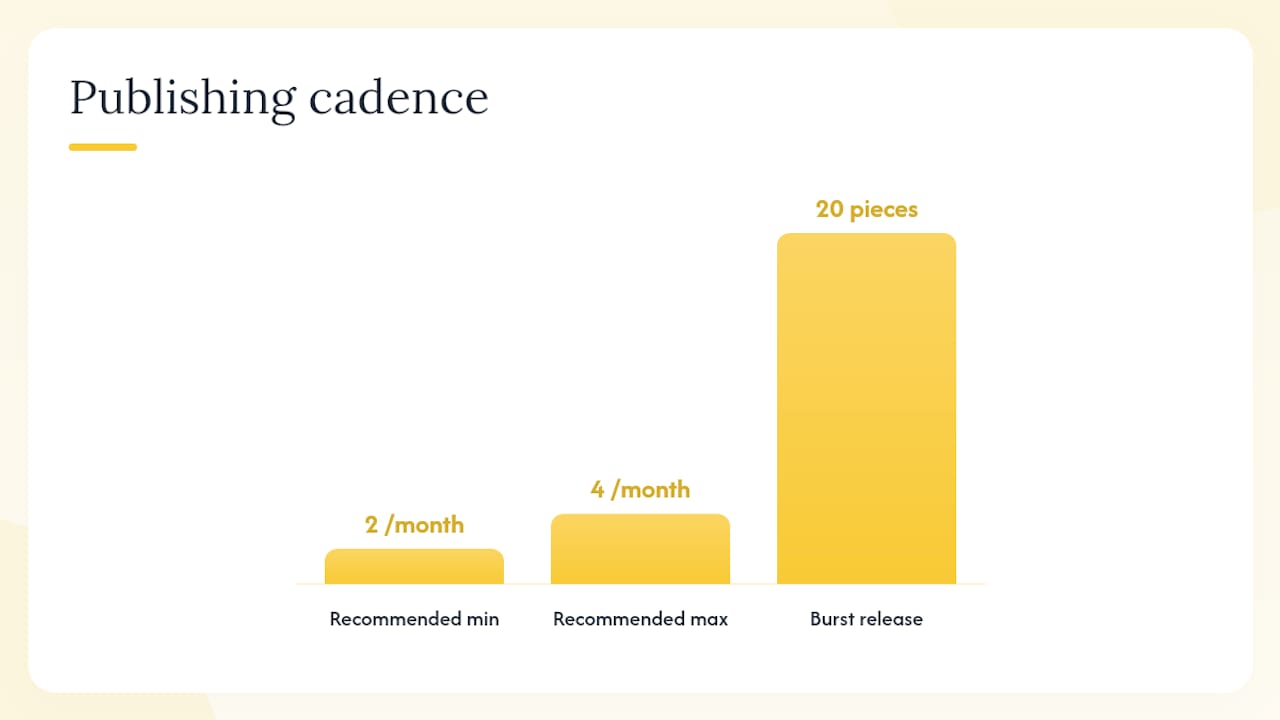
Publish supporting content on a sustainable cadence: two to four pieces per month is more effective than a burst of twenty followed by silence. Each piece should follow a consistent template (intro, answer, supporting detail, internal links, CTA to the relevant category) so production stays fast and quality stays consistent.
How can internal search and reviews improve your SEO?
Internal search and customer reviews are high-value primary data sources for product language and unmet demand. They tell you what shoppers want in their own words, which is exactly the language that matches long-tail search queries.
Workflow: turning search logs into SEO wins
- Export your site search query log from your analytics platform (GA4 tracks site search queries natively if configured). Filter for the last 90 days.
- Identify zero-result searches. These are queries your site returned no results for. They represent either missing products, miscategorized inventory, or filter labels that do not match how shoppers think. Zero-result internal search logs are among the highest-value inputs for naming categories and discovering product gaps.
- Identify high-exit queries. Shoppers who searched and then left without clicking a result found your results irrelevant. These queries need better category mapping or new content.
- Identify high-frequency intent phrases. Queries that appear hundreds of times but lead to low conversion pages are candidates for new landing pages or category restructuring.
- Map findings to action: Zero results → new product or category. High exit → content gap or filter label fix. High frequency, low conversion → page optimization or new landing page.
Using reviews as SEO copy
Reviews contain attribute language, use-case descriptions, and objection-handling phrases that your marketing team would never write on its own. Mine them systematically.
Pull your 50 most recent reviews for a top category. Look for recurring phrases: specific attributes mentioned repeatedly (“lightweight,” “true to size,” “easy to assemble”), use cases (“perfect for hiking,” “great for the office”), and concerns (“runs small,” “color looks different in person”). These phrases belong in your PDP descriptions, your FAQ schema, and your category introductory copy.
Review-derived copy changes also feed your Review and aggregateRating schema, which supports rich result display in organic search. Reviews matter for organic discovery: advanced ecommerce SEO gains come from reviews, internal search insights, and careful out-of-stock handling — tactics most stores skip entirely.
What advanced ecommerce SEO plays deliver the highest ROI?
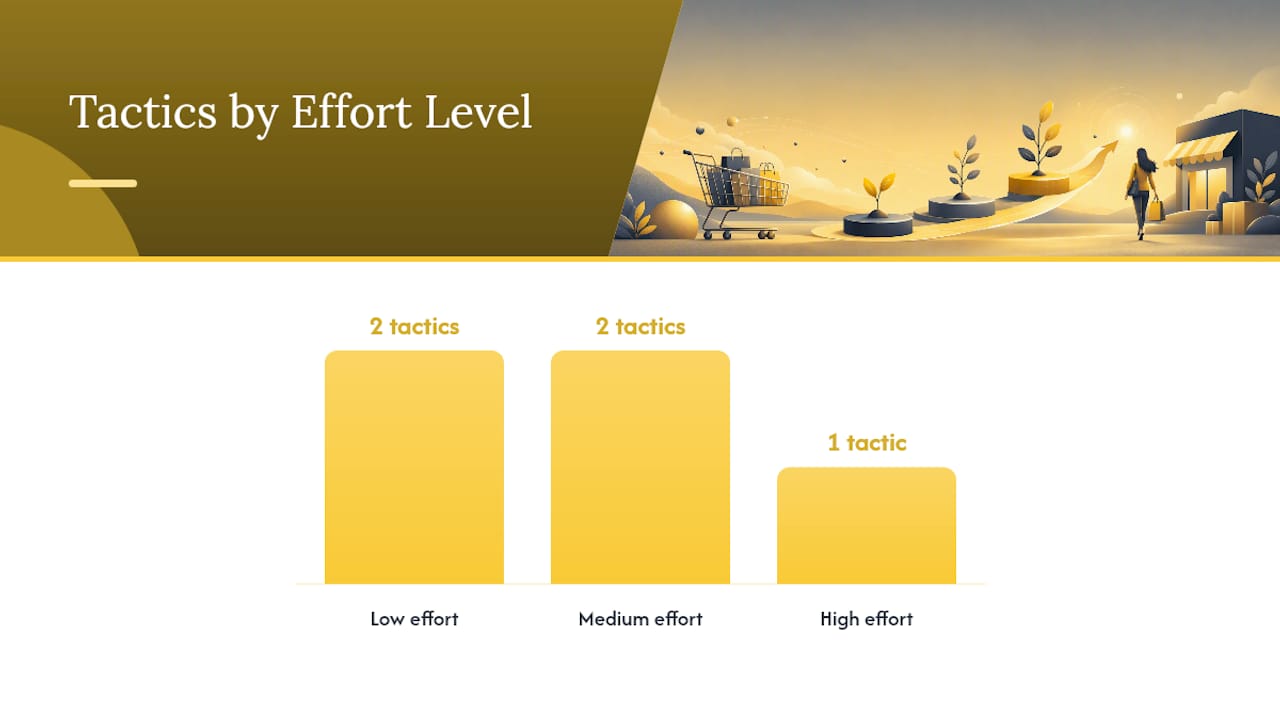
The highest-ROI advanced plays are selective filter indexing, internal link graph optimization, surgical out-of-stock handling, feed automation, and expert microcontent on PDPs. Most stores skip at least three of these. That gap is where the ranking advantage lives.
Prioritization matrix
| Tactic | Impact | Effort | Run first? |
|---|---|---|---|
| Selective filter indexing | High | Medium | Yes, after architecture is clean |
| Internal link graph optimization | High | Low | Yes, immediately |
| Surgical OOS handling | Medium | Low | Yes, immediately |
| Feed automation and alerts | High | Medium | Yes, in parallel with GMC setup |
| Expert microcontent on PDPs | Medium | High | After quick wins are shipped |
Filter indexing: the decision checklist
Selective indexing of faceted combinations should follow a repeatable rule set. Before indexing any filtered combination, confirm:
- The exact phrase (e.g., “women’s trail running shoes wide width”) has measurable search volume in Semrush or Ahrefs.
- The filtered page returns at least 10–15 distinct products (a page with two products is thin content).
- The combination has clear purchase intent, not just browsing intent.
- The page has a unique title tag, H1, and at least a short introductory paragraph that is distinct from the parent category.
If all four conditions are met, index it. If any fail, use noindex or block the parameter.
Internal link graph optimization
Map your internal links the way a search engine does: which pages receive the most internal links, and are those the pages you most want to rank? For most ecommerce sites, the answer is no. Blog posts and support pages accumulate links while category pages are underlinked. Fix this by auditing internal links with Ahrefs or Semrush and deliberately routing link equity from high-authority pages to your top commercial categories.
Agency implementation notes: Phase advanced tactics in sprints. Sprint 1: internal link audit and fixes (low effort, high impact). Sprint 2: filter indexing decisions and page creation for qualifying combinations. Sprint 3: feed automation and GMC alert setup. Sprint 4: expert microcontent on top 10 PDPs. Measure each sprint’s impact in GSC before moving to the next.
What does a 90-day ecommerce SEO roadmap look like?
A focused 90-day roadmap should deliver technical fixes, prioritized content and keyword wins, and feed and schema hygiene. The goal is not to finish everything; it is to ship the highest-impact work in a sequence that builds on itself.
90-day sprint plan
Weeks 1–2: Technical foundation
- Run GSC coverage report; fix crawl errors and redirect chains.
- Audit robots.txt and sitemap; remove non-canonical URLs from sitemap.
- Check Core Web Vitals for top 20 pages; flag LCP and CLS failures.
- Verify GMC feed; resolve all disapprovals and price/availability mismatches.
Weeks 3–4: Keyword mapping and architecture
- Complete keyword-to-page mapping for top 10 categories.
- Audit faceted navigation; apply noindex or canonical to non-qualifying filter combinations.
- Set canonical tags on all paginated URLs.
- Identify top 5 zero-result site search queries and assign to content or product backlog.
Weeks 5–8: On-page optimization
- Rewrite title tags and H1s for top 10 category pages using keyword mapping.
- Add unique introductory copy to each category page.
- Implement
Product,Offer, andaggregateRatingschema on top 20 PDPs. - Validate schema with the Schema.org validator before deploying.
- Publish two buying guides targeting pre-purchase informational queries.
Weeks 9–12: Content, links, and measurement
- Build internal link structure from buying guides to category hubs.
- Mine reviews for attribute language; update PDP copy on top 10 products.
- Publish two comparison or compatibility pages.
- Set up GA4 organic conversion tracking by landing page type.
- Run a regression check after any platform releases.
KPIs and measurement
| KPI | Tool | Cadence | Sample target |
|---|---|---|---|
| Non-brand impressions | Google Search Console | Weekly | +20% by week 12 |
| Non-brand clicks | Google Search Console | Weekly | +15% by week 12 |
| Organic conversion rate by landing page | GA4 | Bi-weekly | Baseline, then improve |
| Core Web Vitals (LCP, CLS) | GSC / PageSpeed Insights | Monthly | LCP “Poor” on mobile |
| Feed approval rate | Google Merchant Center | Weekly | 98%+ items approved |
| Crawl errors | Google Search Console | Weekly | Zero linked 4xx pages |
Weekly sprint handoff template: Marketing owns keyword mapping, copy, and content briefs. Development owns technical fixes, schema implementation, and platform-level changes. Every sprint ends with a 30-minute sync: what shipped, what GSC shows, what moves to next sprint. Keep it that tight and you will not lose momentum.
For long-term brand growth through SEO, the 90-day roadmap is the starting point, not the destination. The compounding happens in months 4 through 18.
Should you run ecommerce SEO in-house or hire an agency?
Hire when you lack bandwidth, technical capability, or when speed-to-impact matters. DIY when you have a developer, a content writer, and someone who can spend 10 hours per week on SEO without it being their entire job.
Decision checklist:
- Do you have a developer who can implement schema, fix canonical tags, and modify robots.txt without a ticket queue that takes three weeks?
- Does your team produce at least two pieces of original content per month consistently?
- Do you have someone who checks GSC weekly and acts on what they find?
- Is your product catalog growing faster than your team can optimize new pages?
- Do you have the budget to run SEO for 6–12 months before expecting significant revenue impact?
If you answered no to two or more of these, an agency is likely the faster path to results. Early-stage teams benefit from a minimal toolset and a focus on solving concrete user problems, but that approach has limits as catalog size and technical complexity grow.
Pro Tip: When vetting agencies, ask for revenue-focused case studies, not just ranking reports. Any agency can show you a keyword that moved from position 12 to position 7. Ask what happened to organic revenue from that category over the same period. Also ask for a scoped test project before signing a long-term retainer: a 30-day technical audit with a prioritized fix list tells you more about an agency’s quality than any sales call. Review their approach to finding the right SEO partner before committing.
Common SEO mistakes to avoid when evaluating agencies: agencies that promise specific ranking positions, agencies that cannot explain their link-building methodology, and agencies that report on vanity metrics without tying them to revenue.
An implementer’s perspective on what actually moves the needle
The stores that see the fastest organic growth are almost never the ones with the most sophisticated strategies. They are the ones that fix the basics completely and ship improvements consistently.
One client came to us with a 40,000-product catalog, a Shopify store generating significant organic traffic, and a feed that had been silently degrading for four months. Nearly a quarter of their products were disapproved in Google Merchant Center due to price mismatches from a pricing engine that updated the site faster than the feed refreshed. Organic shopping visibility had dropped noticeably, but because paid Shopping was still running, the revenue impact was masked until we pulled the GMC Diagnostics report.
The fix was not complex: daily feed refresh via the Content API, an automated alert for disapproval rates above 3%, and a schema audit to align on-page prices with feed prices. Within six weeks, feed approval rates were above 98% and shopping impressions had recovered. The lesson was not about advanced tactics. It was about monitoring the basics consistently.
The same pattern shows up with internal linking. Most ecommerce sites have blog content that ranks reasonably well but links nowhere useful. Routing those internal links to category pages takes an afternoon and often produces measurable impression gains within a few weeks, no new content required.
Envisionmarketingagency accelerates your ecommerce SEO results
Ecommerce SEO done right requires technical depth, consistent execution, and the ability to connect keyword strategy to revenue outcomes. That is exactly where Envisionmarketingagency delivers.

Envisionmarketingagency’s SEO team handles the full program: keyword mapping and architecture audits, Google Merchant Center setup and feed monitoring, on-page optimization for product and category pages, schema implementation, and supporting content that routes authority to your highest-revenue pages. Every engagement is built around measurable outcomes, not ranking reports. Since 2020, the agency has served over 550 clients, and the approach is the same whether you are launching a new store or scaling an existing catalog.
If you are ready to move from a scattered checklist to a structured program that compounds over time, request an SEO audit from Envisionmarketingagency. You will get a prioritized fix list, a 90-day roadmap, and a clear picture of where your organic revenue opportunity actually sits.
Sources
These are the primary references used throughout this guide. Consult them when you need implementation specifics, validation tools, or deeper strategic context.
- Best practices for ecommerce sites in Google Search
- 10 advanced ecommerce SEO tips that boost rankings and revenue
- Non-obvious SEO advice for startups – PostHog
- Validator