

Service area pages are the right tactic when you serve customers on-site but do not want a storefront at every address you cover. The move that matters most: pick a moderate number of priority cities based on real search demand and revenue potential, then build one fully localized page as your template before scaling. Skip that step and you build doorway pages instead of assets.
TL;DR:
- Building a small set of well-supported city pages with unique content and local proof outperforms large batches of generic templates or find-and-replace pages.
- Prioritize cities based on real search demand, actual coverage, and existing proof before creating service area pages to avoid thin or manipulative content.
- Include logistics details like response times and service radius early in the page structure, as they significantly impact local SEO and conversions.
- Use a hub-and-spoke internal linking pattern that connects city pages to parent service pages and related locations to avoid flat, doorway-like site architecture.
- Maintain and monitor each service area page every 60 to 90 days, updating reviews, photos, and logistics to ensure ongoing relevance and performance.
Table of Contents
- What Are Service Area Pages, and When Should You Use Them?
- Why Service Area Pages Drive Local SEO and Leads
- Service Area Pages vs. Location Pages: What Actually Differs
- Core Modules for a High-Converting Service Area Page
- How to Avoid Doorway Pages and Duplication Penalties
- Internal Linking and Site Architecture That Scales
- Schema and Technical Requirements for Service Area Pages
- KPIs and the Maintenance Workflow for Service Area Pages
- How Envision Marketing Agency Builds Service Area Pages
- Trade-Offs Worth Weighing Before You Build a Dozen City Pages
- Get Your Service Area Pages Built Right the First Time
- Where to Verify These Practices Yourself
- Sources
What Are Service Area Pages, and When Should You Use Them?
A service area page (SAP) is a page built to rank for a specific service in a specific place, without claiming a physical office there. Some marketers call them city landing pages or “area served” pages, but they all do the same job: tell Google and the searcher that you handle plumbing repairs in Mesa, or roof inspections in Tempe, even though your crew drives in from a central shop.
SAPs exist for a reason. Mobile and home service businesses (HVAC, electricians, landscapers, cleaning crews, mobile vets) don’t have a retail front in every neighborhood they cover, so a standard “Contact Us” page can’t carry the weight of ranking for dozens of city+service combinations. A SAP fills that gap by giving each city its own page focused on the queries people in that city actually type.
Not every business needs one for every town on the map. Before building a page, check three things:
- Search demand: does “service + city” have real search volume, or are you guessing?
- Genuine coverage: can your team actually respond there within a reasonable window, or would you be overselling reach?
- Local proof: do you have at least one job, review, or photo from that city to back the page?
If any of those three come up empty, hold off. A page with no proof and no real coverage is the exact pattern search engines flag as thin or manipulative.
Why Service Area Pages Drive Local SEO and Leads
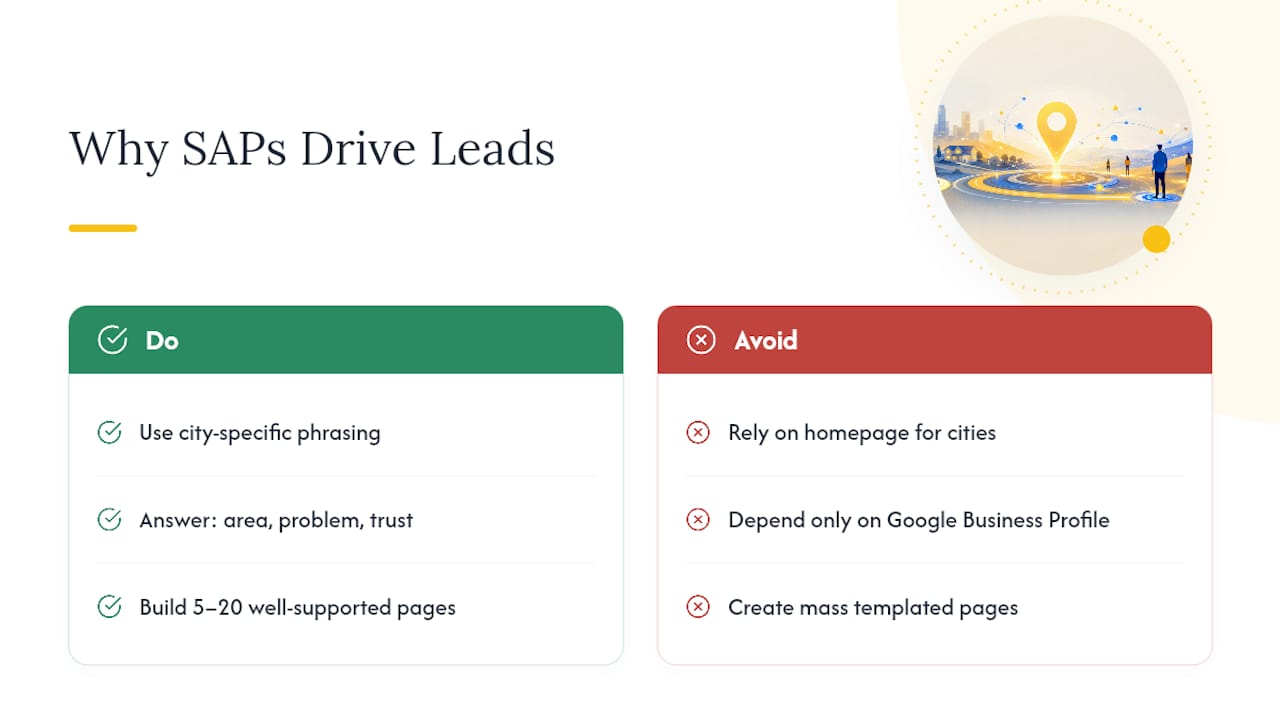
SAPs work because they match the exact phrasing people search when they’re ready to hire. Someone typing “emergency plumber Chandler” is closer to booking than someone searching “plumber near me,” and a dedicated page lets you speak directly to that intent instead of hoping your homepage ranks for every city at once.
They also do work your Google Business Profile can’t. GBP is capped by proximity and physical listing rules, so it can’t cover twelve surrounding towns the way a set of well-built SAPs can. Search Engine Land’s guidance frames this well: a SAP has to answer three questions in order, do you serve my area, can you handle my problem, and can I trust you enough to call. Miss any one of those three and the page underperforms regardless of how well it’s optimized.
Proof beats volume. Backlinko’s research on location pages found that a small set of well-supported city pages, somewhere in the 5 to 20 range, consistently outperforms large batches of templated pages padded with swapped city names and nothing else. That’s the opposite of what most agencies pitch when they promise “50 city pages in 30 days.”
SAPs also make better paid-ad landing pages than your homepage or a generic services page. When a Google Ads or Local Services Ads campaign sends traffic to a page that already names the searcher’s city, shows local reviews, and states a response time, conversion rates tend to climb because the page mirrors the exact promise the ad made. Sending that same click to a generic “Our Services” page forces the visitor to do the matching work themselves, and most won’t bother.
Service Area Pages vs. Location Pages: What Actually Differs
A location page describes a physical address: an office, a showroom, a clinic with hours and a lobby. A service area page describes reach: which neighborhoods you’ll drive to, how fast you respond, and what permits or logistics apply locally. Confuse the two and you either publish a fake address (which risks a Google Business Profile suspension) or you bury the actual travel radius information a searcher needs.
Here’s how to decide which one to build:
- Use a location page when the business has a real staffed address the public can visit at that spot.
- Use a service area page when a crew travels to the customer and there’s no public-facing address in that city.
- Use both when you have a handful of staffed hubs plus a wider radius of cities you serve from each one, common with multi-location HVAC or pest control companies.
A correct implementation names the city in the H1, states the response window, and lists neighborhoods or ZIP codes covered. An incorrect one lists a fake suite number just to appear local, or worse, hides the actual service area behind a store locator widget with no indexable text, a pattern Search Engine Land specifically warns against.
Core Modules for a High-Converting Service Area Page
Every strong SAP follows roughly the same structural logic, even though the copy changes by city. Think of it as a template with fill-in-the-blank sections, not a blank page you write from scratch each time.
- Hero section. The H1 names the service and the city (“24-Hour Water Heater Repair in Glendale”), paired with a call-to-action button and one trust line above the fold, like a review count or years in business.
- Service list scoped to that city. Don’t just repeat your full service menu. Call out what’s relevant locally: permit requirements, HOA rules, or seasonal issues specific to that area.
- Logistics block. State your response time, service radius from the nearest hub, and any travel fee thresholds. This is the section most SAPs skip, and it’s the one Search Engine Land’s checklist treats as non-negotiable.
- Local proof. Reviews tied to that city, a few job photos with captions naming the neighborhood, and ideally a short mini case study (“Replaced a failed sump pump for a homeowner in [neighborhood] within 90 minutes”).
- City-specific FAQs. Two or three questions unique to that location, not the same five FAQs copy-pasted across every city page.
- Internal links. Link up to the parent service page and sideways to two or three adjacent city pages, following the content hierarchy Backlinko recommends for connecting service and location clusters.
Adding schema markup and image alt text tied to the city name rounds out the technical layer, but the modules above are what actually move rankings and conversions.
Pro Tip: Write the logistics block first, before the marketing copy. It forces you to confirm you genuinely serve that city before you invest time polishing a page you might have to pull later.
How to Avoid Doorway Pages and Duplication Penalties
The fastest way to tank an SAP campaign is publishing too many pages too fast with too little unique content. Search engines classify near-identical city pages, ones that only swap the city name and keep every other sentence the same, as doorway pages, and that classification can suppress the whole cluster, not just the weak pages.
Use this checklist before anything goes live:
- Qualify each city with three filters: real search demand, genuine service coverage, and at least one piece of local proof (review, photo, or job story).
- Require 30% to 70% unique content per page, not just a swapped city name in the same three paragraphs, a threshold industry analyses on 2026 doorway classifiers treat as the survivable range.
- Have a human editor read every page before publishing, checking that the logistics, neighborhoods, and proof actually match that city.
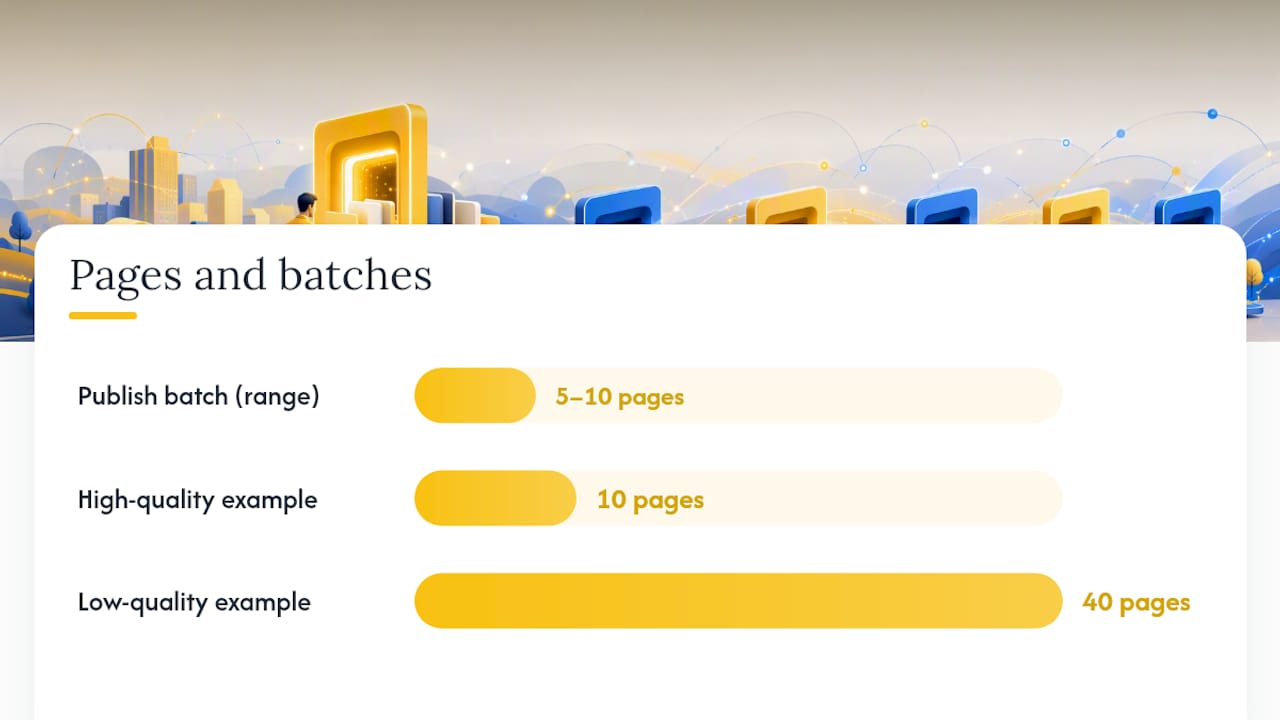
- Publish in batches of 5 to 10 pages, not all at once, and watch how the first batch performs before writing the next.
- Submit new pages through your XML sitemap in the same batch they’re published, so indexation timing lines up with your monitoring window.
BrightLocal’s guidance on service area pages makes the same point from a different angle: uniqueness and local proof matter more than page count. Ten pages built with real photos and real reviews will outrank forty pages built by find-and-replace.
Internal Linking and Site Architecture That Scales
The way you link your pages tells search engines whether your city coverage is real or manufactured. A flat pattern, where every city page sits in the footer of every other page with no hierarchy, reads as a doorway network even if the content itself is decent.
Build a hub instead. A service area hub page links out to your core service pages, each service page links down to its city-specific versions, and each city page links sideways to two or three adjacent cities plus back up to its parent service. That’s the service-cluster model Backlinko recommends: “AC repair” links to “AC repair Scottsdale,” which links to “AC repair Tempe” and back to “AC repair” as the parent.
Practical rules for the links themselves:
- Link each city page to its parent service page and one or two related services you offer in that same city.
- Link to two or three adjacent city pages, not every city you serve. Practitioner guidance on service area link patterns warns that exposing every city in a sitewide footer creates the exact flat doorway pattern search engines penalize.
- Keep your sitemap segmented by service cluster rather than one giant flat list, which makes it easier to spot indexation problems in a specific cluster instead of guessing across hundreds of URLs.
Schema and Technical Requirements for Service Area Pages
Structured data won’t rank a weak page, but it does help search engines and AI answer engines parse what you actually offer and where. Schema lists the core properties worth including on every SAP, and using a specific subtype like Plumber or Electrician instead of the generic LocalBusiness type sharpens how the page gets categorized.
| Schema element | Purpose | Required properties |
|---|---|---|
| LocalBusiness (or subtype) | Identifies the business and service type | name, address or areaServed, telephone |
| Service | Describes the specific offering on that page | serviceType, areaServed, provider |
| Review | Surfaces local proof in rich results | author, reviewBody, reviewRating |
| FAQPage | Marks up the city-specific FAQ section | question, acceptedAnswer |
Beyond schema, four technical items matter more than most SAP guides admit: mobile page speed (most local searches happen on a phone standing in a driveway), clean crawlable URLs that include the city name, correct canonical tags so you’re not accidentally telling Google two pages are duplicates, and sitemap submission timed to your publishing batches.
Test everything before it ships. Run new pages through Google’s Rich Results Test and check Search Console for indexing errors, a workflow Google’s own guidance on helpful content treats as basic hygiene, not an advanced step.
KPIs and the Maintenance Workflow for Service Area Pages
Three metrics tell you whether a SAP is working: impressions and clicks for service+city queries in Search Console, phone calls or form submissions attributed to that page, and actual booked jobs. Vanity traffic without conversions means the page is ranking for the wrong intent or missing trust signals.
Run this loop every 60 to 90 days:
- Pull Search Console data filtered by page, checking impressions, click-through rate, and average position for that city’s target query.
- Flag pages with impressions but low clicks as a title or meta problem, and pages with clicks but no conversions as a trust or logistics problem on the page itself.
- Fix and re-test the flagged pages, then wait a full cycle before judging the fix.
- Merge or retire pages that show no impressions after two full cycles. A city with genuinely low demand doesn’t deserve a standalone page just because you built one.
- Expand only after proof, adding new cities once your current batch shows a stable pattern of impressions and conversions.
The staged version of this workflow, publish in batches then monitor for 30 to 120 days before scaling, keeps you from burning a whole quarter on pages that never had real local demand behind them.
How Envision Marketing Agency Builds Service Area Pages
Envision Marketing Agency starts every SAP project the same way: pull search and conversion data first, then narrow the list to 5 to 15 cities where demand and revenue potential actually overlap. Guessing at coverage, or building a page for every city in a service radius just because the map allows it, is how clients end up with forty thin pages that hurt more than they help.
From there, the process is template plus human fill, not template plus find-and-replace:
- Build one master template covering hero, services, logistics, and FAQ modules.
- Fill each city version with real local proof: job photos, review pulls, and a short local story specific to that town.
- Publish in staged batches rather than all at once, watching early performance before greenlighting the next round.
- Track qualified leads and booked jobs as the success metric, not raw traffic or page count.
A typical engagement runs an audit of your current pages, a prioritized city list, content production for the first batch, and a monitoring period before scaling further. That sequence mirrors what multi-location SEO governance requires at scale, just applied to a smaller starting set.
Trade-Offs Worth Weighing Before You Build a Dozen City Pages
Service area pages are worth the investment once you have real proof to put on them: reviews, job photos, a track record in that city. Before that proof exists, Google Business Profile optimization or Local Services Ads will usually get you more return per hour spent than a half-built SAP with nothing to back it up.
The honest cost people underestimate is maintenance. A SAP isn’t a one-time write and forget; it needs a fresh review pulled in periodically, a photo update, a logistics check when your response radius changes. Ten pages maintained well will outperform thirty pages nobody revisits.
Start with the city that already sends you the most calls. Prove the template works there, then expand. Quality per page, not page count, is what determines whether this tactic pays off.
— Marcus
Get Your Service Area Pages Built Right the First Time
Building SAPs in-house means someone on your team has to pull search data, write unique local content for every city, wire up schema correctly, and monitor Search Console every month, on top of whatever else runs your marketing. A marketing agency can be an alternative to hiring a full internal content team for this work: one engagement covers the audit, the prioritized city list, the content production, and the ongoing monitoring, so you’re not piecing it together from blog posts and trial and error.
A typical project starts with a review of your current pages and search data, narrows down to the cities worth building first, and produces fully localized pages with real local proof before the next batch goes live. If your website also needs technical work to support fast-loading, crawlable city pages, that gets folded into the same process rather than handled as a separate fire drill.
Check out the managed SEO services page to see what a prioritized city rollout looks like for your specific service area, and get a plan built around the cities that actually drive revenue.
Where to Verify These Practices Yourself
The core standards behind this guide come from a handful of sources worth bookmarking. Schema.org’s LocalBusiness documentation covers the exact properties search engines expect. Backlinko’s location page research and BrightLocal’s service area page guide both cover template structure and the local proof standard in more depth. For review management specifics by industry, Local Review Reply’s guide is a useful companion resource once your pages start collecting feedback.
Sources
- How to Build Location Pages That Rank, Convert, and Get Cited
- How to Do Service Area Page SEO for Local Search Visibility
- Service area pages: Boost local SEO across locations