

The single biggest factor in preserving rankings during a website migration is finishing a complete 1:1 redirect map before launch, confirming the new site is fully indexable, and running daily monitoring for the first two weeks after cutover. Expect a temporary ranking dip of one to four weeks on most migrations, longer on domain changes tracked through Google Search Console’s Change of Address tool and its 180-day signal window. These three tasks are treated as non-negotiable on every migration project.
TL;DR:
- Confirm the redirect map is complete, tested, and verified against backlink data before the site goes live to prevent missing URLs and ranking drops.
- Remove noindex tags, password protections, and validate structured data and canonical tags during staging to ensure the new site is fully crawlable and correctly configured.
- Prioritize high-value backlinks during redirection by manually verifying top linking pages and avoid redirecting all pages to the homepage to preserve link equity.
- Conduct daily monitoring using Google Search Console, GA4, and server logs for at least the first 14 days post-launch to catch and fix issues early.
- Use staged, monitored launch processes and involve SEO oversight in development to reduce the risk of technical errors and ranking volatility during migration.
Table of Contents
- What Is Website Migration SEO?
- Pre-Migration Audit: What to Capture Before You Touch Anything
- How Do You Test a Staging Site Before Migration?
- How Do You Build a Redirect Map Without Losing Rankings?
- Launch-Day Runbook: What to Check in the First 24 Hours
- Post-Launch Monitoring: The 14-Day Runbook and Recovery Windows
- The Most Common Migration Mistakes and How to Fix Them Fast
- Envision’s Migration Playbook: What We Always Check First
- Content Audit and Optimization During Migration
- Handling Structured Data and Schema Markup Migrations
- Dealing With Backlinks and Link Equity Preservation
- Communication Strategy With Stakeholders and Users
- SEO Considerations for International and Multilingual Sites
- Mobile SEO and Page Experience Checks Post-Migration
- Why Most Migration Advice Undersells the First Two Weeks
- Migrations go wrong in the gap between “the developer launched it” and “someone checked it worked.” This gap can be closed with a managed migration process that pairs SEO oversight with the actual development work, so redirect mapping and code deployment happen on the same team instead of getting handed off between vendors who never talk to each other.
- Sources
What Is Website Migration SEO?
Website migration SEO is the practice of protecting search rankings, indexed pages, and organic traffic while a site changes domains, platforms, URL structure, or design. It matters because Google treats every URL as a distinct entity with its own accumulated trust signals, and a migration disrupts all of them at once. The industry has a name for the failure mode too: “traffic cliff,” the sudden, visible drop in organic sessions that shows up in Google Analytics 4 the week after a launch that skipped proper redirect mapping.
The mechanics are not mysterious. Search engines need to discover that Page A moved to Page B, verify the move is permanent, and transfer the accumulated ranking signals accordingly. Every checklist item that follows exists to make that transfer as fast and complete as possible. Skip the mapping, and you are not migrating your SEO, you are starting over.
Pre-Migration Audit: What to Capture Before You Touch Anything
Every successful migration starts with a paper trail. If something breaks three weeks after launch, the pre-migration audit is what tells you whether it was already broken or whether the migration caused it.
Baseline your current performance first. Export your Google Search Console performance report for the last 12 to 16 months, covering clicks, impressions, and average position by page and query. Pull a GA4 snapshot of organic sessions, conversions, and top landing pages. If you use a rank tracker, export current positions for your priority keyword set. Without this baseline, you have no way to prove a post-launch dip is temporary or catastrophic.
Crawl the entire old site. Run a full crawl with a tool like Screaming Frog or Sitebulb and export every indexable URL, its title tag, meta description, status code, and canonical tag. This crawl file becomes the source-of-truth for your redirect map. Search Engine Land’s migration guidance is blunt about this: missing URLs in the inventory are the most common root cause of migration failures, because pages nobody remembered to map simply vanish on launch day.
Cull before you move. Not every URL deserves a spot on the new site. Thin content, duplicate category pages, and pages with zero organic traffic and zero backlinks in the last two years are candidates for removal rather than migration. Carrying dead weight into a new domain can trigger a broader quality reassessment of the entire site, which is the opposite of what you want during a transition already under scrutiny.
A few decision rules keep the project from spiraling:
- Avoid bundling a domain change, a CMS swap, and a full redesign into one launch when you can split them into phases instead.
- Build a rollback plan and a firm timeline before development starts, not after.
- Lower your DNS TTL to 300 seconds or less at least 48 hours before cutover so changes propagate fast if something goes wrong.
- Assign an ownership matrix: who signs off on redirects, who owns analytics tagging, who has launch-day veto power.
- Run a risk assessment that ranks pages by traffic and backlink value, so your QA time goes where the stakes are highest.
Here is the order that keeps teams from missing a step:
- Export GSC, GA4, and rank tracker baselines.
- Crawl and export the full URL inventory with status codes and canonicals.
- Identify and flag low-value pages for removal instead of migration.
- Draft the ownership matrix and rollback plan.
- Set DNS TTL changes and lock the launch date and rollback window.
Pro Tip: Screenshot your GSC performance graphs before launch, not just the raw export. When you’re explaining a ranking dip to a client three weeks later, a dated screenshot is faster proof than digging through spreadsheet rows.
How Do You Test a Staging Site Before Migration?
Staging is where migrations quietly fail before they ever go live, and the fixes here are cheap compared to fixing them in production. The most damaging mistake is launching with the staging site’s noindex tag or password protection still active, because staging artifacts left live can make an entire site invisible to search engines within days.
Before you schedule launch, confirm every item below on staging:
- Remove
noindexmeta tags and anyX-Robots-Tagheaders site-wide, then verify with a live crawl, not a visual check. - Take staging out of password protection and confirm the production robots.txt file allows crawling of the new structure.
- Generate and validate the new XML sitemap so it only lists canonical, indexable URLs.
- Check that canonical tags are self-referencing on every page, and that hreflang tags point to the correct language or region variants.
- Validate structured data with a tool like Schema validator to catch broken JSON-LD before it goes live.
- Run a Core Web Vitals and accessibility audit; fix anything flagged as a critical error, not just a warning.
- Crawl staging end to end and resolve broken internal links, missing alt text, and unoptimized images.
- Confirm internal links point directly to final production URLs rather than routing through a redirect chain, which wastes crawl budget during the exact window when fast indexing matters most.
Pro Tip: Run your staging crawl twice, 24 hours apart. Some CMS platforms regenerate noindex tags automatically after a deploy, which means a clean check on Monday can quietly fail again by Tuesday.
How Do You Build a Redirect Map Without Losing Rankings?
Your redirect map is the single artifact that determines whether link equity, rankings, and traffic survive the move. Treat it as a living spreadsheet, not a one-time export.
- Structure the spreadsheet with these columns: old URL, new URL, redirect type (301 or 308), priority tier (based on traffic and backlinks), referring backlink count, and a verification status column you update post-launch.
- Never redirect everything to the homepage. A wildcard homepage catcall for pages with no direct equivalent reads to Google as a soft 404 pattern, and it tells users nothing useful either. Where no true equivalent exists, redirect to the closest topical match, or serve a proper 410 Gone if the content is genuinely retired.
- Use server-side redirects exclusively for permanent moves. A 301 or 308 executed at the server or CDN level is the standard; a 302, a meta-refresh, or a JavaScript redirect signals a temporary change and can stall or dilute signal transfer, a point Google’s own developer documentation reinforces directly.
- Coordinate cutover-morning updates across every channel. Paid media UTMs, email campaign links, and app deep links all need updating the moment DNS flips, not days later.
- Spot-check your highest-value backlinks manually. Pull your top 50 linked pages by referring domains and click through each redirect personally before you consider the map finished.
Pro Tip: Sort your redirect spreadsheet by backlink count descending before QA begins. If you only have time to manually verify 100 of 3,000 redirects, verify the ones attached to your strongest external links first.
Launch-Day Runbook: What to Check in the First 24 Hours
Launch day is not the finish line, it is the start of the highest-risk 24 hours in the whole project. Work through this order without skipping steps:
- Confirm no staging artifacts survived the push: no noindex tags, no staging canonical URLs, no leftover password gates.
- Verify the production robots.txt allows crawling and the new XML sitemap is live at its expected path.
- Test a representative sample of redirects across every priority tier and scan for redirect chains or loops.
- Check status codes on your top 20 pages by traffic; anything other than a clean 200 or a single-hop 301 needs immediate attention.
- Submit the new sitemap in Google Search Console and, for domain-level moves, begin the Change of Address process.
- Keep the old domain fully crawlable. Blocking it in robots.txt after launch is one of the fastest ways to sabotage your own redirects, since Google cannot follow 301s from a domain it is blocked from crawling.
- Verify GA4 and Google Tag Manager are firing correctly, then manually test forms, checkout flows, and any lead-capture journey.
- Confirm your DNS TTL was lowered ahead of cutover, and start watching server logs for crawler activity from Googlebot within hours of going live.
Post-Launch Monitoring: The 14-Day Runbook and Recovery Windows
Migrations do not fail in week one, they get diagnosed in week one. What happens in the following two weeks determines whether a temporary dip becomes a permanent loss.
Run this daily for the first 14 days:
- Check Google Search Console’s index coverage report for spikes in “crawled, not indexed” or “excluded by noindex.”
- Review GA4 organic traffic against your pre-migration baseline, page by page, not just site-wide.
- Track a sample of your top 500 keywords for ranking movement rather than waiting for a weekly report to surface a problem.
- Scan server logs and GSC for 4xx and 5xx errors, which almost always trace back to a redirect map gap.
Industry checklists and migration case studies commonly report that domain-level moves carry the highest risk profile, with full recovery windows spanning six to eighteen months depending entirely on redirect accuracy and how fast issues get caught. A subfolder restructure or a CMS swap with clean redirects typically recovers in a matter of weeks, not months, which is exactly why bundling multiple change types into one launch multiplies risk instead of saving time.
When coverage reports show stalled indexing, resubmit the sitemap and use the URL Inspection tool to request indexing on priority pages directly. If canonical tags or robots directives are misconfigured, fix and reverify rather than waiting for the next crawl cycle. Your triage order should be: fix redirect chains first, restore any broken analytics tagging second, correct canonical errors third. Hold off on backlink outreach until the technical layer is confirmed clean. Chasing new links to a page that is still throwing 404 wastes the outreach effort twice.
The Most Common Migration Mistakes and How to Fix Them Fast
Most migration disasters trace back to five repeat offenders, and all five are detectable within hours if you know where to look.
- Staging noindex tags surviving the push. Detect with a site-wide crawl checking meta robots and X-Robots-Tag headers; fix by removing the tag and requesting reindexing.
- The old domain blocked in robots.txt post-launch. Detect by fetching robots.txt directly and checking the disallow rules; fix immediately, since a blocked domain cannot pass its 301 signals forward.
- Wildcard redirects dumping everything to the homepage. Detect with a redirect crawl showing dozens of source URLs landing on one destination; remap each to its true closest equivalent or serve a 410.
- Redirect chains and loops. Detect by crawling your full redirect list and flagging any URL requiring more than one hop; fix by pointing every redirect directly at the final destination.
- Analytics gaps from missing or misconfigured tags. Detect by comparing GA4 real-time data against expected traffic within hours of launch; fix by redeploying the GTM container and verifying event firing.
Roll back the entire launch only when core revenue paths, like checkout or lead forms, are broken and cannot be patched within a few hours. Everything short of that gets fixed live, in place, on the priority order above.
Envision’s Migration Playbook: What We Always Check First
Every migration starts with the same two questions: is the redirect map complete, and is the new site actually indexable? Everything else gets sequenced around those answers.
The compact version of our checklist:
- Full crawl and redirect map validated against backlink data before any code freeze.
- Staging noindex removal confirmed by an independent crawl, not a visual spot check.
- Structured data validated and canonical tags confirmed self-referencing pre-launch.
- Daily GSC and GA4 monitoring assigned to a named team member for the first 14 days, not left to “whoever notices.”
This process has been run across more than 550 client engagements, and the pattern holds: migrations that skip the pre-launch crawl audit take measurably longer to recover than ones that don’t. If your team lacks the bandwidth to run a daily monitoring cadence for two straight weeks, that gap alone is often the strongest signal you need a managed migration engagement rather than a DIY one.
Pro Tip: Ask any migration vendor for their actual redirect spreadsheet template before you sign. If they can’t produce one with a verification column, they haven’t done enough of these to know they need it.
Content Audit and Optimization During Migration
A migration is the best excuse you will get all year to fix content debt, but only if you audit before you move, not after. Pull your full content inventory alongside the URL crawl and score every page on organic traffic, conversion contribution, and backlink count from the last 24 months.
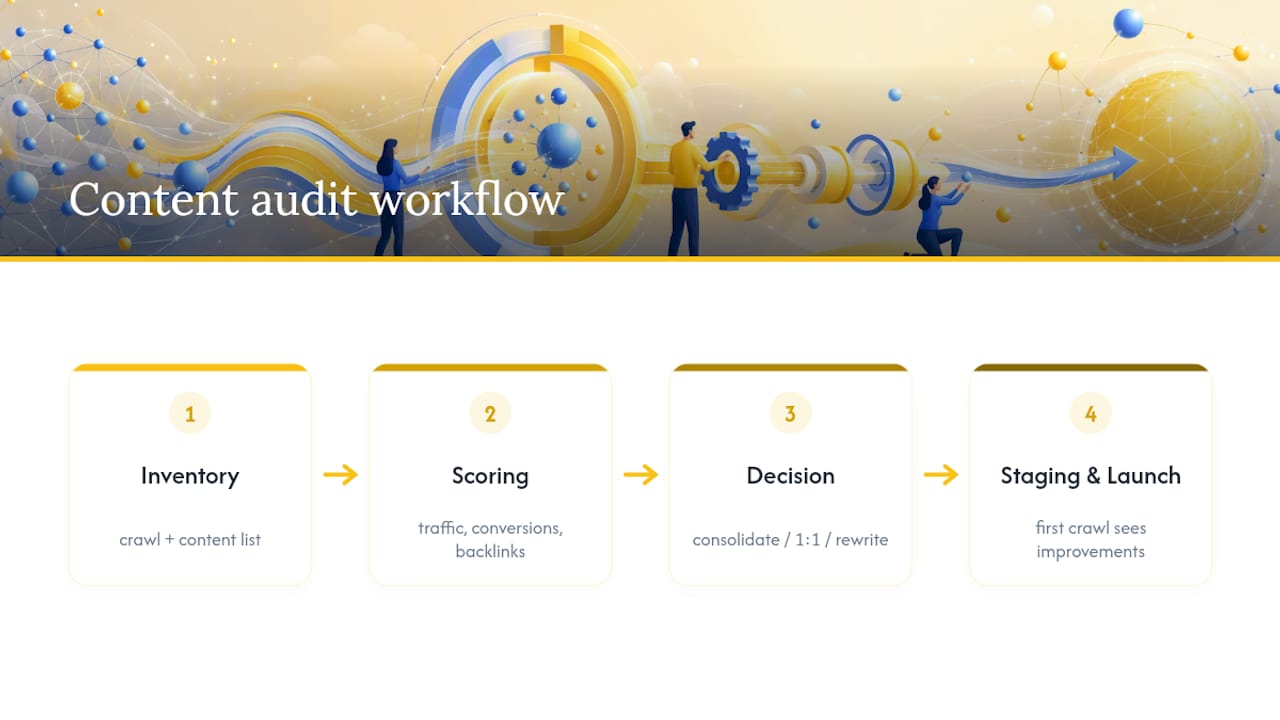
Pages that score low on all three are candidates for consolidation into a stronger, related page rather than a straight 1:1 carryover. Merging three thin blog posts into one comprehensive page and redirecting the two weaker URLs to the survivor often outperforms migrating all three untouched. Where content genuinely needs a rewrite, do it before launch on staging, not after, so search engines encounter the improved version the first time they crawl the new URL rather than re-crawling a changed page twice.
Title tags and meta descriptions deserve a fresh pass too. A migration often coincides with a rebrand or a shift in target queries, and carrying over three-year-old metadata verbatim wastes the opportunity. Just resist rewriting everything simultaneously with the platform move. Changing URL structure, content, and metadata all at once makes it nearly impossible to diagnose which change caused which ranking movement afterward.
Handling Structured Data and Schema Markup Migrations
Schema markup rarely survives a platform migration intact unless someone specifically audits it, because most CMS platforms generate structured data through different plugins or templates than the old system used. Product schema, review schema, FAQ schema, and organization schema all need individual verification on the new build, not a blanket assumption that “the developer handled it.”
Run every key page type, homepage, product pages, article pages, and location pages, through a validator like Schema validator before launch. Look specifically for missing required properties, duplicate schema blocks (a common artifact when a new theme and an old plugin both inject markup), and mismatched types, like a page carrying Article schema when it should carry Product.
Rich results tied to schema, star ratings, FAQ dropdowns, breadcrumbs, can disappear from search results for weeks if the new markup fails validation, even when the underlying page ranks fine. That gap shows up as a click-through-rate drop rather than a ranking drop, which makes it easy to miss if your monitoring only tracks position.
Dealing With Backlinks and Link Equity Preservation
Your backlink profile is the asset most at risk in a careless migration, and it is also the easiest one to protect if you plan for it. Pull a full backlink export before launch and rank referring pages by domain authority and relevance, not just raw link count.
Every redirect in your map needs to resolve cleanly for the URLs carrying your strongest external links. A single broken redirect on a page with fifty referring domains does more damage than fifty broken redirects on orphan pages nobody links to. This is why the backlink column in your redirect spreadsheet matters as a prioritization filter, not just a reference field.
For link equity that flows through a domain change specifically, Google Search Console’s Change of Address tool helps accelerate signal transfer, but it supplements clean redirects, it doesn’t replace them. Where feasible, reach out to your highest-value linking sites and request a direct link update to the new URL rather than relying solely on the redirect to carry the signal indefinitely. Redirects work, but a direct link update removes one hop entirely.
Communication Strategy With Stakeholders and Users
Migrations fail politically as often as they fail technically. Set expectations with stakeholders weeks before launch, not the morning of, and be specific about the timeline: pre-launch audit window, staging QA period, cutover date, and a defined 14-day monitoring phase where temporary ranking fluctuation is expected and normal.
Give stakeholders a plain-language version of what “temporary dip” means in numbers they understand, sessions and leads, not crawl stats and canonical tags. A marketing director who understands that a two-week traffic dip is normal reacts very differently to day-four numbers than one who was told nothing would change.
For end users, plan for redirects to handle most of the transition invisibly, but flag any URL structure change that affects bookmarked pages, saved carts, or account logins in your release notes or a brief on-site banner. Internal teams, especially sales and support, need a heads-up too, since they are the ones fielding customer questions if a bookmarked page suddenly redirects somewhere unexpected.
SEO Considerations for International and Multilingual Sites
Multi-region migrations multiply every risk in this guide by the number of language or country variants involved. Hreflang tags need individual verification for each locale on the new site, confirming that every variant points to the correct corresponding URL and that the tags are reciprocal across the full set.
Country-code top-level domains or subdirectory structures (like /fr/ or /de/) each carry their own indexing history in Google’s systems, and a migration that changes the international structure itself, moving from ccTLDs to subdirectories, for instance, is really several migrations happening simultaneously. Map and test each locale’s redirect set independently rather than assuming one clean English-language test proves the whole site works.
Google Search Console’s international targeting settings and the Change of Address tool both need to be executed per property when domains are involved, since Change of Address applies at the domain level and does not cover path-level restructures like a ccTLD-to-subdirectory consolidation. Budget extra QA time proportional to the number of locales, not a flat percentage, since a tenth language variant tends to get less scrutiny than the first, right when it needs just as much.
Mobile SEO and Page Experience Checks Post-Migration
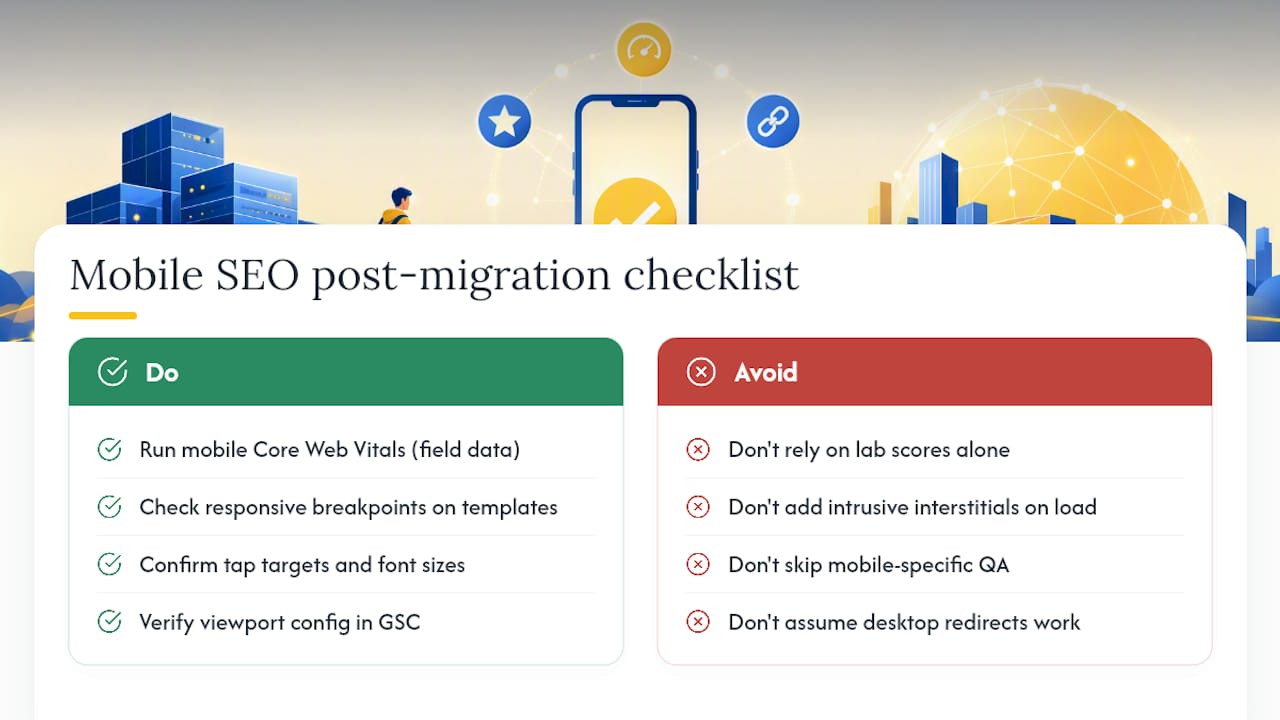
Mobile performance regressions are one of the quieter migration failures, because they rarely trigger an outright ranking collapse, they just erode click-through and conversion over weeks. Run a full mobile Core Web Vitals check on your top pages immediately post-launch using field data where available, not just lab scores, since real-user data reflects your actual audience’s devices and connections.
Check that responsive breakpoints render correctly across your priority page templates, not just the homepage. A new theme that looks clean on desktop staging can hide layout shift issues on smaller viewports that only surface once real mobile traffic hits the page. Confirm tap targets, font sizes, and viewport configuration all pass a mobile usability check in Google Search Console within the first week.
Interstitials and pop-ups deserve a specific look too. A new email capture modal or cookie banner that wasn’t on the old site can quietly violate mobile page experience expectations if it blocks content on load. Test the exact same user journeys on mobile that you tested on desktop during launch-day QA, forms, checkout, navigation, since a redirect that resolves cleanly on desktop can still break inside a mobile-specific template.
Why Most Migration Advice Undersells the First Two Weeks
That balance is backward. The redirect map and staging checks matter enormously, but they are largely mechanical, tasks you either did correctly or didn’t. The first 14 days after launch are where judgment calls happen in real time, and that’s where most teams lose ground they never needed to lose.
The overrated fix is waiting for a weekly report to catch problems. By the time a weekly crawl surfaces a redirect chain, you’ve lost seven days of signal transfer you can’t get back on the same timeline. Daily checks for two weeks, then you can step down to weekly.
One under-discussed wrinkle for 2026 is that AI-driven answer engines now surface brand and product information independent of traditional rankings. A migration that breaks structured data or canonical signals can quietly affect how a brand appears in those surfaces too, not just in classic search results. Worth a glance during the monitoring window, not just a rankings check.
— Marcus
Migrations go wrong in the gap between “the developer launched it” and “someone checked it worked.” This gap can be closed with a managed migration process that pairs SEO oversight with the actual development work, so redirect mapping and code deployment happen on the same team instead of getting handed off between vendors who never talk to each other.
Every migration engagement focuses on three outcomes: redirect accuracy verified against your real backlink data, analytics continuity so your GA4 history doesn’t fracture at the cutover date, and minimal downtime through staged, monitored launches rather than a single high-risk flip. If your team is weighing a redesign, a platform switch, or a domain change and wants someone watching Search Console daily for the first two weeks so you don’t have to, start with a look at Envisionmarketingagency’s managed SEO services and get a scoped plan for your specific migration before you set a launch date.
Sources
- Change of Address – Search Console Help
- Website Migration SEO Best Practices To Preserve Rankings And Avoid Common Pitfalls – Search Engine Journal
- Site migration SEO guide: Preserve rankings & traffic – Search Engine Land
- Site move with URL changes – Google Developers