

Facebook (Meta) ads reliably drive local visits, calls, and bookings when you combine the right campaign objective with real conversion tracking and creative that names your neighborhood. The single biggest lever isn’t budget or radius size. It’s the offer and the creative that goes with it. Get that wrong and no amount of targeting fixes it.
Here’s the 10-minute version before you touch Meta Ads Manager:
- Pick your objective: Store Traffic for foot traffic, Lead Ads for bookings.
- Set a radius (start at 5 to 8 miles, tighter in dense cities).
- Install the Meta Pixel with Conversions API, or use a booking form if you don’t have a website funnel yet.
- Build one hero video or image plus five user-generated-content style variants.
- Launch at a low daily budget ($10 to $20) to test before scaling.
Pro Tip: Location-named copy (your neighborhood, a nearby landmark, a cross street) filters for local intent faster than any radius setting. People self-select when they see their own street name.
Quick action: if you do nothing else today, install the Pixel and write one ad that names your neighborhood by name. That single move outperforms most targeting tweaks.
Key Takeaways
Local Facebook ad campaigns succeed when the right objective, real conversion tracking, and location-named creative work together instead of any single tactic carrying the load.
| Point | Details |
|---|---|
| Objective drives structure | Choose Store Traffic for foot traffic and Lead Ads for bookings before building anything else. |
| Tracking comes before spend | Install Pixel and Conversions API, plus call tracking, before your first dollar goes live. |
| Creative beats radius | Naming neighborhoods and landmarks filters local intent faster than tightening a radius setting. |
| Budget in phases | Test at $10–$20/day, scale to $20–$50/day once a winning creative and offer are proven. |
| Envisionmarketingagency handles the full stack | From Pixel setup to multi-location scaling, the agency builds and manages local campaigns end to end. |
Table of Contents
- Facebook Ads for Local Business: Account and Campaign Setup Essentials
- Defining Your Local Audience: Radius, ZIP Codes, and Neighborhoods
- Which Ad Formats and Creative Actually Drive Local Visits?
- How Much Should You Budget for Local Facebook Ads?
- Measuring What Actually Matters: KPIs, Pixel, and Optimization
- Scaling From One Location to Many
- An Agency-Tested Launch Checklist You Can Copy
- Connecting Facebook Ads to Google Business Profile and Local Listings
- Building a Local Sales Funnel: Cold Traffic to Repeat Customer
- Setting Realistic Timelines for Local Ad Campaigns
- Compliance Considerations for Regulated Local Industries
- Turning Customer Reviews Into Ad Creative That Converts
- How Envisionmarketingagency Builds Local Campaigns That Convert
- Frequently Asked Questions
- Sources
Facebook Ads for Local Business: Account and Campaign Setup Essentials
Before you spend a dollar, your account needs three things configured correctly: business verification, tracking, and the right objective. Skip any of these and you’ll spend money without learning anything useful.
Start in Meta Business Suite (also called Business Manager). Create or claim your Business Profile, add your physical location(s), assign Page roles to anyone who needs access, and confirm your billing currency before your first campaign goes live. This is also where you connect Ads Manager, which is the actual dashboard where campaigns, ad sets, and ads get built and reported on.
Tracking comes next, and it’s the piece most local owners skip.
- Install the Meta Pixel on your website (or use Conversions API if you’re on a platform with limited script access) so Meta can see what happens after someone clicks.
- Set up call tracking, either a dedicated tracking number or a service like CallRail, so phone leads count as conversions instead of vanishing into thin air.
- Decide your objective: Store Traffic for driving people to a physical location, Lead Ads when you want appointment requests or quote forms, or Conversions if you already have a working Pixel and want Meta optimizing toward purchases.
“One location per local-awareness or Store Traffic campaign” is the rule Social Media Examiner emphasizes, and it’s easy to violate by accident when you’re managing more than one storefront in a single ad set. Doing so muddies your location data and makes it impossible to tell which store actually drove the result.
Pro Tip: If you’ve linked Google Business Profile to your Facebook Page, double-check your address and hours match exactly. Mismatched data across platforms quietly kills local ad relevance scores.
Defining Your Local Audience: Radius, ZIP Codes, and Neighborhoods
Geotargeting on Meta gives you four real options: radius around a pin, ZIP code selection, city-level targeting, or a manually dropped pin with a custom radius. Which one you pick depends heavily on where your business sits.
- Urban businesses usually do better with a tighter radius (1 to 3 miles) because density means there’s already a large enough audience nearby.
- Suburban businesses often need 5 to 10 miles to reach a workable audience size without feeling stretched thin.
- Rural businesses may need 15 to 25 miles, sometimes combined with specific town names rather than a pure radius, since population density is too sparse for a tight circle to work.
Custom Audiences add another layer. Upload your customer list and build a Lookalike Audience constrained to your service area. Recent website visitors or people who engaged with your Page make strong retargeting pools too. The mistake most owners make here is stacking interest layers on top of location, assuming more filters means better targeting. It usually backfires. Meta’s delivery system, Advantage+ targeting, treats a tight radius as more of a soft signal than a hard rule, and heavy interest stacking just shrinks your pool until the algorithm can’t optimize.
Pro Tip: Name actual neighborhoods, cross streets, or landmarks in your ad copy instead of relying on radius alone. “Serving the Arcadia and Biltmore area” filters intent better than a map circle ever will.
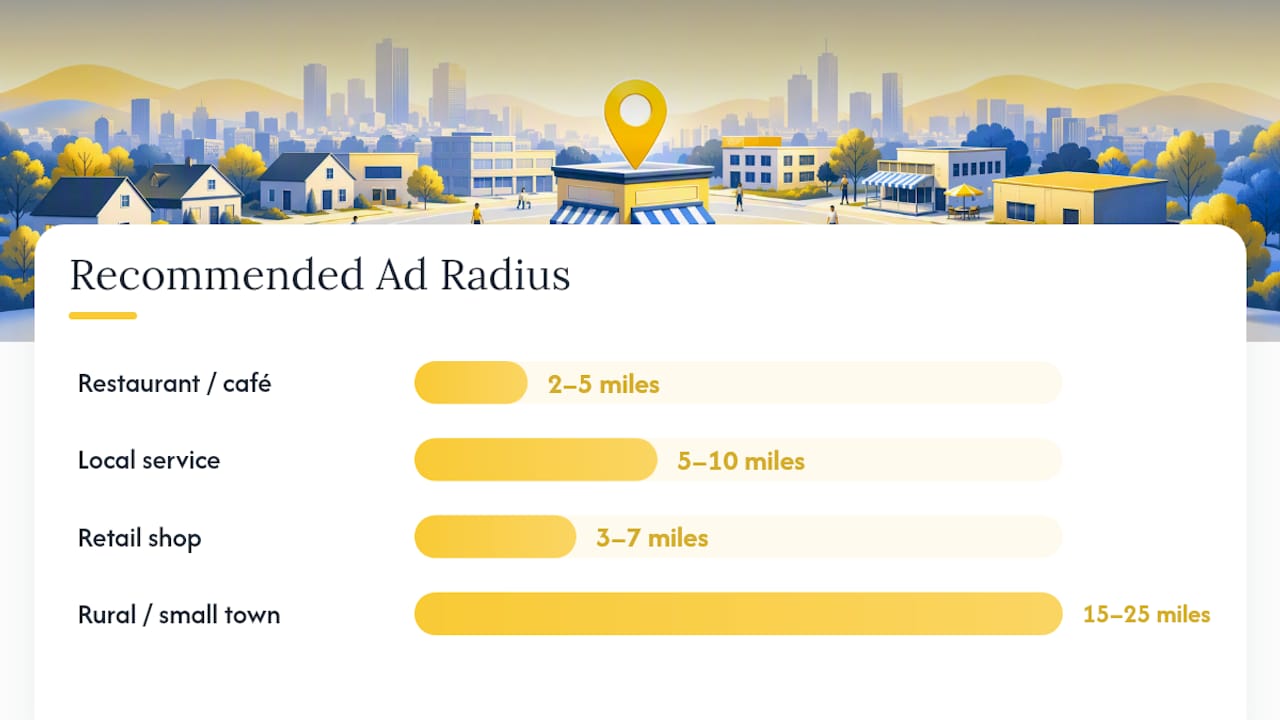
| Business Type | Recommended Radius | Notes |
|---|---|---|
| Restaurant / café | 2–5 miles | Dense areas can go tighter; add lunch vs. dinner dayparting |
| Local service (plumber, salon) | 5–10 miles | Widen for mobile services, tighten for storefronts |
| Retail shop | 3–7 miles | Pair with drive-time landmarks in copy |
| Rural or small-town business | 15–25 miles | Use town names instead of pure radius when population is sparse |
Which Ad Formats and Creative Actually Drive Local Visits?
Format choice should match your goal, not the other way around. Store Traffic and Local Awareness creative work with a map card and a Get Directions button baked in, which Meta’s own local-business tools support directly. Lead Ads pair with Instant Forms so someone can request an appointment without ever leaving Facebook. Offer Ads work well when you have a specific discount or promotion to push. Short video and carousel formats round out the mix for brand awareness that feeds the other two.

The creative system that consistently performs best for local advertisers is what the industry now calls “1-hero-plus-5”: one polished hero video or image, backed by five lower-production, UGC-style variants. This structure lets you rotate creative fast without losing your best-performing asset, and it mirrors how people actually scroll, expecting a mix of polish and authenticity.
A few creative rules worth following every time:
- Use real photos of your actual location, staff, and products, never stock imagery.
- Include a recognizable landmark or storefront shot so locals recognize the place immediately.
- Screenshot a strong Google review and use it as a static ad, since social proof from strangers converts better than brand copy.
- Keep video to 15 to 30 seconds; attention drops fast past that point.
- Rotate creative every 7 to 14 days to avoid frequency fatigue, especially in smaller radius audiences where the same people see your ad repeatedly.
For copy, match the CTA to the objective:
- Foot traffic: “5 minutes from downtown. Get directions and stop by today.”
- Appointment bookings: “Book your spot this week. Tap to reserve, no calls needed.”
- Local offers: “Mention this ad for 15% off your first visit at our Arcadia location.”
Pro Tip: Swap your worst-performing UGC variant every two weeks, but never touch the hero creative unless its cost per result climbs for three straight days. Killing a working hero too early resets your learning phase for nothing.
How Much Should You Budget for Local Facebook Ads?
Ten dollars a day can work, but only under specific conditions: a tight geographic radius, a Lead Ads or Store Traffic objective, and functioning conversion tracking so Meta actually has data to optimize against. Without the Pixel or call tracking in place, that same $10 a day just buys impressions with no feedback loop, and you’ll have no idea what’s working.
Tactical guidance for local campaigns generally lands in the $10 to $50 daily range depending on how far along you are in testing versus scaling.
| Phase | Daily Budget | Recommended Objective |
|---|---|---|
| Testing | $10–$20 | Store Traffic or Lead Ads, single creative set |
| Initial scaling | $20–$50 | Same objective, expand to winning creative only |
| Established campaign | $10 to $50 | Advantage+ Sales or Conversions, multiple ad sets |
On bidding, start with lowest-cost (Meta’s default) while you’re still learning what converts. Once you have at least a couple weeks of conversion data, test a cost cap or target-cost bid to keep your cost per result predictable as you scale spend. Advantage+ automated budget and placements are worth turning on once you trust your tracking, since manual placement picking rarely beats the algorithm at this budget level anyway.
- Don’t judge a campaign before it exits the learning phase (roughly 50 conversions per ad set).
- Increase budget in 20% increments rather than doubling overnight, which resets learning.
Measuring What Actually Matters: KPIs, Pixel, and Optimization
Vanity metrics like reach and impressions tell you nothing about whether ads are filling your storefront. The KPIs that matter for local campaigns are cost per direction request, cost per call, cost per lead, and, if you’re running e-commerce alongside a physical location, return on ad spend.
Getting there requires the tracking stack built correctly:
- Install the Meta Pixel on every page of your site, then layer Conversions API on top so server-side data backs up browser tracking that ad blockers or iOS privacy settings might block.
- Choose the right event type: Lead for form submissions, Purchase for actual transactions, or a Custom Conversion if your business model doesn’t fit neatly into either.
- Set up offline conversions if most of your business happens in person. Upload transaction data manually, or use a unique in-store promo code tied to the ad so you can match redemptions back to campaign spend.
- Integrate call tracking so phone leads count toward cost-per-result instead of disappearing as an untracked walk-in or call.
Pro Tip: If your business runs on bookings rather than online purchases, require a small refundable deposit at checkout. That single change turns an in-person booking into a trackable Purchase event Meta can actually optimize toward.
For optimization rhythm, check performance every 3 to 4 days rather than daily. Kill underperforming UGC variants after they’ve had a fair shot (roughly 1,000 impressions with no conversions), keep your winning hero creative untouched, and widen your location signal only after a campaign has proven itself in a tight radius. Retarget engaged visitors and Page interactors for 14 to 30 days before letting them roll off into a fresh Lookalike pool.
Scaling From One Location to Many
Multi-location scaling breaks most often when owners duplicate one campaign structure across every store without localizing anything. A single campaign covering five ZIP codes with generic copy will underperform five smaller campaigns, each speaking directly to its own neighborhood.
The better structure: one campaign per location, each with its own ad set, radius, and creative referencing that specific store’s landmarks or cross streets. If Meta’s dynamic localization features are available for your ad type, use them to auto-swap location names into a single creative template instead of manually building duplicates every time.
- Give each location its own tracking number or a unique landing page URL so results don’t blend together in your reporting.
- Stagger offer cadence across locations if they compete for the same regional audience, so you’re not bidding against yourself.
- Review location-level performance monthly and reallocate budget toward whichever store is converting most efficiently.
- Duplicate the campaign shell, not the creative.
- Swap in store-specific photos, landmarks, and offer details.
- Assign a unique tracking number or promo code per location before launch.
An Agency-Tested Launch Checklist You Can Copy
Here’s the sequence Envisionmarketingagency runs for local clients, in order:
- Install Pixel and Conversions API.
- Build or confirm a landing page or booking form that captures leads without friction.
- Set up call tracking (CallRail or equivalent) tied to the ad account.
- Produce one hero creative plus five UGC-style variants.
- Launch a two-campaign shape: Advantage+ Sales at 70 to 80% of budget for broad reach, paired with a manual retargeting campaign at 20 to 30% for warm audiences.
Two templates worth stealing directly:
- Store Traffic template: Map card creative, “Get Directions” CTA, offer copy naming your neighborhood (“Stop by our Arcadia location this week for 20% off”).
- Lead Ads template: Instant Form appointment booking, refundable deposit to create a trackable Purchase event, follow-up copy confirming the booking within minutes.
Pro Tip: Ask any agency you’re evaluating for their typical onboarding timeline and reporting cadence before signing anything. A serious partner should walk you through week-by-week setup, not just promise “results.”
Connecting Facebook Ads to Google Business Profile and Local Listings
Facebook ads work best as one piece of a larger local credibility system, not a standalone channel. When your Google Business Profile, Yelp listing, and Facebook Page all show matching hours, address, and phone number, Meta’s local relevance scoring improves and customers researching you across platforms see a consistent, trustworthy business.
The practical integration points are simple but often skipped. Make sure your Facebook Page’s address field matches your Google Business Profile exactly, down to suite numbers and abbreviations. Cross-post your Google reviews as static image ads on Facebook, since a five-star review screenshot builds trust faster than any brand-written copy. If you run Store Visit-style campaigns, the map card and direction CTA in your Facebook ad should point to the same physical address customers see when they search you on Google.
Tracking benefits too. If a customer sees your Facebook ad, then searches your business name on Google before visiting, that Google Business Profile listing needs to reinforce the same offer they saw in the ad, not contradict it with outdated hours or a different promotion. Some owners run a “See us on Google” CTA within Facebook ad copy specifically to drive review growth, since more Google reviews feed back into higher local search visibility, which in turn makes your Facebook retargeting audience larger and warmer over time.
Treat these platforms as one funnel rather than separate marketing lines, and the credibility signals compound each other instead of working in isolation.
Building a Local Sales Funnel: Cold Traffic to Repeat Customer
A working local funnel has three stages, and skipping the middle one is the most common reason local campaigns stall at “lots of clicks, no bookings.”
Stage one: cold reach. Run Store Traffic or Advantage+ Sales campaigns targeting a broad local radius with your hero creative. The goal here is awareness and initial engagement, not conversion. Keep the offer simple and the CTA low-commitment (Get Directions, Learn More).
Stage two: warm retargeting. Anyone who engaged with your Page, watched 50% or more of your video, or visited your landing page without converting goes into a retargeting audience. This group already knows who you are, so the creative should shift toward a stronger, more specific offer, like a limited-time discount or a direct booking link rather than a general awareness message.
Stage three: lookalike expansion. Once you have a customer list of even a few hundred names, upload it and build a Lookalike Audience constrained to your service radius. This pool tends to convert better than cold interest-based targeting because it’s modeled on people who already bought from you, not people who merely fit a demographic guess.
Run all three simultaneously once you have enough budget, with roughly 60% toward cold reach, 25% toward retargeting, and 15% toward the lookalike layer. Adjust that split based on which stage shows the lowest cost per result after your first month of data. Most local businesses find retargeting delivers their cheapest conversions by a wide margin, simply because that audience already trusts the brand.
Setting Realistic Timelines for Local Ad Campaigns
Local Facebook advertising moves through three distinct phases, and expecting results from week one is the fastest way to abandon a strategy that would have worked.
Weeks 1 to 2 (planning): Set up tracking, build creative, define your radius and objective. Nothing goes live yet. Rushing this phase to “just launch something” is the single biggest cause of wasted early spend.
Weeks 2 to 4 (launch and learning phase): Campaigns go live at your testing budget. Meta needs roughly 50 conversions per ad set to exit the learning phase and start optimizing efficiently. Expect costs to be higher and less consistent during this window; that’s normal, not a sign of failure.
Weeks 4 to 8 (optimization): With enough data collected, start killing underperforming creative, shifting budget toward winners, and testing your first retargeting audience. This is also when most owners start seeing cost per result stabilize into a predictable range.
Beyond week 8 (scaling): Only after a campaign has proven a repeatable cost per result should you increase budget meaningfully or expand to new locations. Scaling too early, before the learning phase has settled, tends to reset performance and waste the progress already made.
Set these expectations with your team or agency in writing before launch. Owners who expect month-one results almost always pull the plug right before a campaign starts performing.
Compliance Considerations for Regulated Local Industries
Not every local business can run ads the same way, and Meta enforces stricter rules the moment your industry touches health, alcohol, or finance.
Healthcare and medical practices face restrictions on targeting based on health conditions and often need Meta’s special ad category review before certain claims run. Avoid before-and-after imagery that implies guaranteed outcomes, and steer copy toward general wellness framing rather than specific medical promises.
Alcohol-related businesses (bars, breweries, liquor stores) must age-restrict their targeting and cannot show ads to audiences below the legal drinking age in their region. Meta also restricts certain alcohol ad placements entirely depending on the country, so confirm your ad account’s alcohol advertiser status before launch.
Financial services fall under Meta’s Special Ad Category rules for credit-related products, which limits certain targeting options like age, gender, and ZIP code precision to prevent discriminatory ad delivery. If you’re a local lender, insurance broker, or credit union, expect your targeting flexibility to be narrower than a typical local retailer’s.
Across all three categories, the practical move is the same: review Meta’s advertising policies for your specific vertical before building campaigns, since a rejected or disabled ad account costs far more time than the extra due diligence upfront. Local businesses in unregulated categories, like restaurants or home services, don’t face these restrictions, but it’s worth double checking your specific niche doesn’t carry a lesser-known flag before you launch at scale.
Turning Customer Reviews Into Ad Creative That Converts
Reviews do heavier lifting in local ad creative than almost anything else you can produce, because a stranger’s word carries more weight than brand copy ever will.
Start by making review collection part of your regular customer flow, not an afterthought. Send a text or email request within 24 hours of service while the experience is fresh, and link directly to your Google or Facebook review page to reduce friction. Some local businesses tie a small incentive, like an entry into a monthly drawing, to leaving a review, which is generally fine as long as you’re not paying for a specific star rating.
Once you have reviews, turn the strongest ones into static image ads. A clean screenshot of a five-star Google review, paired with your logo and a simple CTA, consistently outperforms professionally designed brand graphics in local campaigns. Video testimonials work even better if you can get a customer on camera for 15 to 20 seconds, but a well-formatted screenshot ad is far easier to produce at volume.

Rotate testimonial ads into your UGC variant set rather than running them as a separate campaign. This keeps social proof flowing through your existing retargeting and cold-traffic funnels without extra management overhead. Refresh your review-based creative every month or two as new testimonials come in, since repeat local audiences will notice if they see the same review screenshot for the sixth time.
When to DIY Versus Hire an Agency
If tracking spans multiple locations or you’re short on time, hire out. Agencies like Envisionmarketingagency typically handle setup, creative, tracking, and weekly reporting. Simple, single-location, low-complexity campaigns are reasonable to run yourself.
How Envisionmarketingagency Builds Local Campaigns That Convert
Running local Facebook ads well means juggling Pixel setup, creative production, call tracking, and weekly optimization, on top of actually running your business. Envisionmarketingagency handles that full stack for local clients: campaign setup in Ads Manager, Pixel and Conversions API implementation, landing pages and booking funnels built to convert, and multi-location scaling when you’re ready to grow beyond one storefront.
A discovery call typically covers a quick audit of your current setup (or lack of one), an initial campaign plan matched to your goals, and a sample budget estimate based on your industry and location. If you’d rather build the funnel side yourself first, Envisionmarketingagency’s landing page and booking funnel work is worth a look before you launch anything. Otherwise, the fastest next step is a look at Envisionmarketingagency’s full-service marketing offerings and a conversation about what a working local ad account should actually look like for your business.
Frequently Asked Questions
Is $10 a day enough for Facebook ads for local business?
It can work for a single-location campaign with a tight radius and functioning conversion tracking, but without a Pixel or call tracking in place, that spend won’t generate usable data to optimize toward.
What’s the best campaign objective for a local business?
Store Traffic works best for driving foot traffic to a physical location, while Lead Ads fits businesses selling appointments, quotes, or bookings rather than walk-in visits.
How long before Facebook ads start working for a local business?
Expect a two-to-four week learning phase before performance stabilizes, followed by another few weeks of optimization before costs settle into a predictable range.
Do I need a website to run local Facebook ads?
No. Lead Ads use Instant Forms built directly into Facebook, so a business without a website can still capture leads without an external landing page.
How many locations should be in one campaign?
One location per Store Traffic or Local Awareness campaign is the standard recommendation, since combining locations makes it impossible to attribute results to a specific store.
Sources
- How to Use Facebook Local Awareness Ads to Target Customers : Social Media Examiner
- Promote Your Local Business
- Facebook Ads for Local Businesses: Complete Campaign Setup Guide (2026) | Adligator
- Facebook Ads Local Business: Radius-and-Offer Playbook 2026