

The fastest, highest-return move for most small businesses is a CRM-driven email automation setup paired with three to five tightly connected tools. Not a sprawling platform. Not twelve apps stitched together with duct tape and hope.
Small business marketing automation works best when it’s boring and consistent: a lead comes in, gets tagged, gets emailed, gets tracked. Two reasons this beats a bigger buildout. First, email tied to CRM events delivers the strongest return for small contact lists, according to Monday. Second, a small stack is far easier to measure and adjust than a sprawling one, since you’re not hunting through five dashboards to find out what worked.
Here’s what to do this week:
- Install a lead capture form on your highest-traffic page.
- Build a three-email welcome sequence triggered the moment someone signs up.
- Connect your CRM to your analytics tool so every new lead has a paper trail.
Pro Tip: If you only do one of these three, do the welcome sequence. It’s the single automation most likely to turn a stranger into a customer within the first week.
TL;DR:
- Using a CRM-driven email automation with three to five connected tools maximizes return and simplifies measurement for small businesses.
- Prioritize automating lead capture, welcome sequences, and basic analytics within the first two weeks to establish a strong foundation.
- Keep the marketing stack limited to five or fewer tools to prevent data silos and reduce ongoing integration issues.
- Focus on sequential automation tasks: starting with capture, then onboarding, tracking, segmentation, and nurturing, in that order.
- Track key metrics monthly, including conversion rate, lead-to-customer rate, revenue per contact, and LTV to CAC, to measure ROI effectively.
Table of Contents
- What Are the Main Categories of Marketing Automation Tools?
- Which Tasks Should You Automate First?
- How Do You Build a Connected Stack Without Sprawl?
- What’s a Realistic Implementation Roadmap?
- What Does Marketing Automation Actually Cost?
- How Do You Measure ROI From Marketing Automation?
- What Mistakes Should You Avoid, and What Governance Do You Need?
- How Does an Agency Approach Marketing Automation Differently?
- What Questions Should You Ask a Vendor Before You Buy?
- What Red Flags Should Make You Walk Away?
- How Do Popular Marketing Automation Platforms Compare?
- How Long Does It Take to See Results?
- What Should Busy Owners Actually Prioritize?
- How Can Envision Help You Implement This Roadmap?
- Key Takeaways
- Sources
What Are the Main Categories of Marketing Automation Tools?
Small business marketing automation tools generally sort into five categories, and picking the wrong one wastes months. Each has a different core promise and a different kind of buyer.
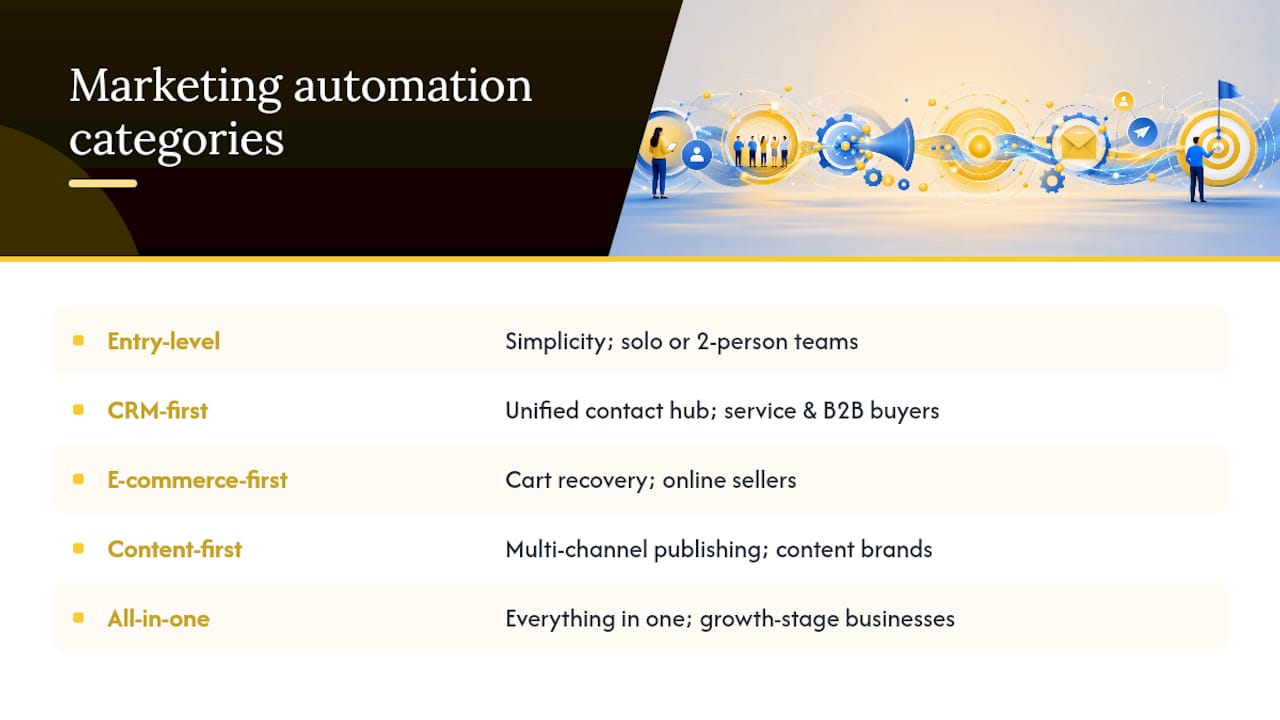
Entry-level automation tools promise simplicity above all else. They’re built for solo operators or two-person teams who need a form, an email sequence, and basic tagging, nothing more. Expect to run these yourself with no technical staff, at a cost that often starts free and climbs modestly with your list size. The upside: you’re live in an afternoon. The downside: you’ll outgrow them the moment you need multi-step lead scoring.
CRM-first platforms promise one home for every contact and every interaction. Buyers here are service businesses and B2B companies where sales follow-up matters as much as marketing. Forbes’ guidance for small businesses treats a solid CRM as the foundation everything else should connect to. You’ll likely need someone comfortable with basic configuration. Pros: sales and marketing finally share one truth. Cons: setup takes longer than an entry-level tool.
E-commerce-first platforms promise recovered revenue from abandoned carts and repeat purchases. Online sellers are the obvious buyer profile, and pricing tends to scale with order volume or store revenue rather than contact count. Pros: built-in workflows for cart recovery and post-purchase upsells. Cons: weaker fit if most of your business is service-based.
Content-first platforms promise coordinated social and blog distribution alongside email. Buyers are usually content-heavy brands, agencies, or media-adjacent businesses. Staffing needs a content calendar owner, not necessarily a developer. Pros: strong scheduling and multi-channel publishing. Cons: often the weakest CRM functionality of the five.
All-in-one platforms promise everything under one login: CRM, email, landing pages, sometimes even invoicing. Buyers are typically growth-stage businesses ready to consolidate. Monthly cost is the highest of the five categories, and the learning curve matches it. Pros: fewer integrations to babysit. Cons: you pay for modules you may never touch.
Which Tasks Should You Automate First?
Not every automation deserves your attention in month one. Rank these by ROI and difficulty, and you’ll see a clear order emerge.
- Lead capture and qualification. Trigger: a form submission or chat message. Action: auto-tag the lead by source and interest, then route hot leads to a sales notification. Timing: instant.
- Welcome and onboarding. Trigger: new subscriber or new customer. Action: a three to five email sequence introducing your value, spaced two to three days apart. Timing: starts within minutes of signup.
- Cart abandonment (if you sell online). Trigger: checkout started but not completed. Action: reminder email, then a second nudge with urgency. Timing: one hour, then 24 hours later.
- Re-engagement. Trigger: no opens or clicks in 60 to 90 days. Action: a “we miss you” email offering something of value. RealClient’s guidance on automated follow-ups shows these sequences routinely recover clients who’d otherwise gone cold.
- Scheduled social distribution. Trigger: new blog post or promotion published. Action: auto-post across two or three channels at set times. Timing: same day, staggered by platform.
- Basic reporting. Trigger: end of week or month. Action: auto-generate an open rate, click rate, and conversion snapshot. Timing: recurring schedule, no manual pull needed.
Pro Tip: Set a hard cap of one promotional email per contact every 72 hours across all automations combined. Overlapping welcome, re-engagement, and cart sequences can quietly triple-send to the same person in a single day, and that’s the fastest way to spike unsubscribes.
How Do You Build a Connected Stack Without Sprawl?
Three to six core tools is the practical ceiling for most small teams, and going past that invites exactly the kind of chaos that kills automation before it pays off. Practitioner guidance cited by Gartner’s review platform recommends capping the core marketing stack at five to seven integrated platforms specifically to avoid data silos and wasted staff hours.
Your CRM, email tool, website, ad accounts, and analytics need to talk to each other automatically. If a lead fills out a form and your CRM doesn’t know within seconds, you’ve already built a silo. Zapier’s roundup of automation software makes integration capability and ease of building workflows the top selection criteria for small teams, ahead of any individual feature checklist. That tracks with what actually breaks in practice: teams don’t abandon a tool because it lacks a feature. They abandon it because connecting it to everything else took three support tickets and a weekend.
Before you commit to any tool, check for:
- Native integrations with your existing CRM and email provider, not just a generic “connects to everything” claim.
- Webhook support, so custom triggers can fire between tools that don’t have a native integration.
- Open API access, in case you need a developer to bridge a gap later.
- Straightforward import and export, so your contact list is never trapped.
- Contact limits and how pricing changes as you cross them.
Beyond the technical checks, get your operational house in order. Decide which tool owns your master contact list, the CRM, in nearly every case, and treat every other tool as a subscriber to that source of truth, not a competing database. Agree on a tagging convention before you build a single workflow: “lead_source:webinar” beats “Webinar Lead” and “webinar-lead” existing as two different tags in two different systems. monday.com’s platform guidance puts this plainly: tools only deliver value when they work together, and disconnected tools create data silos that slow teams down rather than speeding them up.
Pro Tip: Before adding any new tool to your stack, ask one question: which existing tool does this replace? If the honest answer is “none,” you’re adding sprawl, not capability.
What’s a Realistic Implementation Roadmap?
Small business marketing automation succeeds or fails based on sequencing. Skip a step and every later step gets shakier. The order that works: capture, then welcome, then track, then segment, then nurture.

Week 1 is foundation work. Get your lead capture form live, build the welcome sequence, and connect basic analytics so you can see what’s actually happening. Don’t touch segmentation yet. You need data before you can segment anything meaningfully.
Weeks 2 through 8 is where the real construction happens. Start segmenting contacts by source, behavior, or interest. Introduce basic lead scoring so your team knows which leads deserve a phone call versus another email. Build out a second automated journey, maybe a nurture sequence for leads who downloaded a resource but haven’t bought. Run your first A/B test, subject line or send time, and let it run long enough to mean something.
Month 3 and beyond is expansion territory, but only once the basics are humming without daily fixes. This is when personalization based on purchase history, predictive lead scoring, and additional channels like SMS start to earn their keep. ActiveCampaign’s product materials describe this kind of multi-channel expansion, email plus SMS plus other channels, as a natural next step once the core automation is stable, though results depend heavily on execution.
Here’s how that timeline typically maps to deliverables and decision points:
| Phase | Timeframe | Core deliverable | Hire outside help if… |
|---|---|---|---|
| Foundation | Week 1 | Live capture form, welcome sequence, analytics connected | Your CRM won’t talk to your website without custom code |
| Build-out | Weeks 2 to 8 | Segmentation, lead scoring, second automated journey, first A/B test | Integrations keep breaking or nobody owns the tagging convention |
| Expansion | Month 3+ | Personalization, predictive scoring, added channels | You need custom API work or a dashboard beyond native reporting |
A guide to using AI for local business marketing walks through several of these expansion tactics in more detail if you’re past the foundation phase and ready to layer in smarter targeting.
The honest checkpoint for hiring outside help isn’t a calendar date. It’s whether your internal team is still fixing integrations in month three instead of running campaigns. If setup keeps eating the hours meant for strategy, that’s the signal.
What Does Marketing Automation Actually Cost?
Pricing in this category follows three shapes, and knowing which one you’re buying into prevents the surprise invoice six months from now.
Per-contact pricing charges based on how many people are in your database, regardless of how many emails you send them. This punishes list growth and rewards list hygiene, since a bloated list of unengaged contacts costs you money for nothing. Per-seat pricing charges based on how many team members log in, common in CRM-first platforms where sales reps need individual access. Tiered pricing bundles a set of features and limits into flat monthly packages, stepping up as you need more contacts, more automations, or more advanced reporting.
Sample monthly ranges, kept conservative:
- Solo operator: $0 to $50 a month, usually an entry-level tool with a free tier or a low-cost starter plan.
- Small team: $50 to $500 a month, typically a CRM-first or all-in-one platform once you add a second or third tool for social scheduling or landing pages.
- Growth-stage business: $500 or more a month, where contact volume, seat count, and advanced automation features start compounding.
Before committing to a full contract, run every serious candidate through its free trial with real data, not a sample account. Build a staging list of test contacts separate from your live list, since a botched workflow test that hits real customers is a hard way to learn tagging conventions.
How Do You Measure ROI From Marketing Automation?
Five numbers tell you whether your automation is working: conversion rate, lead-to-customer rate, average order value, revenue per contact, and a rough LTV to CAC ratio. Track these monthly, and you’ll know within one quarter whether your stack is earning its keep.

Conversion rate is the share of leads who take your desired action, subscribe, book a call, buy. Lead-to-customer rate narrows that further, tracking only leads who become paying customers. Average order value tells you whether automated upsells and cross-sells are doing their job. Revenue per contact divides total revenue by total contacts, a useful sanity check on whether your list is actually monetizing. LTV to CAC compares what a customer is worth over time against what it cost to acquire them, the closest thing to a north star metric for whether automation spend makes sense.
Here’s a simplified illustration of scale. If AI-powered lead insights lift your conversion rate by roughly 1.5x, a documented range from Thryv’s Q2 2026 earnings call transcript, a business converting 40 leads a month into customers could see that climb toward 60. If your average customer is worth $200, that’s an extra $4,000 in monthly revenue from the same lead volume. The same transcript cites revenue gains up to 40% per client in some cases, though that figure reflects a specific vendor’s reported results and should be treated as a ceiling, not a guarantee, since results vary by industry and starting baseline.
A minimum reporting setup for weekly and monthly check-ins:
| Cadence | What to check | Why it matters |
|---|---|---|
| Weekly | Open rates, click rates, new leads captured | Catches broken workflows or sending errors fast |
| Weekly | Lead response time | Slow follow-up quietly kills conversion rate |
| Monthly | Conversion rate, lead-to-customer rate | Shows whether the funnel is actually working |
| Monthly | Revenue per contact, average order value | Tracks whether monetization is improving over time |
An email marketing automation case study from Arizona shows how tracking these numbers consistently, rather than sporadically, is what turns a report into a decision-making tool.
What Mistakes Should You Avoid, and What Governance Do You Need?
Tool sprawl tops the list of mistakes, closely followed by inconsistent tagging, since a lead tagged “webhook_source” in one tool and “web-lead” in another is functionally two different people to your automation. Poor suppression list management comes next: failing to exclude unsubscribed or bounced contacts from new campaigns is how you end up flagged as spam. Broken journeys, workflows that were built once and never audited, quietly waste money for months before anyone notices the drop-off. And over-automation, sending too many triggered messages to the same contact, burns trust faster than almost anything else on this list.
A short governance checklist keeps this from happening:
- Audit every active workflow quarterly for broken links or outdated content.
- Maintain one master suppression list shared across every tool that sends email.
- Document your tagging conventions somewhere every team member can see them.
- Track consent records for every contact, including when and how they opted in.
One caveat worth stating plainly: privacy and consent rules vary by jurisdiction and by how you collect data, so treat this checklist as a starting point and confirm specific compliance requirements with primary legal sources rather than a marketing blog.
Pro Tip: Run a “silent audit” once a quarter: sign yourself up as a test lead and let every automated sequence run its course. You’ll catch broken links and mistimed messages faster than any dashboard will show you.
How Does an Agency Approach Marketing Automation Differently?
Envisionmarketingagency’s approach centers on a data-driven method that prioritizes qualified leads over vanity metrics, a distinction that matters more than it sounds. A high open rate means nothing if none of those opens turn into paying customers. Having worked with more than 550 clients since 2020, the agency’s role typically shifts from initial setup to ongoing governance once a stack is running: fixing broken integrations, documenting tagging conventions, and building dashboards that let an internal team take over day-to-day operation.
Three scenarios show how that plays out in practice:
- Onboarding: a client with three disconnected tools gets consolidated into one CRM-driven system, with lead capture and welcome sequences live within the first two weeks.
- Integration: a client whose CRM and email tool weren’t talking gets a proper API or webhook connection built, closing the gap between “captured” and “actually followed up with.”
- Reporting: a client with no visibility into what was working gets a simple weekly dashboard tracking the same core metrics covered above.
The agency role typically shifts from setup to governance: fixing integrations, documenting tagging, and establishing dashboards so internal teams can own ongoing operations once the foundation is solid.
The DIY route makes sense when you have one person comfortable with basic tool configuration and a stack under five tools. Hiring help makes sense once integrations keep breaking, reporting takes more hours than it should, or you’re three tools deep with no clear owner of the contact list. A typical engagement includes an audit of your current stack, a rebuilt or newly connected integration layer, and a dashboard handoff, usually within four to eight weeks depending on how much existing infrastructure needs untangling.
What Questions Should You Ask a Vendor Before You Buy?
Every vendor demo sounds impressive. The questions that separate a good fit from a expensive mistake rarely come up unless you ask them directly.
Start with integration specifics: “Which CRM and email tools do you natively connect to, and what breaks if I need something outside that list?” Vague answers here predict months of support tickets later. Ask directly about contact limits and what happens financially the moment you cross them, since some platforms quietly jump a full pricing tier at a threshold you won’t notice until the invoice arrives.
Push on data ownership: “If I cancel, can I export every contact, tag, and interaction history in a usable format?” A vendor that hedges on this question is telling you something important. Ask how support works once you’re past onboarding, not during the sales call, since the quality of week-one support rarely matches month-six support once you’re a smaller account among thousands.
Finally, ask what a realistic implementation timeline looks like for a business your size, and ask for a specific number, not “it depends.” A vendor confident in their onboarding process will give you a real answer. One who can’t is often one whose customers are figuring it out largely on their own.
What Red Flags Should Make You Walk Away?
A few warning signs show up again and again in businesses that regret their automation purchase six months in.
Pricing that’s opaque about what happens at your next contact tier is the first one. If a sales rep can’t tell you exactly what you’ll pay at double your current list size, that’s a number they don’t want you to see yet. Locked-in contracts with no meaningful trial period are another: any platform confident in its product will let you test it with real data before committing annually.
Watch for platforms with a native integration list that looks broad but is thin in practice, connections that technically exist but require extra configuration, workarounds, or a paid add-on to actually function. Support that’s genuinely available before you buy and mysteriously slow after your contract is signed is one of the more common complaints in this category. And be wary of any vendor whose pitch leans entirely on feature count rather than how those features actually connect, since Zapier’s own evaluation criteria put integration ease ahead of raw feature volume for exactly this reason.
How Do Popular Marketing Automation Platforms Compare?
Rather than ranking specific vendors, it helps to compare the categories by what they’re actually built to solve, since the “best” platform depends entirely on which category matches your business.
CRM-first platforms win when sales follow-up is central to your revenue, professional services, agencies, anything with a sales cycle longer than a single web visit. E-commerce-first platforms win when your revenue comes from repeat online purchases and cart recovery genuinely moves the needle. Entry-level tools win when you need something running today and can’t justify a learning curve yet. Content-first platforms win when distribution volume, not lead scoring, is your bottleneck. All-in-one platforms win when consolidation itself is the goal, usually once a business has outgrown three or four separate tools and wants one login instead.
The mistake most small businesses make is picking based on brand recognition rather than fit. A platform beloved by e-commerce brands will frustrate a service business that needs deep CRM functionality, and vice versa. Match the category to your actual buyer profile first, then evaluate specific products within that category on integration depth and support quality.
How Long Does It Take to See Results?
Most small businesses see their first measurable signal, usually an uptick in welcome-sequence conversions or faster lead response, within two to four weeks of launching the foundation phase. That’s fast, but it’s also the smallest win in the whole roadmap.
Meaningful results, the kind that show up as a real shift in conversion rate or revenue per contact, typically take eight to twelve weeks, roughly matching the segmentation and lead-scoring buildout described earlier. This lines up with the deep sequencing principle that capture has to precede segmentation, which has to precede meaningful personalization: you can’t shortcut the order without shortcutting the results.
Full maturity, where personalization and predictive scoring are actually earning their keep, generally lands somewhere in the three to six month range, and that number stretches or shrinks based on how disciplined the tagging and integration work was in month one. A business that skipped clean tagging early will spend month four fixing data instead of building on it, which is the single most common reason a “three month” roadmap turns into a six month one.
What Should Busy Owners Actually Prioritize?
Revenue-generating automations come first, always. A welcome sequence that converts beats a beautifully designed social scheduler every time, and too many small businesses build the impressive-looking automation before the boring, profitable one.
Here’s the trade-off nobody says out loud: an imperfect automation running today beats a perfect one still in development next quarter. Ship the three-email welcome sequence even if it’s not personalized yet. Delay the fancy segmentation until you actually have the contact volume to segment meaningfully. Perfect and stalled loses to rough and live, every time I’ve seen this play out.
Envisionmarketingagency’s own approach reflects this: fix the foundation, measure it, then layer in complexity. If you’re staring at a stack that feels half-built, that’s usually the sign to simplify, not add another tool.
— Marcus
How Can Envision Help You Implement This Roadmap?
If you’ve read this far and you’re thinking “this is the right plan, but who has the time,” that’s exactly where Envisionmarketingagency fits. The agency builds the connected stack, integration, automation, and reporting, so you’re not the one troubleshooting a broken webhook at 9 PM.
A typical engagement starts with an audit of whatever you’re currently running, even if that’s nothing yet. From there, the team builds out lead capture, welcome sequences, and the CRM connections that make everything else function, usually within four to eight weeks depending on how much untangling your existing tools need. Reporting dashboards come next, so you’re checking one screen instead of five logins to know what’s working. This mirrors the same full-service digital marketing approach the agency applies across web design, SEO, and paid campaigns for its clients.
If your welcome sequence, lead capture, or CRM integration isn’t built yet, or isn’t built well, request a consultation on Envision’s email automation services and get a specific plan for your contact volume and budget before you commit to another tool.
Key Takeaways
Small business marketing automation delivers the strongest return when it starts with CRM-driven email automation and stays limited to a handful of tightly integrated tools.
| Point | Details |
|---|---|
| Start with email and CRM | A welcome sequence tied to CRM events remains the highest-ROI automation for small contact lists. |
| Cap your stack at 3 to 6 tools | More platforms than that tend to create data silos and eat time meant for strategy. |
| Sequence matters | Capture, then welcome, then track, then segment, then nurture, in that order, not reversed. |
| Track five core metrics | Conversion rate, lead-to-customer rate, average order value, revenue per contact, and LTV to CAC. |
| Get help when integrations keep breaking | Envisionmarketingagency builds the connected stack and reporting dashboards so internal teams can take over ongoing operations. |
Sources
- Thryv Holdings Inc (THRY) Q2 2026 earnings call transcript — Seeking Alpha
- The 9 best marketing automation software tools — Zapier
- Best Marketing Automation Tools For Small Business — Forbes
- Monday