

Your landing page needs to do two things in the first three seconds: match the promise in your ad, and point every visitor toward one action. Nail that combination and Google Ads rewards you with better Quality Score and lower CPC; miss it and you’re bleeding budget on traffic that bounces. Everything else in this guide, from technical fixes to form design, exists to support that single principle.
TL;DR:
- Ensuring message match between ad and landing page headline and avoiding multiple exit points significantly boosts conversion rates and improves campaign reporting.
- Technical compliance, including matching domains, correct tracking setup, and server-side redirects, is crucial to prevent disapproval and ensure campaign approval.
- Regularly testing and optimizing core elements like headlines, CTA wording, and form length can continually improve performance and lead quality over time.
- Personalization strategies such as dynamic text and location swaps can increase trust and relevance without requiring extensive page variations, but should avoid invasive data use.
- Addressing common mistakes like sending traffic to a homepage, slow mobile load times, and overly complex forms can quickly rescue underperforming campaigns within an hour.
Table of Contents
- What Is a Google Ads Landing Page, and When Do You Need One?
- The Core Elements Every Landing Page Needs
- Google’s Technical Rules That Get Landing Pages Disapproved
- How to Test and Improve Landing Pages Over Time
- Templates and a 60-Second Message-Match Checklist
- The Landing Page Mistakes That Quietly Kill Campaigns
- How Envision Marketing Agency Approaches Landing Page Optimization
- Personalizing Landing Pages Without Building a Hundred Versions
- Connecting Landing Pages to Analytics Beyond Google Ads
- Privacy Compliance for Landing Pages: What GDPR and CCPA Actually Require
- What I Prioritize First When a Landing Page Isn’t Converting
- How Envision Marketing Agency Builds Landing Pages That Convert
- Resources for Auditing and Building Landing Pages
- Sources
What Is a Google Ads Landing Page, and When Do You Need One?
A Google Ads landing page is a standalone page built for one campaign, one ad group, and one conversion goal. It’s not your homepage, and it’s not a generic service page with a dozen navigation links pulling visitors in different directions. A homepage has to serve everyone: existing customers, job seekers, investors, people who Googled your brand name out of curiosity. A landing page serves exactly one type of visitor, the one who just clicked a specific ad with a specific promise.
You need a dedicated landing page anytime you’re running a distinct ad group, promoting a limited-time offer, or targeting high-intent search terms where the visitor already knows what they want. If someone searches “emergency plumber Phoenix” and clicks your ad, sending them to a homepage with a rotating banner and six service categories wastes the intent they arrived with.
The payoff for building dedicated pages shows up in three places. Conversion rates climb because the page asks for one thing instead of offering five. Reporting gets cleaner because you can attribute performance to a specific message and audience instead of guessing which visitors came from where. And landing page experience feeds directly into Quality Score, which lowers what you pay per click across the entire campaign.
The Core Elements Every Landing Page Needs
Most underperforming landing pages aren’t broken, they’re just cluttered with things that don’t need to be there. Strip a page down to these elements and you’ll usually see conversion rates move within the first test cycle.
Message match comes first, always. Your headline should echo the language in your ad almost word for word. If the ad says “Free Roof Inspection in 24 Hours,” the landing page headline should say something close to that, not a rebranded tagline about “your trusted roofing partner.” Message match is the single highest-impact variable in PPC landing page performance, and the check is simple: does the visitor see, within three seconds, the exact thing they clicked for?
One conversion goal, no exceptions. Remove the main navigation menu. Remove links to your blog, your about page, your other service lines. Every exit point you leave on the page is a chance for the visitor to wander off before converting. Practitioner testing has repeatedly found that cutting navigation and centering the page around one action increases completion rates because there’s simply nowhere else to go.
Beyond those two non-negotiables, a handful of supporting elements determine whether visitors actually trust you enough to convert:
- Social proof (review counts, client logos, or a specific result) placed near the CTA, not buried at the bottom
- CTA button copy that names the outcome (“Get My Free Quote”) instead of a generic “Submit”
- Visual hierarchy that guides the eye from headline to proof to form, with no competing focal points
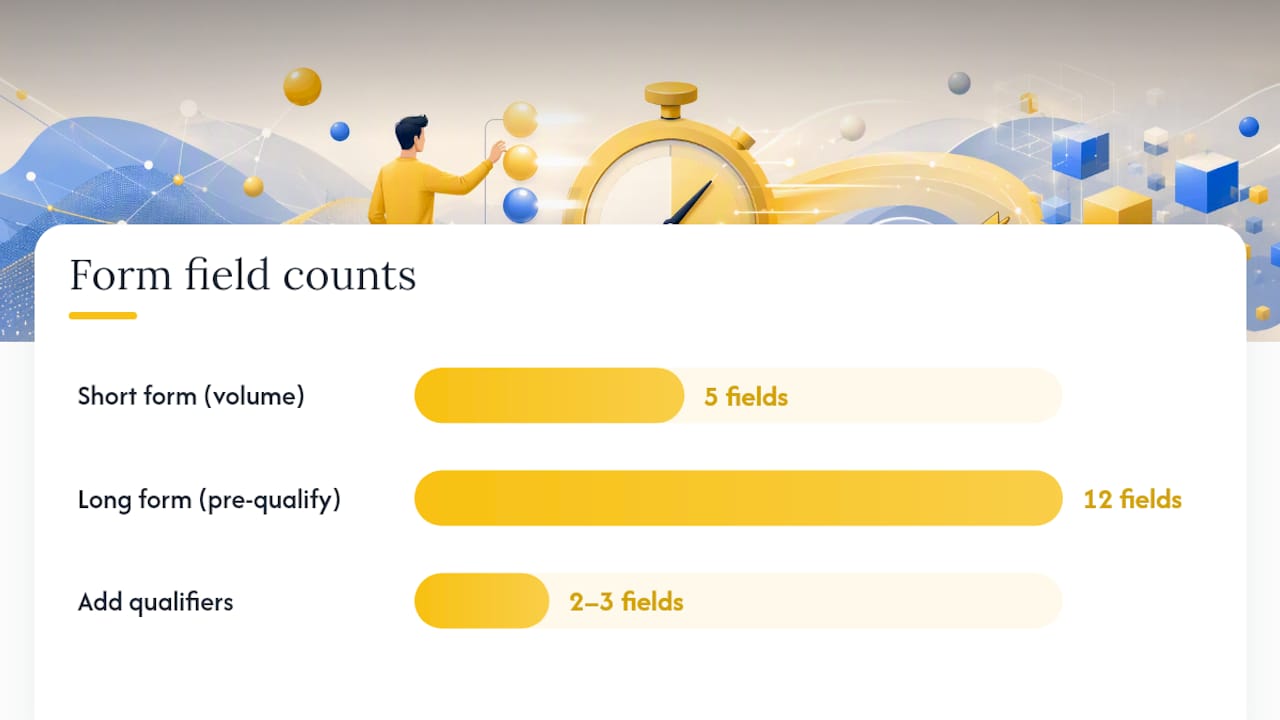
- Form length matched to your goal: fewer fields for volume, more fields when you need to pre-qualify leads
That last point deserves nuance. A five-field form will convert at a higher rate than a twelve-field form, but if your sales team is drowning in unqualified leads, adding two or three qualifying questions can raise lead quality even as raw volume dips. The tradeoff is real, and it’s worth discussing with whoever owns your sales pipeline before you decide.
Pro Tip: Put your strongest social proof directly beside the CTA button, not in a separate testimonials section further down the page. Visitors who scroll past the fold before converting are visitors you’re about to lose.
Google’s Technical Rules That Get Landing Pages Disapproved
Plenty of well-designed landing pages get rejected or throttled by Google Ads for reasons that have nothing to do with copy or layout. These are the checks worth running before you ever launch a campaign.
- Confirm your domain matches. Google requires the display URL and the final URL to use the same domain. A destination mismatch between what your ad shows and where it actually sends traffic is one of the most common causes of disapproval.
- Set up tracking templates correctly. If you use Upgraded URLs with a tracking template and the
{lpurl}macro, test the full chain, because a broken template can send visitors to a blank page even when the ad itself looks fine. Parallel tracking, which Google now requires, loads the landing page first and processes tracking redirects in the background, so a slow or misconfigured redirect chain will hurt load time before it hurts anything else. - Use server-side redirects, not JavaScript. A landing page that relies on a JavaScript redirect to reach its final destination can trigger policy flags. Server-side HTTPS redirects are the safer, faster, and Google-approved path.
- Run the landing page test before launch. Google Ads’ built-in landing page test returns specific diagnostic messages like “final URL mismatch” or “page not found.” Treat these messages as your first troubleshooting stop rather than guessing what broke.
Most disapprovals trace back to one of these four checks. Run through them in order and you’ll usually find the culprit in under ten minutes.
How to Test and Improve Landing Pages Over Time
A landing page you build once and never touch again is a landing page slowly losing money to CPC inflation. Treat it as a living asset, not a finished project.
Start by watching the right numbers. In Google Ads, track conversion rate, landing page experience score, and average CPC by ad group. In GA4, pair that with bounce rate and time on page, since a high bounce rate on a page with strong message match usually points to a speed or mobile problem rather than a copy problem.
When you’re ready to test, don’t spread your effort thin across ten small tweaks at once. Prioritize in this order:
- Headline and subhead (the biggest lever, since it drives message match)
- CTA button copy and placement
- Form length and field order
- Hero image or video versus static layout
- Social proof placement and format
Run A/B tests with enough traffic to reach a real sample size before declaring a winner. A test that “wins” after 40 clicks on each variant is noise, not signal. As a rough sanity check, wait until each variant has collected at least 100 conversions or two full weeks of traffic, whichever comes later, before you trust the result. Once a variant wins clearly, scale its budget and immediately queue the next test rather than treating the win as a finish line.
Templates and a 60-Second Message-Match Checklist
Here’s a hero section template you can adapt for almost any campaign type:
- Headline: Mirror the ad’s exact promise (5-8 words)
- Subhead: Add the specific benefit or timeframe (10-15 words)
- Hero visual: One image or short video showing the outcome, not the process
- CTA button: Name the result (“Get My Quote,” “Start Free Trial”)
- Social proof: One line with a number or named result, positioned beside the CTA
- Form: Name, email, phone, and one qualifying field maximum for lead-gen; skip the form entirely for ecommerce and go straight to “Add to Cart”
A search lead-gen page for something like legal services should lead with urgency and credibility: “Free Case Review, No Fee Unless You Win,” followed by a short form. An ecommerce landing page built around a Google Shopping or Search ad should skip the form entirely and drop the visitor straight onto a single product with pricing, shipping info, and reviews visible without scrolling.
Before you launch any page, run this checklist:
| Check | What to confirm |
|---|---|
| Headline | Matches the ad’s core promise within the first line |
| CTA | One button, one action, visible without scrolling |
| Navigation | Removed or minimized to reduce exit points |
| Load speed | Loads in under 3 seconds on mobile |
| Domain | Matches the display URL exactly |
For fast page production and split testing, tools like Google Analytics 4, Unbounce, and Hotjar cover most of what a small team needs, from session recordings to variant testing. If you want to speed up how many page variants you can build without hiring a developer for every campaign, AI-assisted page builders have gotten good enough to handle most of the heavy lifting.
The Landing Page Mistakes That Quietly Kill Campaigns
Four mistakes account for most of the underperforming landing pages we see, and all four have quick fixes.
- Sending traffic to a homepage. Fix: build one dedicated page per ad group, even if it’s a simplified template you reuse.
- Slow mobile load times. Fix: compress hero images, defer non-critical scripts, and check your Core Web Vitals scores monthly.
- Message mismatch between ad and page. Fix: rewrite the headline and above-the-fold copy to echo the ad’s exact wording.
- Forms with too many fields. Fix: cut to the essentials, or split a longer form into two steps so it feels lighter even when it collects the same information.
None of these require a redesign. They require an audit, and most take under an hour to fix once you’ve spotted them.
How Envision Marketing Agency Approaches Landing Page Optimization
We’ve built landing pages for lead-generation and ecommerce campaigns across more than 550 clients since 2020, always chasing qualified leads over vanity traffic. Our process: audit message match first, fix technical destination issues second, then test one variable at a time. Any team can run that same sequence starting today.
Personalizing Landing Pages Without Building a Hundred Versions
Personalization sounds like it requires a massive content library, but most of the gains come from a handful of targeted swaps, not a full rebuild per audience.
The simplest lever is dynamic text replacement: your headline pulls the exact search term or ad group name a visitor clicked on, so someone who searched “dentist near me open Saturday” sees that phrase reflected back at them instead of a generic “Book Your Appointment” line. This keeps message match tight without forcing you to design a separate page for every keyword variation.
Geography is the second easiest win. If you run campaigns across multiple cities or regions, swapping the city name into the headline and testimonials section based on the visitor’s location tends to lift trust immediately, since local proof reads as more credible than a generic claim.
Beyond that, URL-based personalization lets you build one template and pass parameters through the URL to change specific blocks, pricing tiers, offer copy, even the hero image, based on which ad drove the click. At scale, this is far more manageable than building a static page for every single ad group, and it keeps your page count from spiraling into the hundreds.
Where personalization gets risky is when it starts feeling manipulative rather than relevant. Swapping in a visitor’s first name from a previous form fill can feel clever in an email; on a landing page, it can feel invasive. Stick to context that came from the ad click itself, location, search term, referring campaign, rather than pulling in personal data that wasn’t volunteered on this visit.
Connecting Landing Pages to Analytics Beyond Google Ads
Google Ads gives you conversion counts and Quality Score signals, but it won’t tell you where visitors got stuck on the page itself. That’s where a second layer of analytics earns its place.
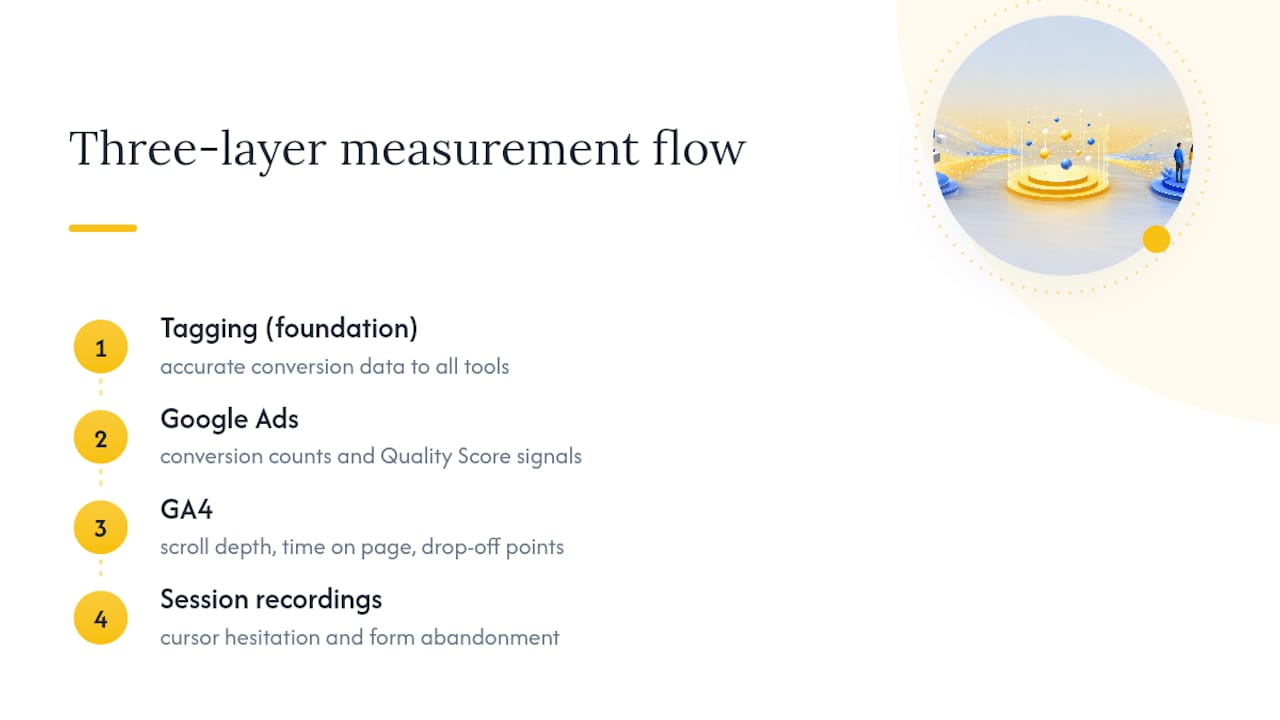
GA4 fills the gap on behavior: scroll depth, time on page, and where visitors drop off before reaching your form. If your Google Ads dashboard shows a healthy click-through rate but a weak conversion rate, GA4 is usually where you find the answer, often a slow-loading section or a form visitors abandon halfway through.
Session-recording tools add a layer GA4 can’t: you actually watch what a visitor did, where their cursor hesitated, which field made them pause before abandoning. That kind of qualitative signal frequently explains a conversion problem faster than a week of split testing would.
For conversion tracking setup that feeds accurate data into both Google Ads and your analytics stack, get the tagging right before you start optimizing anything else. A landing page test built on broken conversion tracking will point you toward the wrong fix every time, because you’re optimizing against numbers that were never accurate to begin with.
Privacy Compliance for Landing Pages: What GDPR and CCPA Actually Require
Every landing page that collects a name, email, or phone number is collecting personal data, and that means privacy law applies whether your visitor is in California, the European Union, or anywhere else with an active data protection framework.
If you serve visitors in the EU or UK, GDPR requires clear, specific consent before you collect data, not a pre-checked box buried in fine print. Your form needs a link to a privacy policy that explains what you collect and why, and you need a legitimate basis for storing that information beyond “we might want it later.”
The California Consumer Privacy Act, and its expanded version the CPRA, applies if you do business with California residents and meet certain revenue or data-volume thresholds. It requires you to disclose what personal data you collect and give visitors a way to request deletion or opt out of having their data sold or shared.
Practically, this means every lead-gen landing page needs a visible privacy policy link, a cookie consent mechanism if you’re running tracking pixels, and a data retention practice you can actually explain if someone asks. None of this is optional legal boilerplate you can skip because you’re a small business; enforcement has reached companies well below the size most marketers assume is “too small to notice.” If you’re unsure whether your current setup meets these requirements in your specific market, that’s a conversation for a privacy attorney, not a marketing blog post.
What I Prioritize First When a Landing Page Isn’t Converting
Message match, then technical checks, then testing. In that order, every time. Most underperforming pages fail step one, not step three, yet teams jump straight to A/B testing button colors before confirming the headline matches the ad. If you’ve fixed message match and destination errors and conversions still lag, that’s the point to bring in outside help rather than keep guessing.
— Marcus
How Envision Marketing Agency Builds Landing Pages That Convert
If you’d rather skip the audit-and-fix cycle and hand the whole thing to people who do this daily, Envision Marketing Agency builds and manages Google Ads landing pages as a full done-for-you service, from message match copy to technical setup to ongoing testing.
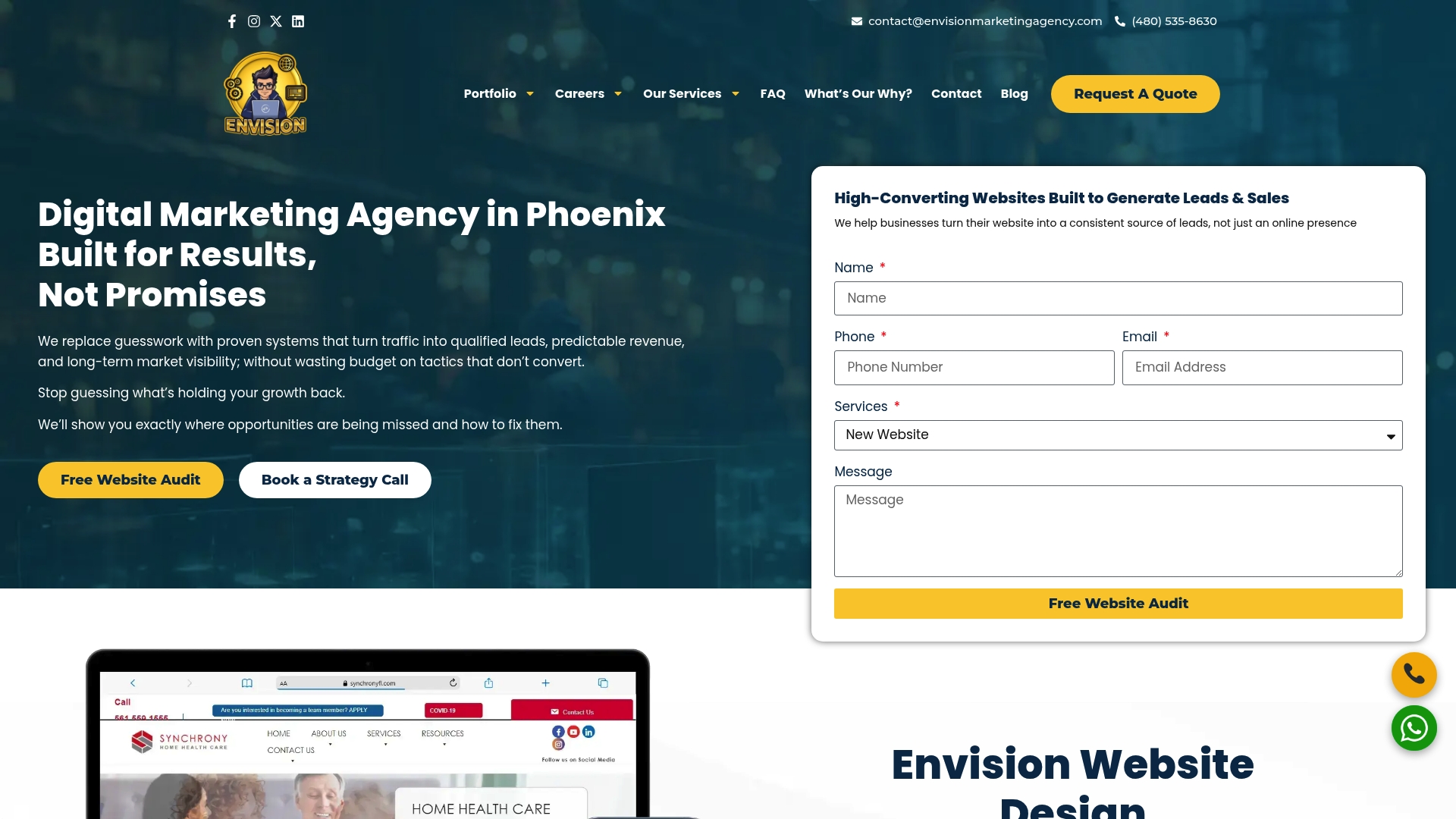
We’ve worked with over 550 clients since 2020, and our approach stays focused on qualified leads over vanity traffic, meaning we track conversions and cost-per-lead, not just clicks. Every page we build starts with the same audit this article walked through: message match, single conversion goal, and a technical check against Google’s destination rules, before a single design element gets touched. If you’re running Google Ads campaigns and want pages built to convert from day one, our Google Ads lead generation playbook walks through exactly how we structure campaigns for measurable results, and you can see our web development work to get a sense of what a finished build looks like before you reach out.
Resources for Auditing and Building Landing Pages
For the official rules, check Google’s guidance on landing page destination requirements, running a landing page test, and setting up A/B experiments. For practitioner design tips, see Shopify’s PPC landing page guide. For a partner deep dive on the Quality Score connection, read Golden Path Digital’s fix-first guide.
Sources
- Landing page – Google Ads Help
- What is a PPC landing page? (With 7 examples for Google Ads) – Unbounce