

To rank every physical location, treat each branch as its own local entity: an optimized location page, a verified Google Business Profile, consistent NAP citations, local backlinks, and location-level tracking. Multi location SEO fails when brands treat it like one big SEO project instead of dozens of small, independent ones running on the same infrastructure. Every location needs to earn its own visibility in its own market, and that only happens with a repeatable system behind it.
Here are five things to do this week, before you build anything bigger:
- Build or claim one location landing page as your template test case
- Claim and verify the Google Business Profile for that location
- Start a master NAP spreadsheet: name, address, phone, exactly as they should appear everywhere
- Set up UTM parameters and call tracking for that one location so you can see what’s working
- Pick a listing-management tool before you’re managing 40 spreadsheets by hand
Pro Tip: Run this five-step sequence on your busiest location first. You’ll surface every operational gap (bad photos, wrong hours, a manager who never checks messages) before you scale the mistake across 50 branches.
Key Takeaways
Multi location SEO succeeds when every physical branch is treated as an independent entity with its own page, profile, citations, and tracking, all run through one centralized system.
| Point | Details |
|---|---|
| Build one page per location | Each location needs a unique page with local content, not a template with a city swap. |
| Verify every GBP individually | Use bulk verification for 10 or more locations and match NAP exactly to the website. |
| Centralize citation management | Keep one master data sheet feeding all directories to prevent NAP drift over time. |
| Track performance by location | Assign a location ID convention across UTMs, call tracking, and dashboards. |
| Partner with Envisionmarketingagency | Run a 90-day pilot to build location pages, verify profiles, and fix tracking gaps. |
Table of Contents
- What Makes Multi Location SEO Different From Regular Local SEO
- Should You Use Subfolders, Subdomains, or Separate Domains?
- What Should Every Location Page Include?
- How Do You Verify Google Business Profiles at Scale?
- How Should You Manage Reviews Across Locations?
- How Do You Keep NAP Consistent Across Every Directory?
- What Local Link-Building Actually Works for Multiple Branches?
- How Do You Track SEO Performance by Location?
- Which Tools Handle Multi-Location SEO Without Chaos?
- Who Owns What in a Multi-Location SEO Program?
- How Would a Pilot Program for 5 Locations Actually Run?
- What Local Keywords Should Each Location Target?
- How Does Schema Markup Support Location-Specific Pages?
- How Do You Avoid Duplicate Content Across Location Pages?
- What Mobile Optimization Matters Most for Local Search?
- How Do You Handle Multiple Languages or Regional Dialects?
- How Should Paid Ads Support Local SEO Efforts?
- Sources
What Makes Multi Location SEO Different From Regular Local SEO
Single-location SEO optimizes one entity for one market. Multi location SEO builds a grid: dozens or hundreds of entities, each with its own page, its own Google Business Profile, and its own local footprint, all competing independently in their respective markets. A distributed grid model means three storefronts need three location pages and three separate Google Business Profiles, each one built to rank on its own merits, not riding on the brand’s overall domain authority.
Most brands break this model the same three ways:
- Template pages that swap only the city name, leaving every other sentence identical
- NAP drift, where the phone number on the website doesn’t match what’s listed on GBP or a directory
- Keyword cannibalization, where two nearby locations compete for the same search terms
- Unverified or duplicate GBP listings that confuse Google about which entity is real
Distance from the searcher is a ranking factor Google controls, not you. Proximity to the query is unyielding: no amount of on-page optimization overrides a competitor who happens to be closer. Your job is to maximize what you can control: relevance (how well your page matches the query) and prominence (how well-known and trusted your business is).
Should You Use Subfolders, Subdomains, or Separate Domains?
Subfolders win for most multi-location businesses, and it’s not close. A structure like yoursite.com/locations/phoenix consolidates domain authority under one root domain, so every location page benefits from the backlinks and trust the whole brand has built. Subdomains (phoenix.yoursite.com) split that authority into semi-independent silos, and separate domains (yoursitephoenix.com) split it completely, forcing every location to build its own reputation from zero.
Separate domains only make sense in narrow cases: true franchise models where each location is a legally distinct business with its own marketing budget, or brands operating under different names in different regions for regulatory reasons. Outside of that, a separate domain is usually extra hosting cost, extra technical maintenance, and diluted authority for no real gain.
Subfolders aren’t a free pass, though. You still need governance:
- One canonical URL per physical location, no duplicates for the same address
- A consistent naming convention (city, or city plus neighborhood, decided once and never varied)
- Canonical tags on any near-duplicate pages so Google knows which version to index
- Internal links from your homepage and service pages down to the relevant location pages, not just a buried locations directory page
When you’re deciding how many pages to actually build, the goal isn’t maximum coverage. It’s the smallest number of pages that accurately represents the business while giving each page a distinct job. A regional hub page covering five small satellite offices often outperforms five thin pages that all say the same thing with different city names swapped in.
Pro Tip: If you’re debating subfolders versus a subdomain, ask whether the location needs its own brand identity for legal or franchise reasons. If the answer is no, subfolders are the default, not the exception.
What Should Every Location Page Include?
A location page has one job: convince both a human and a search engine that this specific branch is real, active, and relevant to a nearby search. That means it can’t just be your homepage copy with a city name dropped in. It needs unique content that a template can’t fake, including staff details, local project photos, and neighborhood-specific service notes.
Here’s what belongs on every page, and why each element matters:
| Element | Why it matters |
|---|---|
| NAP block (name, address, phone) | Matches citations and GBP for consistency signals |
| Embedded map with geo-coordinates | Confirms physical presence to both users and crawlers |
| Local hours and holiday exceptions | Prevents “closed” signals from hurting trust |
| Location-specific photos | Differentiates the page from templated duplicates |
| Services offered at that branch | Signals relevance for location-specific queries |
| Manager or staff bio | Adds a human, locally credible signal |
| Local case study or project | Provides unique, non-duplicated content |
| Location-specific FAQ | Captures long-tail local search intent |
| Review snippets from that location | Reinforces social proof tied to the branch |
| Clear call to action | Converts the visit into a lead or booking |
Every page also needs its own LocalBusiness schema block. Google and AI-driven search systems both need machine-readable confirmation of the exact business name, address, phone number, hours, and geo-coordinates, or thin pages get filtered out of AI citation results entirely. Add a sameAs property linking to that location’s Google Business Profile and, where relevant, its Wikidata entry, so every platform is pointing at the same verified entity.
To scale this without burning out your content team, build modular content blocks: a reusable services section, a reusable FAQ shell with local answers dropped in, a reusable schema template with variables for each location’s data. Tools built for AI-assisted landing page creation can speed this up considerably, but the local details (staff names, neighborhood references, actual project photos) still need a human hand. That’s the line between a real location page and a doorway page Google will eventually deindex.
Pro Tip: Photograph every location the same week, with the same checklist: storefront, interior, team, and one “in action” shot. Consistency in your photo library makes bulk page updates dramatically faster later.

How Do You Verify Google Business Profiles at Scale?
Get these steps right the first time, because fixing a suspended or duplicated GBP later costs far more time than doing it correctly up front.
- Claim each location’s profile individually, matching the exact business name used on the location page.
- Verify each profile. Locations under one account with 10 or more listings typically qualify for Google’s bulk verification process, which saves you from mailing postcards to every branch.
- Confirm the website URL field points to that specific location page, not the homepage.
- Select one primary category that matches your core service, then add secondary categories only where they’re genuinely accurate.
- Upload local photos, current hours, and a services list specific to that branch.
For service-area businesses without a public storefront, hide the street address and use Service Area settings instead. Listing a fake or residential address to game local rankings risks suspension across your entire account, not just one listing.
Once profiles are live, treat them as living pages, not a one-time setup task:
- Add UTM parameters to every link in the GBP profile (something like
?utm_source=gbp&utm_medium=organic&utm_campaign=phoenix-location) so GA4 can isolate GBP-driven traffic per branch - Pre-load a Q&A section with the five questions customers actually ask that location
- Audit attributes (wheelchair access, curbside pickup, payment types) quarterly, since Google periodically resets or hides outdated ones
- Respond to every new review within 48 hours to keep the engagement signal fresh
How Should You Manage Reviews Across Locations?
Review velocity, recency, and sentiment all feed into local prominence, and increasingly into how confident AI systems are when recommending a business by name. A location with three reviews from 2023 signals stagnation. A location with a steady trickle of recent, detailed reviews signals an active, trustworthy business.
Automate the ask: a short link or QR code, sent immediately after service, works better than a generic monthly reminder email. Encourage customers to mention specifics (the service, the staff member, the neighborhood) since detailed reviews carry more local relevance than generic five-star ratings.
Centralize monitoring so one person or small team sees every review across every location in a single dashboard rather than logging into 40 separate GBP accounts. Build a small bank of response templates by scenario (glowing review, minor complaint, service failure) and standardize tone across the brand, then customize each response with the location and specific detail mentioned.
Pro Tip: Never bulk-post identical review responses across locations. Google and readers both notice copy-paste replies, and it undercuts the local trust you’re trying to build. A quick swap of the location name and one specific detail takes 30 seconds and looks entirely different.
How Do You Keep NAP Consistent Across Every Directory?
NAP drift is the silent killer of multi-location rankings. A phone number that’s correct on your website but outdated on a data aggregator confuses both searchers and search engines, and accurate, consistent citations directly support how confidently search engines rank a business locally.
Start with a master data sheet: one row per location, columns for name, address, phone, website URL, hours, and a “last verified” date. This becomes your single source of truth, the file every listing update gets pulled from, never typed fresh each time.
From there, the workflow runs in one direction: master sheet feeds your listing-management tool, which pushes verified data out to Google Business Profile, Bing Places, Apple Maps, and major data aggregators. Set a recurring quarterly audit to catch drift, since directories occasionally revert to old data after a business changes hands or moves.
Not every directory carries equal weight. Prioritize:
- Core aggregators that feed dozens of smaller directories automatically
- Navigation and mapping platforms like Apple Maps and Bing Places
- Industry-specific directories relevant to your category (legal, medical, home services)
Build local citations methodically rather than chasing every directory that exists. A handful of accurate, authoritative listings outperforms a hundred inconsistent ones.
What Local Link-Building Actually Works for Multiple Branches?
Local link building strategies succeed when they’re rooted in genuine community presence, not mass outreach emails with a city name swapped in. A link from a local chamber of commerce, a sponsored little league team, or a regional news story about a store opening carries local relevance that a generic guest post never will.
Prioritize partnerships that make sense for each branch: local news coverage of a grand opening, chamber of commerce membership listings, event sponsorships, and cross-promotion with complementary local businesses. These earn citations and backlinks simultaneously, since most local directories and news sites link back to the business they’re covering.
Before requesting any link, run it through a quick filter: Is this source actually local to the branch? Does it have real domain authority? Would it plausibly send referral traffic, not just a citation to please a crawler? For creators and multi-channel brands juggling several link destinations at once, structuring a clear link strategy prevents the same scattergun problem multi-location SEO faces at a larger scale.
To avoid a spammy footprint across dozens of locations, build one outreach template with variable fields (contact name, local detail, specific ask) rather than 50 unique campaigns, and track every request in a shared sheet so two team members never pitch the same local outlet twice.
Pro Tip: Sponsor something hyperlocal, not brand-wide. A $200 sponsorship of a neighborhood 5K generates a link, a mention, and goodwill that a national ad campaign never touches.
How Do You Track SEO Performance by Location?
If you can’t tie a location’s rankings to actual leads and revenue, you’re optimizing blind. This is where most multi-location programs quietly fall apart: great pages, verified profiles, and zero way to prove any of it worked.
Start with a location ID convention and stick to it everywhere: UTMs, call tracking numbers, and internal reporting all reference the same code, like phx-central or loc-014. Tag every location-specific link this way, whether it’s the GBP website field, a local Google Ads campaign, or an email footer.
Call tracking closes the loop that web analytics can’t. Tools like CallRail assign a unique tracking number per location (or per campaign within a location), so you can see exactly which calls originated from organic search, from GBP, or from paid ads, and which converted into booked appointments.
Your dashboard needs to answer one question at a glance: which locations are performing, and why. In Looker Studio, map data sources so each location’s row includes:
- Organic impressions and clicks from Search Console
- GBP calls, direction requests, and website clicks
- Call-tracking data from CallRail
- Form leads tagged with the location ID
- Revenue attributed to that location, where sales data connects
Validate everything in GA4 before trusting the dashboard. The two most common pitfalls are cross-domain tracking gaps (when a location page links to a booking system on a different domain without proper referral exclusions) and duplicate UTM parameters that split one location’s traffic into two reporting buckets. Audit UTM tagging monthly until it’s clean, then quarterly after that.
Pro Tip: Build the dashboard before you have 50 locations, not after. Retrofitting attribution onto a decade of inconsistent tagging is a multi-month project; building it right from location one is an afternoon.
Which Tools Handle Multi-Location SEO Without Chaos?
At a certain scale, spreadsheets and manual updates stop working entirely, and the failure mode isn’t gradual. It’s a sudden pile of inconsistent listings nobody can trace back to a source of truth. The fix is running the whole program as a system: modular pages, centralized reviews and citations, and dashboards that make every location visible in one place.
Match tools to function rather than trying to find one platform that does everything:
- Listing management: BrightLocal and Semrush Local for bulk citation building, monitoring, and NAP corrections across directories
- Review management: GatherUp for centralized review requests, monitoring, and response workflows
- Call tracking: CallRail for per-location number assignment and call-source attribution
- Analytics and dashboards: GA4 and Looker Studio for cross-location performance reporting
- Citation discovery: Whitespark for finding the highest-value directories in a given industry or region
When evaluating any tool, weigh API access (can it feed your dashboard automatically), bulk editing (can one person update 50 locations in one action), multi-user permissions (can a local manager edit their own listing without touching others), and whether the pricing model scales sensibly with your location count.
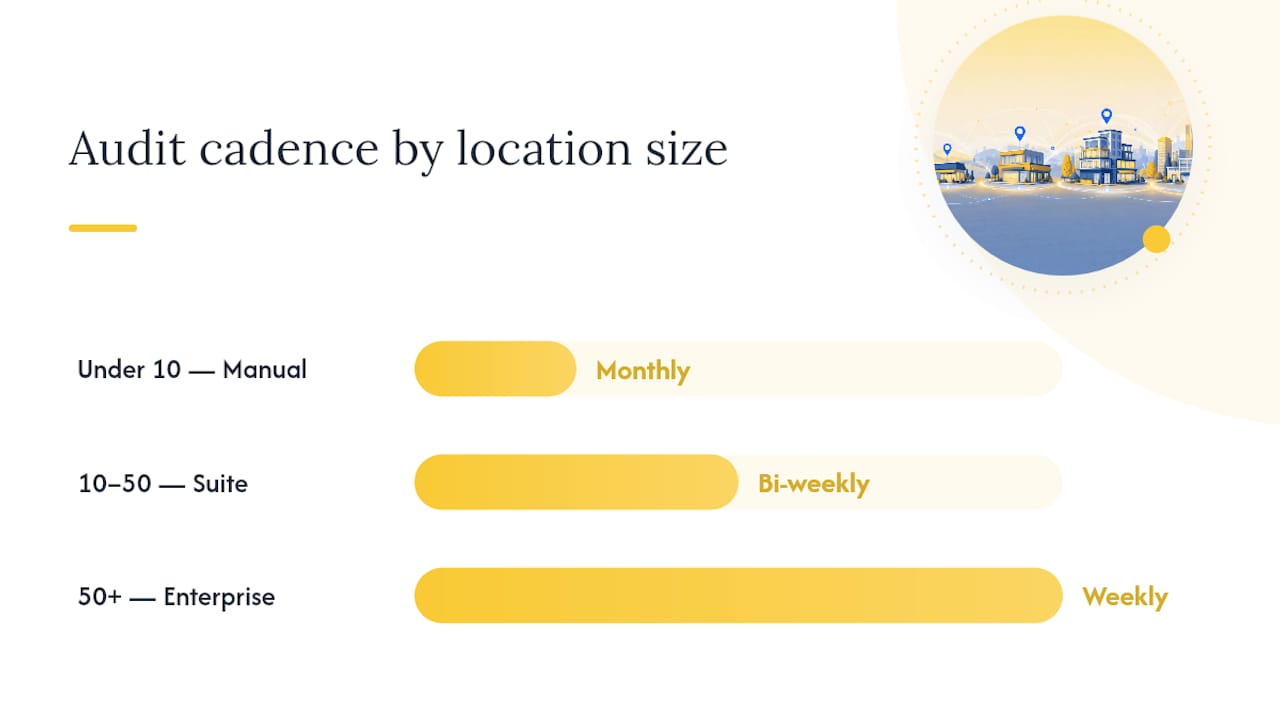
| Location count | Recommended tool tier | Audit cadence |
|---|---|---|
| Under 10 | Manual spreadsheet plus one listing tool | Monthly |
| 10 to 50 | Full listing and review management suite | Bi-weekly |
| 50 or more | Enterprise tools with API integration and dashboards | Weekly, with automated alerts |
Pro Tip: Don’t buy enterprise tooling for a 6-location business. The overhead of learning a complex platform often costs more time than the manual process it replaces at that scale.
Who Owns What in a Multi-Location SEO Program?
Without clear ownership, listings drift and nobody notices until rankings drop. Define roles before you scale past a handful of locations, not after.
| Role | Responsibility |
|---|---|
| Head office / SEO lead | Owns strategy, schema templates, keyword maps, and quarterly audits |
| Local manager | Uploads photos, responds to reviews, confirms hours and NAP accuracy |
| External vendor or agency | Handles technical implementation, citation building, and dashboard reporting |
New location onboarding should follow the same checklist every time: confirm the address matches the lease or permit exactly, build the location page from the modular template, create and verify the GBP, run an initial citation audit, and kick off local outreach within the first 30 days. Skipping the order (building the GBP before the page exists, for instance) creates mismatched URLs that take months to fully correct.
Set a standing quarterly audit for the full network, with monthly spot checks on your top 10 locations by revenue. When a mismatch surfaces (wrong hours, a suspended listing, a broken phone number), route it through a clear escalation path: local manager flags it, head office corrects the master sheet, the listing tool pushes the fix out within days.
How Would a Pilot Program for 5 Locations Actually Run?
A realistic pilot starts small: pick 3 to 5 locations that represent your highest revenue or highest opportunity, not just the easiest ones to fix. Build or rebuild their location pages using the full template, verify every GBP from scratch, and audit citations against the master data sheet before touching anything else.

Run the pilot for 90 days and watch three things closely: local pack ranking movement for your priority keywords, review velocity per location, and lead volume tied back through UTMs and call tracking. Quick wins tend to show up fast: correcting NAP mismatches and verifying a previously unclaimed GBP often move the needle within weeks, while backlink and content gains take longer to compound.
The centralized data sheet and UTM structure built during the pilot become the template for every location added after it, which is the entire point: prove the system works at a small scale before multiplying it.
What Local Keywords Should Each Location Target?
Generic city-plus-service keywords aren’t enough once you’re competing against your own other locations. Build a keyword map before you write a single page: one row per location, with a primary keyword and two or three secondary keywords assigned specifically to that branch, so a search for “plumber near Camelback” and “plumber near Tempe” don’t both point Google toward the same generic page.
Research neighborhood-level terms, not just the city name. Searchers near a specific district often use that district’s name, a nearby landmark, or a cross-street in their query, and pages that reflect that specificity tend to earn better relevance signals than pages built only around the broader city term. Pull this from Google Search Console’s query data for existing pages, plus manual searches from each location’s actual area.
Content strategy per location should reflect real local variation, not cosmetic changes. A location near a business district might emphasize commercial services and fast turnaround; a location in a residential suburb might emphasize family-friendly service and weekend availability. That difference should show up in the page copy itself, not just the meta title.
Assign keyword ownership clearly in the map so two nearby locations never target the identical primary term. When overlap is unavoidable, because two branches genuinely serve overlapping areas, differentiate by secondary services or a slightly narrower geographic qualifier rather than letting both pages compete head-to-head in the same search results.
How Does Schema Markup Support Location-Specific Pages?
Every location page needs its own LocalBusiness schema, populated with that location’s exact data. This isn’t optional decoration. It’s how search engines and AI systems confirm the page represents a real, distinct entity rather than a duplicate.
The core fields to include: business name, full street address, phone number, opening hours (including holiday exceptions where relevant), geo-coordinates, and a sameAs array linking to that location’s Google Business Profile and any verified directory or Wikidata entry. Add priceRange and specific service types where they apply, since these help match the page to more specific queries.
Keep schema data in lockstep with what’s visibly on the page and what’s listed on GBP. A schema block claiming hours of 9 to 5 while the page text says 8 to 6 creates a trust conflict that can suppress the page in local results. Automate this where possible: pull schema fields directly from the same master data sheet that feeds your citations, so one update propagates everywhere instead of requiring three manual edits.
For franchise or multi-brand operations, nest a parent Organization schema referencing each individual LocalBusiness location, which helps search engines understand the corporate relationship without merging the entities together. Test every page’s markup, since a single malformed field can cause the entire block to be ignored rather than partially read.
How Do You Avoid Duplicate Content Across Location Pages?
Duplicate content is the single fastest way to sink a multi-location program, and it happens almost by accident. A team builds one strong location page, then copies it 40 times and swaps the city name, assuming the template quality will carry every version.
Google reads that pattern quickly, and the pages start competing with each other instead of ranking independently. The fix isn’t writing 40 completely unique essays from scratch. It’s building genuinely modular content: a reusable structure with data-driven fields (address, hours, map) and human-written fields (staff bios, local case studies, neighborhood notes) that differ from location to location by design.
Where two locations are close enough that separate pages would create thin, near-identical content, consolidate them into one regional hub page rather than forcing two weak pages to compete. This is often the right call for satellite offices with minimal foot traffic or locations added mainly for service coverage rather than storefront visibility.
Canonical tags help when duplication is unavoidable for technical reasons (a print version of a page, a staging URL), but they don’t fix a genuine content duplication problem. If two pages are functionally identical apart from a city name, the answer is better content, not a canonical tag pointing one at the other.
What Mobile Optimization Matters Most for Local Search?
Most “near me” searches happen on a phone, standing outside or in a car, which makes mobile performance a direct local ranking factor rather than a nice-to-have. A location page that loads slowly on mobile data loses the exact searcher it was built to capture.
Prioritize a fast-loading map embed, since heavy interactive maps are one of the most common mobile speed killers on location pages. A static map image linking out to full directions often performs better than an embedded interactive map that takes seconds to render.
Click-to-call needs to work flawlessly. Every phone number on a location page should be a tappable link, not plain text, and the same goes for the address linking directly to map directions. These are the two actions a mobile searcher takes most often, and friction on either one costs conversions directly.
Test each location page on an actual phone, not just a desktop browser’s mobile emulator. Emulators miss real-world issues like a map embed that pushes the phone number below the fold, or a contact form that’s unusable with a mobile keyboard. Google’s own indexing is mobile-first, so a page that renders poorly on a phone is the version Google is actually evaluating.
How Do You Handle Multiple Languages or Regional Dialects?
If your locations serve markets with meaningfully different language needs, whether that’s Spanish-language content for a Southwest market or regional terminology differences, each language version needs its own URL, not a JavaScript toggle that swaps text without changing the address bar.
Use hreflang tags to tell search engines which language and regional version to serve to which searcher. This matters even within a single country: a location in a heavily Spanish-speaking community may perform better with a dedicated Spanish-language version of its page, properly tagged, rather than relying on a browser translation plugin.
Dialect and terminology differences matter too, even within the same language. A service called “yard work” in one region might be searched as “lawn care” in another. Build these variations into your keyword map per location rather than assuming one national vocabulary works everywhere. This is a smaller lift than full translation, but it directly affects which queries a page can rank for.
Never machine-translate a location page and publish it without review. Automated translation frequently produces phrasing that reads as unnatural to native speakers, which undercuts the trust signal a local page is supposed to build in the first place.
How Should Paid Ads Support Local SEO Efforts?
Paid and organic aren’t competing budgets. They’re two channels feeding the same local visibility goal, and the strongest multi-location programs run them together deliberately. A Local Services Ad or Google Ads campaign can fill visibility gaps for a new location whose organic rankings haven’t matured yet.
Geo-target every local campaign tightly around each location’s actual service radius rather than running one broad regional campaign. This keeps spend efficient and prevents two nearby locations from bidding against each other’s ads for the same searchers.
Use the same UTM and location ID conventions across paid and organic tracking. When both channels feed the same dashboard, you can see whether a location’s overall visibility is organic-driven, paid-driven, or a healthy mix, and adjust budget toward the locations where paid spend is actually filling a real gap rather than duplicating traffic you’d get anyway.
New locations benefit most from paid support in the first 90 to 120 days, while organic signals like citations, reviews, and backlinks are still accumulating. Reassess quarterly, and shift budget away from paid as a location’s organic rankings stabilize, especially in markets where deciding SEO versus paid ads comes down to how competitive the local pack already is.
Practitioner’s Note on Trade-Offs When Scaling
Central governance keeps data clean but can slow local agility to a crawl if every photo needs head-office sign-off. Reserve bespoke content for your top revenue locations; a minimal, accurate page beats a stalled perfect one everywhere else. Resources are finite. Pick your battles.
How Envision Marketing Agency Can Help You Scale
Envision Marketing Agency is the alternative to hiring an in-house team to manage this system for you: one partner handling location page builds, GBP verification, citation cleanup, and attribution dashboards, instead of your marketing manager juggling six different tools alone. We’ve built this exact playbook for local and multi-branch clients across industries, combining custom website design and development with SEO strategy that ties directly to lead volume, not vanity rankings.
If you’re managing 3 to 10 locations and unsure where the data is breaking down, a 90-day pilot on your top locations is the fastest way to find out. It surfaces NAP mismatches, unverified profiles, and tracking gaps before you scale the same problems to 50 more branches. Reach out through our SEO services page to scope a pilot for your locations.
Sources
- Multi-Location SEO: The Complete Guide To Local SEO For Multiple Locations
- Local citations (Moz Learn)